
Resource packs for Minecraft Java 1.21 — page 61
Resource packs: list


Better Ghast Remastered (Discontinued)
changes the ghast model into improvedInstall

Cobblemon Battle Tracks
Adds music to the otherwise dull Cobblemon Battle SystemInstall

Anime Music
Replaces minecraft main menu and music discs music with anime music.Install

"Cool" Font
Standalone version of the font that PvP resource packs useInstall
CRIF Custom Gui (GUI Retextures add-on)
A Custom Gui made for all CRIF Studios modpacksInstall
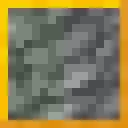
Healthier Tuff
Removes the sickly green hue from tuff and tuff variants, making it nicer to build with.Install
Excalibur | Iron's Spells 'N Spellbooks support
This resource pack redraws the Iron's Spells 'N Spellbooks mod in the Excalibur styleInstall

CPvP Sounds
PvP Sounds is a lightweight resource pack that replaces the default Minecraft sounds with cleaner and sharper effects optimized for PvP. Get clear hit sounds, satisfying damage feedback, and smoother audio that helps you focus during fights.Install

Lantern 3D - Better Lantern
3D Lantern transforms Minecraft’s classic lantern into a beautiful 3D model, adding depth, detail, and realism to your builds!Install

Bushy Vegetation
A collection of bushy grass, bushy leaves, foliage and more to liven up the world. Includes vines, corals, tall flowers, sweet berry bush, nether roots, hanging roots, mangrove roots, pink petals, pale moss, firefly bush, leaf litter, wildflowers.Install

Sugar Cane 3D
This texture makes the sugar cane 3DInstall

FA: Player Extension X Better Combat
FA: Player Extension Compat is a resource pack that fixes animation conflicts between Fresh Animations (FA: Player Extension) and the PlayerAnimator mod. Must be placed above Fresh Animations in the resource pack list.Install

Anti Block Rotation
Replaces the Textures from Stones and Ores with the Netherite block textureInstall

Taco's Rainbow XP Bar
A simple resource pack to make your XP bar rainbow.Install

Excalibur | Waystones Support
Teleport altars forged in a more realistic, medieval styleInstall

Grimdark Pirate Pack
This combat pack includes Pirate themed armor, weapons and tools inspired by the age of pirates. Grab your cutlass and flintlock while gilding your look with sea-worthy armor trims.Install

Excalibur | Modern World Creation Compat
Compatibility patch between Excalibur resourcepack and Modern World Creation mod.Install

Immersive Weathering Connected Glass
Adds connected glass to Immersive Weathering, uses fusion.Install

Whimscape Better Eating and Drinking Animations
An (unofficial) add-on pack that makes the Whimscape Eating and Drinking Animations Better!Install

Pride Pack
A LGBTQ+ pride themed resource pack for Minecraft.Install

Improved RUS Sodium/Embeddium translation
Improves russian translate for Embeddium/Sodium and it for some addonsInstall

Wood Totem Cross
Replaces totem with a wood crossInstall
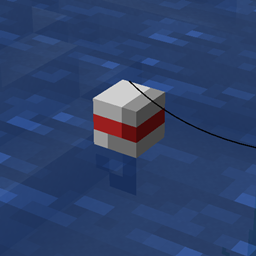
fishing hook bobber 3D
Replaces the 2D fishing hook with a 3D oneInstallFAQ
Do I need Forge or Fabric for a resource pack?
No. A resource pack works on the regular game with no loaders or mods. Click “Install” and Millida Launcher will put the pack into the right modpack — then just enable it in the settings.
What do 16×, 32×, 64× mean?
The resolution of a single texture in pixels. 16× matches the original game, 32× and 64× are more detailed and heavier, and 128× and up put a noticeable load on your graphics card.
Will a pack made for another version work?
Most likely partly: older packs don't have textures for newer blocks, so those will stay default. The game won't break, though.
How is a texture pack different from a resource pack?
Only by name and age. Before version 1.6 the sets were called texture packs and changed only textures; in 1.6 resource packs replaced them and also change sounds, fonts and the interface. Old texture packs for 1.5 and below do not work on new versions without conversion.
Which texture packs are best for PvP?
PvP packs: 16× resolution or lower, shortened swords, low fire, a clear sky and bright particles. They barely load the computer and make the opponent easier to see. These packs are collected in the PvP theme.
How do I install a resource pack?
Press Install and Millida Launcher puts the pack into the resourcepacks folder of the right instance. Then enable it in the game: Options, then Resource Packs. Manually, the archive goes into resourcepacks inside the game folder, no need to unpack it.
Resource packs for Minecraft Java 1.21
Resource packs for Minecraft 1.21: 1,674 items in the Resource packs section. Compatibility is checked against the files, not the description: only items with a build for exactly these conditions stay in the list.
The key thing about a pack is its resolution. The game's default textures are 16×16 pixels; 32× and 64× packs look more detailed, while 128× and up need a real graphics card and are usually paired with shaders. On a weak machine it makes sense to stay at 16× or go for packs that deliberately simplify graphics for more FPS. Every pack here lists its game version, author and license, and all released versions are gathered on one card. Put the downloaded archive in the resourcepacks folder and enable it in the game settings.