
Resource packs for Minecraft Java 1.21 — page 48
Resource packs: list


Hellim's Connected Textures
This resource pack makes eligible blocks appear as a whole when placed side by side.Install
Ashen + Inmis Support
A small, 16x pack adding compatibility between Ashen 16x and InmisInstall

ReCrafted Mobs
The pack for all your mobs of the Minecraft Universe!Install

Bare Bones - Emissive Ores
Adds glowing emissive effects to ores, enhancing their appearance while maintaining the minimalist style of the Bare Bones pack.Install

PvP Fundamentals
A Texturepack That Contains Everything Needed for PvPInstall

Cat Girls
Changes the appearance of cats into that of cute cat girls.Install

Better Grass
Adds the grass top texture to the side like better grass in optifine without any modsInstall

Legacy Glint
Bring back the old, pre 1.19.3 enchantment glint!Install

Classic panorama with Shaders (Java Edition)
Adds shader to the classic Minecraft PanoramaInstall

Death of the Beds for Bedwars
a bedwars texture pack, for simple and easy pvpInstall

shuriart Font
Smooth, rounder font, made to balance the letters and ease legibility, supporting a wide range of letters from Latin, Greek, Cyrillic, Arabic, Devanagari, Japanese, & more!Install
shureee's Potions
Vanilla-like animated potion textures, with unique shapes for each effect!Install
Mandala's Brewing Guide On
Potions Guide on, in the style of Minecraft Vanilla.Install

Realistic Sheeps
Now the sheeps will look much more realistic!Install
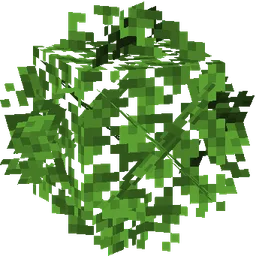
Universal Bushy Leaves
A better leaves pack that just works. Compatible with mods and other resource packs you can keep using Biomes You'll Go, Biomes O' Plenty, Let's Do Vinery, Mizunos, Faithful, Whimscape... and everything else too!Install

ChicknTurtle's 3D Tools
Gives tools some depth, while keeping the vanilla style!Install
Terraria Soundtrack
Replaces Minecraft's background music with Terraria'sInstall

Crazy PvP Pack
A PvP focused resource pack with stunning textures, smooth performance, and combat enhancements for ultimate Minecraft battles.Install
Delightful Plaques
Farmer's Delight theme for Advancement Plaques.Install

DOT Crosshair
This resourcepack will remake your crosshair small and minimalistic by making it a dot!Install

Andesite Chests + Crafting Table
New Textures for Chests and Crafting TableInstall

OLD MINECRAFT
ORIGINALS MINECRAFT TEXTURES, MINERALS , NETHER AND MOREInstall

Witch Girl
This texture makes the Minecraft witch look more attractive.InstallFAQ
Do I need Forge or Fabric for a resource pack?
No. A resource pack works on the regular game with no loaders or mods. Click “Install” and Millida Launcher will put the pack into the right modpack — then just enable it in the settings.
What do 16×, 32×, 64× mean?
The resolution of a single texture in pixels. 16× matches the original game, 32× and 64× are more detailed and heavier, and 128× and up put a noticeable load on your graphics card.
Will a pack made for another version work?
Most likely partly: older packs don't have textures for newer blocks, so those will stay default. The game won't break, though.
How is a texture pack different from a resource pack?
Only by name and age. Before version 1.6 the sets were called texture packs and changed only textures; in 1.6 resource packs replaced them and also change sounds, fonts and the interface. Old texture packs for 1.5 and below do not work on new versions without conversion.
Which texture packs are best for PvP?
PvP packs: 16× resolution or lower, shortened swords, low fire, a clear sky and bright particles. They barely load the computer and make the opponent easier to see. These packs are collected in the PvP theme.
How do I install a resource pack?
Press Install and Millida Launcher puts the pack into the resourcepacks folder of the right instance. Then enable it in the game: Options, then Resource Packs. Manually, the archive goes into resourcepacks inside the game folder, no need to unpack it.
Resource packs for Minecraft Java 1.21
Resource packs for Minecraft 1.21: 1,675 items in the Resource packs section. Compatibility is checked against the files, not the description: only items with a build for exactly these conditions stay in the list.
The key thing about a pack is its resolution. The game's default textures are 16×16 pixels; 32× and 64× packs look more detailed, while 128× and up need a real graphics card and are usually paired with shaders. On a weak machine it makes sense to stay at 16× or go for packs that deliberately simplify graphics for more FPS. Every pack here lists its game version, author and license, and all released versions are gathered on one card. Put the downloaded archive in the resourcepacks folder and enable it in the game settings.