
Minecraft texture packs — page 65
6,456 itemsResource packs: list


Chainsaw Man Custom GUI Pack
Chainsaw Man Custom GUI PackInstall

(Bee's) Banner Pattern Clarity
Retextures of banner pattern items, compatible with modsInstall

Create Energistics
A resource pack for Applied Energistics inspired by the visual style of the Create mod.Install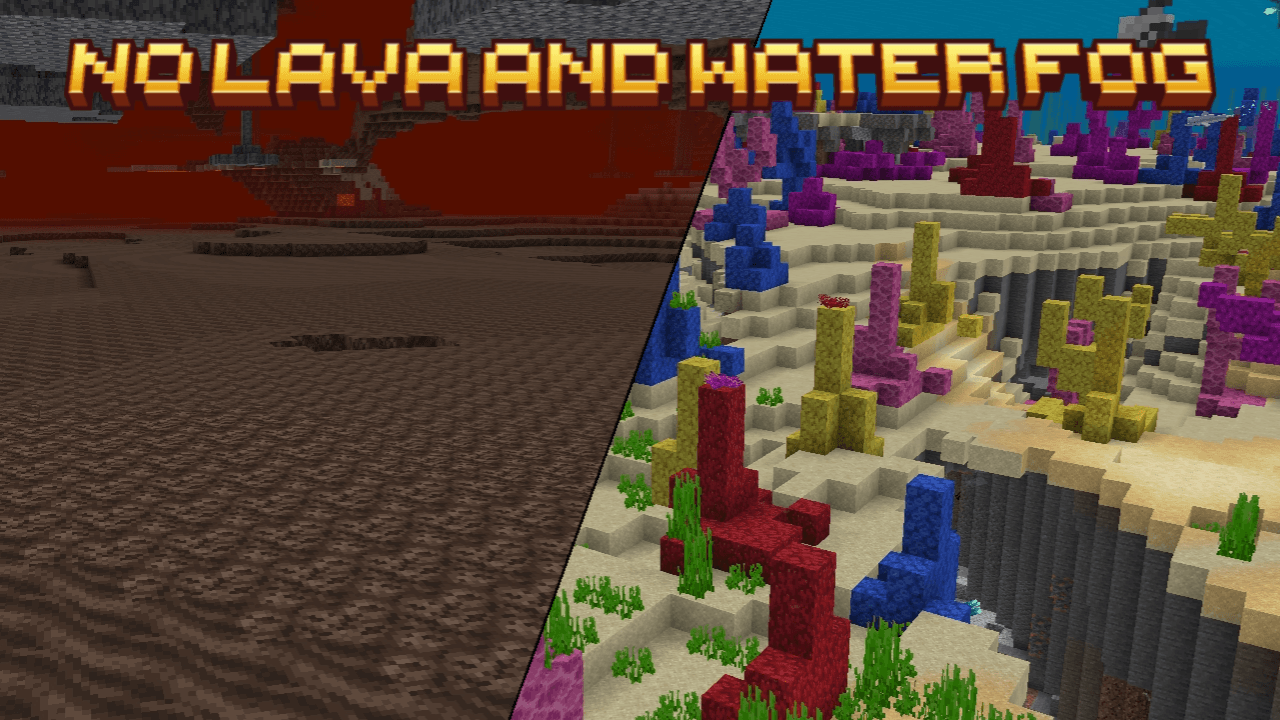

No Lava & Water Fog
Are you got distracted of water or lava fogs? This pack removed them completely! Removed water fog and enhance your exploring experience. Also with clearer water surface. And remove lava fog, it's useful for finding ancient debris under the lava poolDownload
Better Create Palettes
Retexturing the Create mod's palette blocksInstall
Monsterley
Monsterley [1.9.x -1.16.x]Install

HTTYD Franchise Paintings
New paintings in Minecraft from the HTTYD Franchise!Install

Xaero's Horrors - Minimap Icons for Cave Dwellers & More
For When Have To Tell The Difference Between One Red Dot And AnotherInstall

Classic Panorama with Shaders (Bedrock Edition)
Adds shader to the classic Minecraft PanoramaDownload

Isle of Berk Xaero's Minimap Icons
New Minimap Icons for the Isle of Berk Mod!Install

Odyssey Visuals (Vibrant Visuals/Deferred)
Odyssey is a vibrant pack designed to breathe new life into the classic Minecraft experience. We've meticulously enhanced the vanilla aesthetic with vibrant colours, and a host of visual improvements while maintaining the core Minecraft look and feel.Download

Boss Bars Reforged
Freshly redesigned and more ambitious boss bar sprites!Install

R3D CRAFT 32px
A HD alternative to Minecraft's default apperanceInstall

Better OneBlock - Splash
Replaces and adds new splashes! The yellow text under the Minecraft Title!Install

Flower Clusters
Flowers cover the ground better, being placed in clusters rather than individuallyInstall

Pato's 3D Brews
A Minecraft resource pack that adds 3D bottle models and drinking animations for potions, honey, and all other bottles!Install

Peeves
A resource pack that tweaks pet-peeves with Minecraft's textures | 1.16 - 1.19+Install
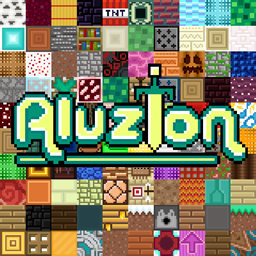
Aluzion [PVP]
Removes Minecraft's grainy textures and optimises it for PvPInstall

[Moonsu] Better GUI for Villagers!
Revamp your Minecraft trading experience with our market-inspired interface: vibrant red awnings, rustic wooden structures, and authentic charm!Install

Infinity Visuals (Vibrant Visuals Pack)
Infinity Visuals is a Vibrant Visuals pack for Minecraft Bedrock latest version to provide you all with a immersive visuals exprience, PBR, reflections, new caustics, new water, new lightning and alot more!!!Download

Detail Brush
Polishes and redesigns a few items in Minecraft!Install

Alvoria's Sanity - No Longer Updating
A Natural, Sensible look for Minecraft in Default ResolutionInstall

ImDJForShorts Perferct PVP Pack
Best PVP PackInstallFAQ
Do I need Forge or Fabric for a resource pack?
No. A resource pack works on the regular game with no loaders or mods. Click “Install” and Millida Launcher will put the pack into the right modpack — then just enable it in the settings.
What do 16×, 32×, 64× mean?
The resolution of a single texture in pixels. 16× matches the original game, 32× and 64× are more detailed and heavier, and 128× and up put a noticeable load on your graphics card.
Will a pack made for another version work?
Most likely partly: older packs don't have textures for newer blocks, so those will stay default. The game won't break, though.
How is a texture pack different from a resource pack?
Only by name and age. Before version 1.6 the sets were called texture packs and changed only textures; in 1.6 resource packs replaced them and also change sounds, fonts and the interface. Old texture packs for 1.5 and below do not work on new versions without conversion.
Which texture packs are best for PvP?
PvP packs: 16× resolution or lower, shortened swords, low fire, a clear sky and bright particles. They barely load the computer and make the opponent easier to see. These packs are collected in the PvP theme.
How do I install a resource pack?
Press Install and Millida Launcher puts the pack into the resourcepacks folder of the right instance. Then enable it in the game: Options, then Resource Packs. Manually, the archive goes into resourcepacks inside the game folder, no need to unpack it.
Minecraft texture packs
A resource pack changes how the game looks and sounds: block and item textures, fonts, the interface, sounds. It doesn't touch the game's code, so it needs no mod loader and breaks nothing on a server — the pack only works on your screen. That's exactly why a resource pack is safer than any mod: the worst that happens on a version mismatch is that some textures stay default.
Textures, texture packs and resource packs are essentially the same thing: since version 1.6 Mojang calls these sets resource packs, but the old name is still searched more often. PvP packs are a big genre of their own: shortened swords, low fire, bright particles and 16× resolution or lower, so the opponent stands out and the frame rate does not drop. Such packs are most often made for 1.8.9 and 1.16.5, the versions many PvP servers run on.
The key thing about a pack is its resolution. The game's default textures are 16×16 pixels; 32× and 64× packs look more detailed, while 128× and up need a real graphics card and are usually paired with shaders. On a weak machine it makes sense to stay at 16× or go for packs that deliberately simplify graphics for more FPS. Every pack here lists its game version, author and license, and all released versions are gathered on one card. Put the downloaded archive in the resourcepacks folder and enable it in the game settings.