

- 次下载
- 169 次下载
- 次浏览
- 466 次浏览
- 已更新
- 已更新 03.09.2026
- 1.20 — 1.20.1
 Forge
Forge- 客户端
关于 Sodium Options API 模组

此模组添加了跨平台事件,用于添加 Sodium/Embeddium 选项菜单集成。例如,你可以用一个事件为 Forge 上的 Embeddium、1.20.1 上的 Fabric Sodium 0.5,以及 1.21.1 上的 Fabric/NeoForge Sodium 0.6 添加一个选项页面:
OptionGUIConstruction.EVENT.register((pages) -> pages.add(new TestOptionPage()));
如果你是最终用户,并且尚未将此模组作为其他 Sodium 附加模组的库安装,你可以将其与 Reese's Options 一起安装,以获得改进的分类菜单,并支持下拉菜单,使其更易于导航。即使对于不使用此 API 并直接注入 Sodium 选项的模组,这也会生效。
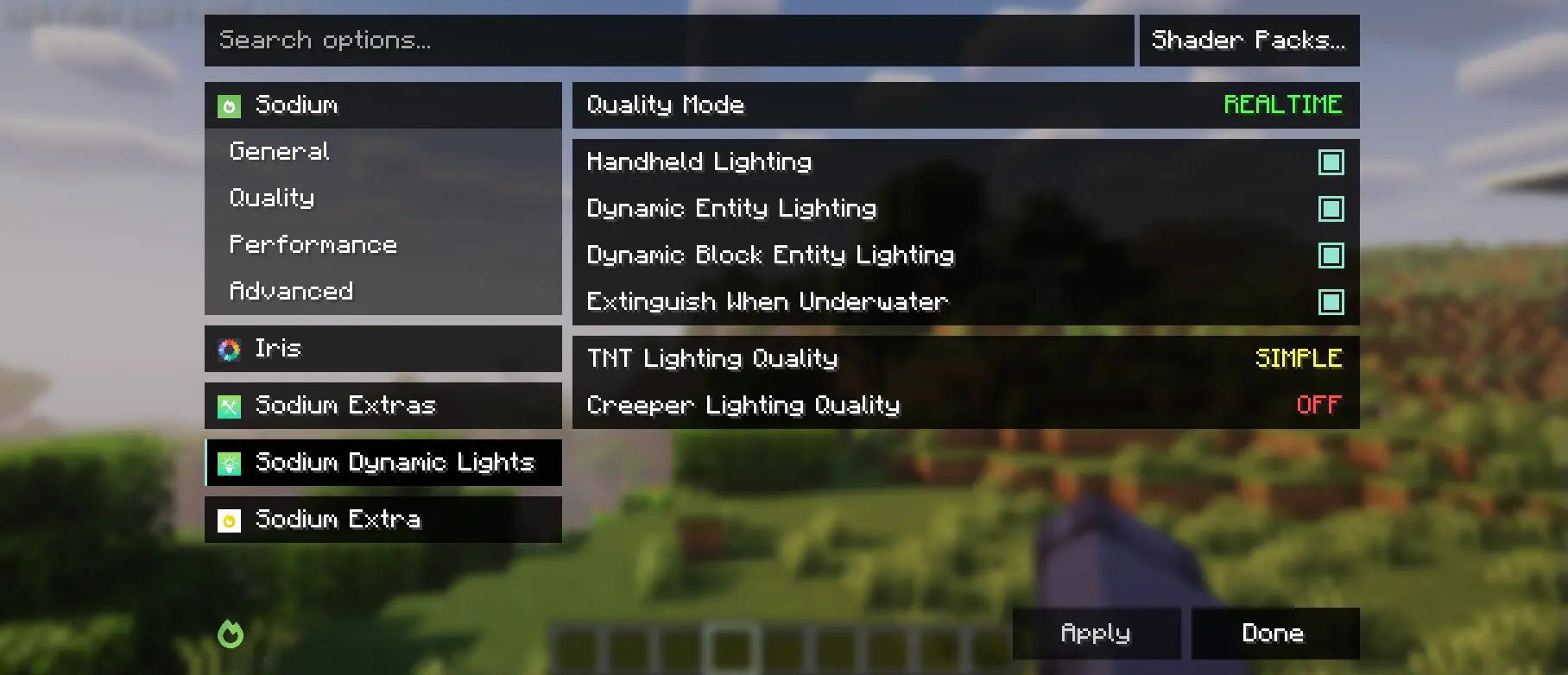
此模组部分派生自 Embeddium 分类 API 和选项事件,并进行了大量更改以支持上游 Sodium。虽然它会更改 Reese's Sodium Options 菜单,但出于兼容性原因,它是通过 mixin 实现的,因此你需要同时安装两者。
使用 API
首先,你需要将此模组添加到你的开发环境中,使用 Curseforge 或 Modrinth 的 Maven 发布版本。
modImplementation("maven.modrinth:sodium-options-api:version")
然后,此模组在 toni.sodiumoptionsapi.api 中提供了三个事件:
- OptionGUIConstruction.EVENT,在 GUI 构造函数中调用一次,允许添加整个页面。这可能是你想要的那个。
- OptionPageConstruction.EVENT,为每个 OptionPage 调用。如果你想向性能标签页添加一组开关之类的,请使用这个。
- OptionGroupConstruction.EVENT,为每组选项调用。如果你想将单个选项插入现有组,或修改原版选项,请使用这个。
如何安装 Sodium Options API
With Millida Launcher
Install Millida Launcher
The launcher is free: download it at millida.net/launcher and sign in with any nickname.
Click “Install” on this page
The launcher opens and installs the mod for Minecraft 1.20–1.20.1 on Forge automatically, together with its dependencies: Embeddium.
Launch the game
A profile with it appears in the launcher: click “Play”.
Manually
Install Forge
The loader must match the game version of the mod file, for example Minecraft 1.20.1. After installing it, a separate profile appears in your launcher.
Download the file for your version
In the version list above, pick the file sodiumoptionsapi-forge-1.0.10-1.20.1.jar (434 KB) for your game version.
Put it in the mods folder
The folder is inside .minecraft (Windows: %appdata%\.minecraft\mods). If it does not exist, create it. Required dependencies go there too: Embeddium.
Launch the loader profile
Open “Mods” in the main menu: Sodium Options API should be in the list.
Sodium Options API works on the player’s side only: there is no need to install it on a server.
Minecraft 1.20.1 runs on Java 17: with a different Java version the game may close right after launch.
版本
含依赖项
| Minecraft | 加载器 | 文件 | 操作 |
|---|---|---|---|
| 1.20.1 | Forge | 1.20.1434 KB 168 |
常见问题
Which Minecraft versions does Sodium Options API work on?
There are files for 1.20.1, 1.20. The newest is 1.20.1.
Is Sodium Options API for Forge or Fabric?
Only for Forge: 1.20–1.20.1. There are no files for Fabric or NeoForge: a mod for another loader will not start.
What does Sodium Options API need to work?
Required: Embeddium. Without it the mod will not start: dependencies go into the same mods folder.
Do I need to install Sodium Options API on a server?
No. Sodium Options API works on the player’s side only: there is no need to install it on a server.
Which Java does Sodium Options API need?
Minecraft 1.20.1 runs on Java 17. If the game closes right after launch, the usual cause is the wrong Java version in the profile settings.
Where can I download Sodium Options API safely?
On this page: the file sodiumoptionsapi-forge-1.0.10-1.20.1.jar (434 KB) is stored on Millida’s server, with no link shorteners. SHA-1 checksum: 7529fbf938787ed13a251cbf40936f8c29ec4b6c.
评价
成为第一个评价 Sodium Options API 的人


