Fabric
 Quilt
QuiltMod Menu
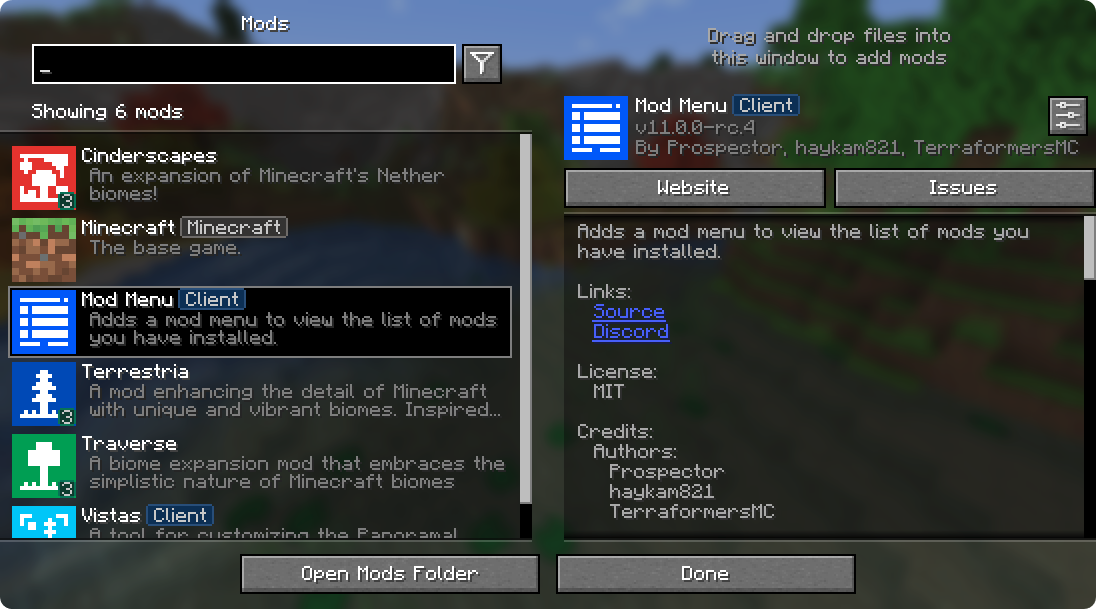
Mod Menu 让你查看已安装的模组,并且在模组支持的情况下,快速便捷地访问模组的配置界面。
Mod Menu 还支持一些更高级的功能,例如可翻译的模组名称和描述、借助 Patbox 的 Text Placeholder API 在模组描述中支持 QuickText 格式、将库模组从普通模组中过滤出来、针对托管在 Modrinth 上或提供自有更新源的模组进行更新检查,以及为我们提供的所有功能进行深度配置。

支持的平台
Mod Menu 目前适用于 Minecraft: Java 版 1.14 或更高版本的 Fabric 或 Quilt。

开发者
Mod Menu 为开发者提供了多种 API,用于改善其模组在 Mod Menu 中的显示效果。这些 API 以语言键、JSON 元数据甚至 Java API 的形式提供。
翻译 API
你无需改动任何 Java 代码,就能翻译模组的名称、摘要和描述。只需按支持的格式为你想要的任何语言添加翻译键即可。
翻译 API 文档
下面是 Mod Menu 翻译成海盗语的一个示例。要创建你自己的翻译,只需将翻译键末尾的 modmenu(不是开头的那个)替换为你自己的模组 ID,例如 modmenu.descriptionTranslation.traverse。
enpt.json
"modmenu.nameTranslation.modmenu": "Menu o' mods!", "modmenu.descriptionTranslation.modmenu": "Menu o' mods ye installed matey!", "modmenu.summaryTranslation.modmenu": "Menu o' mods ye installed matey!"
这里的摘要翻译是多余的,不必包含,因为它与描述相同,但这里包含它是为了说明你可以将摘要(模组的一句话简短描述)与描述分开翻译,甚至可以用英文!
Fabric 元数据 API
仅通过 fabric.mod.json 中的元数据,你就可以添加不少内容。
所有这些都添加到 fabric.mod.json 中为 Mod Menu 元数据准备的自定义块里。下面是此 API 提供的许多功能的一个使用示例:
fabric.mod.json
{ ... "custom": { "modmenu": { "links": { "modmenu.discord": "https://discord.gg/jEGF5fb" }, "badges": [ "library", "deprecated" ], "parent": { "id": "example-api", "name": "Example API", "description": "Modular example library", "icon": "assets/example-api-module-v1/parenticon.png", "badges": [ "library" ] }, "updatechecker": true } } }
Fabric 元数据 API 文档
徽章("badges": [ ])
客户端徽章会自动添加到设为仅客户端侧的模组上(在 fabric.mod.json 中设置 "environment": "client" 即可做到),而库和已弃用等其他徽章则需要在此处定义。
支持的值:
- library - 应分配给纯粹作为其他模组依赖的模组,默认情况下不应向用户显示,除非用户主动开启。
- deprecated - 应分配给纯粹出于遗留原因而存在的模组,例如旧的 API 模块之类。
其他任何值都会被忽略,并且 Mod Menu 不支持添加你自己的徽章。如果你有令人信服的新徽章使用场景,可以在这里提交 issue。
链接("links": { })
links 对象允许模组作者在描述末尾添加自定义超链接。如果你在官方 fabric.mod.json 元数据中指定了 sources 联系方式,它也会被包含在链接部分中。
links 对象中的任何键都会被包含在链接部分中,该键会被用作翻译键。例如,这个:
fabric.mod.json
"custom": { "modmenu": { "links": { "modmenu.discord": "https://discord.gg/jEGF5fb" } } }
会显示为一个文本为 "Discord" 的链接,因为 "Discord" 是 Mod Menu 为 "modmenu.discord" 提供的英文翻译。
Mod Menu 提供了若干可用于链接的默认翻译。完整列表可在此处的 Mod Menu 语言文件中查看。所有默认链接翻译键的形式均为 modmenu.。
如果你想添加自定义链接,也可以提供自己的翻译。请确保为任何自定义键使用你自己的命名空间(而不是 modmenu)。
父级("parent": "modid" 或 { })
父级用于将某个模组显示为另一个模组的子级。这适用于被划分为不同模块的模组。fabric.mod.json 中的以下元素会将模组定义为模组 'flamingo' 的子级:
fabric.mod.json
"custom": { "modmenu": { "parent": "flamingo" } }
不过,如果你想将模组归组到一个父级之下,但该父级并不是一个真实的模组,也可以这样做。在下面的示例中,一个模组为某个父级定义了元数据。请确保此元数据包含在使用该假/虚拟父级的所有子级中。这也可以用作可选父级的回退,如果存在该模组的真实元数据,它将被替换。
fabric.mod.json
"custom": { "modmenu": { "parent": { "id": "this-mod-isnt-real", "name": "Fake Mod", "description": "Do cool stuff with this fake mod", "icon": "assets/real-mod/fake-mod-icon.png", "badges": [ "library" ] } } }
虚拟父级模组仅支持以下元数据:
- id(字符串)
- name(字符串)
- description(字符串)
- icon(字符串)
- badges(字符串数组)
禁用更新检查器("updatechecker": false)
默认情况下,Mod Menu 的更新检查器会使用你模组 jar 的哈希值在 Modrinth 上查找最新版本。如果找到匹配的项目,它会检查支持你的模组加载器和 Minecraft 版本的最新版本,如果该版本的哈希值与你现有文件不同,就会提示用户有可用更新。
你可以像这样在 Mod Menu 元数据中将 updatechecker 设为 false 来禁用更新检查器:
fabric.mod.json
"custom": { "modmenu": { "updatechecker": false } }
Quilt 元数据 API
由于 Mod Menu 也支持 Quilt,Fabric 元数据 API 部分中的相同 API 同样适用于 Quilt 模组,但自定义元数据的格式略有不同。
不是在 "custom" 块内放置 "modmenu" 块,而是将 "modmenu" 块作为根对象中的一个元素。因此它应该像这样:
quilt.mod.json
{ ... "modmenu": { // 这里放你的链接、徽章等内容 } }
Java API
要使用 Java API,你需要在 gradle 项目中添加 Mod Menu 作为编译时依赖。这不会让你的模组依赖 Mod Menu,但它会出现在你的环境中供你测试。
build.gradle
// 将 Terraformers maven 仓库添加到你的 repositories 块 repositories { maven { name = "Terraformers" url = "https://maven.terraformersmc.com/" } }
// 将 Mod Menu 作为依赖添加到你的环境中 dependencies { // 在 Minecraft 26.x 之前,请改用 "modImplementation" implementation("com.terraformersmc:modmenu:${project.modmenuversion}") }
然后,在 gradle.properties 中定义你使用的 Mod Menu 版本。你可以在这里获取最新版本号,但如果你使用的不是最新的 Minecraft 版本,可能需要不同的版本。完整版本列表请参见版本页面。
gradle.properties
modmenuversion=VERSIONNUMBERHERE
如果你不想把它放在环境中用于测试,但仍想针对 Mod Menu 进行编译以使用 Java API,可以使用 modCompileOnly 代替 modImplementation(即使 Mod Menu 尚未更新到你正在运行的 Minecraft 版本,这也能正常工作)。
Java API 文档
入门
要使用该 API,请在一个类上实现 ModMenuApi 接口,并在你的 fabric.mod.json 中将其添加为类型为 "modmenu" 的入口点,如下所示:
fabric.mod.json
"entrypoints": { "modmenu": [ "com.example.mod.ExampleModMenuApiImpl" ] }
模组配置界面
模组可以提供 Screen 工厂,以便通过配置按钮打开自定义配置界面。为此,请在你的 API 实现中实现 getModConfigScreenFactory 方法。
其预期用途是让模组提供自己的配置界面。配置界面的模组 ID 会根据入口点来源的源模组容器自动确定。
提供的配置界面
模组可以提供 Screen 工厂,以便通过其他模组的配置按钮打开自定义配置界面。为此,请在你的 API 实现中实现 getProvidedConfigScreenFactories 方法。
其预期用途是让像 Cloth Config 这样的模组为使用其 API 的模组提供配置界面。
整合包徽章
模组可以通过实现 attachModpackBadges 方法给其他模组授予整合包徽章,例如通过以下方式:
@Override public void attachModpackBadges(Consumer consumer) { consumer.accept("modmenu"); // 表示 'modmenu' 是整合包的一部分 }
请注意,像 Minecraft 本身和模组加载器这样的 'internal' 模组无法被授予整合包徽章,因为它们不会在典型的整合包中分发。
静态辅助方法
ModMenuApi 还为希望更好地与 Mod Menu 配合的模组提供了一些辅助方法,例如制作自己的模组按钮。
创建模组界面实例
你可以调用此方法来获取模组界面的实例:
Screen createModsScreen(Screen previous)
创建模组按钮文本
你可以调用此方法来获取将显示在 Mod Menu 模组按钮上的文本:
Text createModsButtonText()
如何安装 Mod Menu
With Millida Launcher
Install Millida Launcher
The launcher is free: download it at millida.net/launcher and sign in with any nickname.
Click “Install” on this page
The launcher opens and installs the mod for Minecraft 1.16–26.3 on Fabric or Quilt automatically, together with its dependencies: Fabric API, Text Placeholder API.
Launch the game
A profile with it appears in the launcher: click “Play”.
Manually
Install Fabric or Quilt
The loader must match the game version of the mod file, for example Minecraft 26.3. After installing it, a separate profile appears in your launcher.
Download the file for your version
In the version list above, pick the file modmenu-21.0.0.jar (837 KB) for your game version and loader.
Put it in the mods folder
The folder is inside .minecraft (Windows: %appdata%\.minecraft\mods). If it does not exist, create it. Required dependencies go there too: Fabric API, Text Placeholder API.
Launch the loader profile
Open “Mods” in the main menu: Mod Menu should be in the list.
Mod Menu works on the player’s side only: there is no need to install it on a server.
版本
含依赖项
| Minecraft | 加载器 | 文件 | 日期 | 操作 |
|---|---|---|---|---|
| 26.2 | Fabric, Quilt | 26.2602 KB 1,462 | ||
| 26.1.2 | Fabric, Quilt | 26.1.2840 KB 388 | ||
| 1.21.11 | Fabric, Quilt | 1.21.11938 KB 4,653 | ||
| 1.21.1 | Fabric, Quilt | 1.21.1953 KB 548 | ||
| 26.3 | Fabric, Quilt | 26.3837 KB 2,618 | ||
| 26.3 | Fabric, Quilt | 26.3837 KB 2 | ||
| 26.2 | Fabric, Quilt | 26.2602 KB | ||
| 26.1.2 | Fabric, Quilt | 26.1.2840 KB |
运行所需
评价
成为第一个评价 Mod Menu 的人