
Mods for Minecraft 26.3 — page 32
1,838 itemsMods: list



Block Runner
Encourages path building by making you run faster on certain blocks such as path blocks.InstallOn a server
Trample No More
This mod adds a few nice tweaks to Minecraft's farmland trampling.Install

Texture Locale Redirector
By extending the vanilla resource loading mechanism, it provides native multi-language texture support for resource packs, enabling localization of texture assetsInstall
BactroMod
Fullbright, low fire, low shield, item scaling, no fog, no pumpkin blur and more all in one mod!Install
[SBM] Bone Torch
Simple mod to create torches from bonesInstall
Loot Integrations: Structory & Towers
Adds better loot to Structory and Structory: Towers chests, including modded lootInstall

XPlus Autofish (Fabric / Forge / NeoForge)
Automatically reel in and recast the fishing rod when fish bites. Including useful options and bugfixs.Install

Friends&Foes - Flowery Mooblooms (Fabric/Quilt)
An addon for the Friends&Foes mod, adding one moobloom variant for each flower.InstallOn a server
Effect Insights
Adds potion and food effect descriptions directly to tooltips. Know effects without the wiki.Install
Unlit Campfire
Placed campfires are unlit. (Forge, NeoForge, Fabric, Quilt)Install
Giant Spawn
🧟♂️ Allows giants to spawn naturally with custom AI (based on zombies) and other tweaks.Install
Global Narration Toggle
🗣️ Makes the narrator setting global automatically, across instances. Turns the screen off and on.Install
Bundle API
An API for mods that allows easy addition of bundles with custom sizes and filtered content.Install
Crosshair Addons Public
Provides helpful icons around the crosshair when certain conditions are met.Install

Guns ++
Multiplayer and Survival Friendly Vanilla Guns Datapack, Many versions starting from 1.17, Adds 50+ Guns and 4 Grenades all with Custom Models and Sounds!InstallOn a server
Biolith
A biome placement mod focusing on configurability and consistent distribution of modded biomesInstall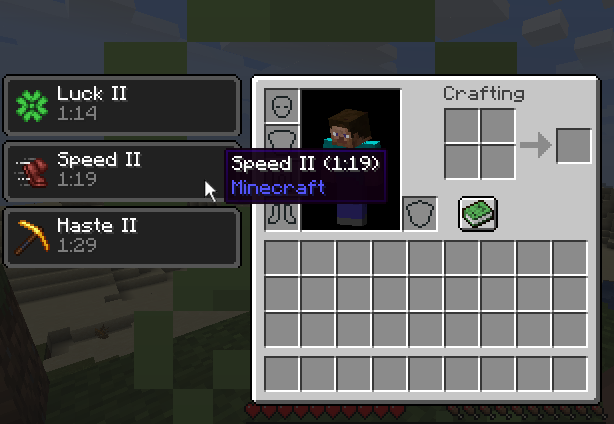

Effect Tooltips
Adds tooltips to the potion effect section of the inventory.Install

Amplified Nether
The nether explorer's simple dream: doubled height and amplified terrain. What more is needed?InstallOn a server

LDLib
LDLib is a libarary mod for custom rendering, modular gui.InstallOn a server
Beautified Chat [Client]
💬 A highly configurable mod to change the chat style and colour on the client.Install

Antique Trading Ship
Adds an antique villager trading ship to all ocean biomesInstall

Axes Are Weapons
Disables the increased durability loss in combat and enables Looting for axes and more!InstallOn a server
Ender Zoology
Vanilla themed monsters to add some difficulty to the game. A remake of Ender Zoo.InstallFAQ
How is Forge different from Fabric?
They're two different mod loaders that aren't compatible with each other. Forge is the older one and better suited to big tech and magic modpacks; Fabric is lighter, updates to new game versions faster, and hosts most performance mods. NeoForge is a Forge fork for newer versions, and Quilt is a Fabric fork. A Forge mod won't run on Fabric, and vice versa. Millida Launcher installs the right loader for you.
How do I know which mod version I need?
The one that matches your game version and loader. The “Install” button picks the file for you: Millida Launcher grabs the version for your modpack. A mod for 1.20.1 usually won't work on 1.21.
How do I install a mod?
Click “Install” and Millida Launcher will download the mod, its dependencies and the right loader for you. To install a downloaded file manually, put it in the mods folder inside the game directory.
Do I need CurseForge to install mods?
No. The Install button on a mod page opens Millida Launcher: it downloads the mod, its dependencies and the right loader into the chosen instance by itself. No CurseForge and no manual file copying.
Which mods are there for 1.20.1?
1.20.1 is one of the most modded versions, especially on Forge: tech, magic, RPG, furniture, weapons. Pick 1.20.1 in the version filter to keep only mods with a file built exactly for it, then pick Forge or Fabric next to it.
Can I install mods on my phone?
On Android, yes: Millida Launcher runs the Java edition on a phone, and mods work there just like on a PC, though light ones run much better than heavy ones. Minecraft PE (Bedrock) cannot load PC mods — it has add-ons instead, in the Minecraft PE mods section.
Which mods are best to play with friends?
The usual picks are Simple Voice Chat for proximity voice chat, Waystones for fast travel, Xaero's Minimap and something big to work on together, such as Create. Mods that change the world must be installed by every player and on the server, while client-side ones like a minimap or performance mods are up to each player.
Mods for Minecraft 26.3
Mods for Minecraft 26.3: 1,838 items in the Mods section. Compatibility is checked against the files, not the description: only items with a build for exactly these conditions stay in the list.
One mod in the catalog, one page. Every version the author has released is listed on its card: pick your game version and loader right there instead of jumping between ten similar pages. Each file shows its size, release date and checksum, and the mod itself shows the author, license and a link to the original source. Files whose license allows rehosting are stored with us and download directly — no link shorteners, timers or ad redirects. If the license forbids rehosting, the button honestly takes you to the author.