

- 次下载
- 1 次下载
- 次浏览
- 23 次浏览
- 已更新
- 已更新 02.10.2026
- 1.20.1
 Forge
- 客户端与服务器
关于 Wooden Elytra 模组
The wooden elytra loses durability depending on the height in which you are! It will also have different visual (and not-so-visual) effects depending on what's going on.
Every time your elytra loses durability, it will lose some feathers too. You can use this to identify how much durability your are losing, as well as how much durability you have left (Less durability means more feathers will appear) There is also some configuration options for managing dimensions in which it never burns Base Values (Can be edited on config):
Spoiler
"high-intensity" (Default: Y230+) = You will burn (if "burn" is set to true") and lose 1 durability every 3 ticks. "burn" (Default: true) = You will burn at high intensity "medium-intensity" (Default: Y150+) = Lose 1 durability every 5 ticks. "low-intensity" (Default: Y80+) = Lose 1 durability every 7 ticks. "durability" (Default: 80) = The amount of durability your wooden elytras have.
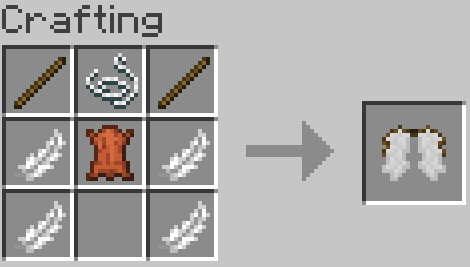
Base Recipe (Can be changed by crafttweaker or similar mods):
如何安装 Wooden Elytra
With Millida Launcher
Install Millida Launcher
The launcher is free: download it at millida.net/launcher and sign in with any nickname.
Click “Install” on this page
The launcher opens and installs the mod for Minecraft 1.20.1 on Forge automatically.
Launch the game
A profile with it appears in the launcher: click “Play”.
Manually
Install Forge
The loader must match the game version of the mod file, for example Minecraft 1.20.1. After installing it, a separate profile appears in your launcher.
Download the file for your version
In the version list above, pick the file wooden_elytra-1.20.1-2.0.1.jar (25 KB) for your game version.
Put it in the mods folder
The folder is inside .minecraft (Windows: %appdata%\.minecraft\mods). If it does not exist, create it.
Launch the loader profile
Open “Mods” in the main menu: Wooden Elytra should be in the list.
On a server
A server on Forge
The mod only works on a server with the same loader and game version, for example 1.20.1.
File goes into the server’s mods folder
Stop the server, put the mod file into the mods folder and start the server again.
Use the “To server” button
On Millida Hosting, the button at the top of the page uploads the file to your server and restarts it for you.
Minecraft 1.20.1 runs on Java 17: with a different Java version the game may close right after launch.
版本
含依赖项
| Minecraft | 加载器 | 文件 | 日期 | 操作 |
|---|---|---|---|---|
| 1.20.1 | Forge | 1.20.124.6 KB 1 |
常见问题
Which Minecraft versions does Wooden Elytra work on?
Only Minecraft 1.20.1: there are no files for other versions.
Is Wooden Elytra for Forge or Fabric?
Only for Forge: 1.20.1. There are no files for Fabric or NeoForge: a mod for another loader will not start.
Does Wooden Elytra need other mods?
The author lists no required dependencies: the Forge loader is enough.
Does Wooden Elytra work on a server?
Yes. Wooden Elytra works both in singleplayer and on a server.
Which Java does Wooden Elytra need?
Minecraft 1.20.1 runs on Java 17. If the game closes right after launch, the usual cause is the wrong Java version in the profile settings.
Where can I download Wooden Elytra safely?
On this page: the file wooden_elytra-1.20.1-2.0.1.jar (25 KB) is stored on Millida’s server, with no link shorteners. SHA-1 checksum: c899e8017a1c97b220f1ca64c8176485d270bda2.
评价
成为第一个评价 Wooden Elytra 的人


