

 NeoForge
 Forge
Forge Fabric
TslatEntityStatus (TES)
查看实体生命值和其他状态。让揍人重新变得有趣!
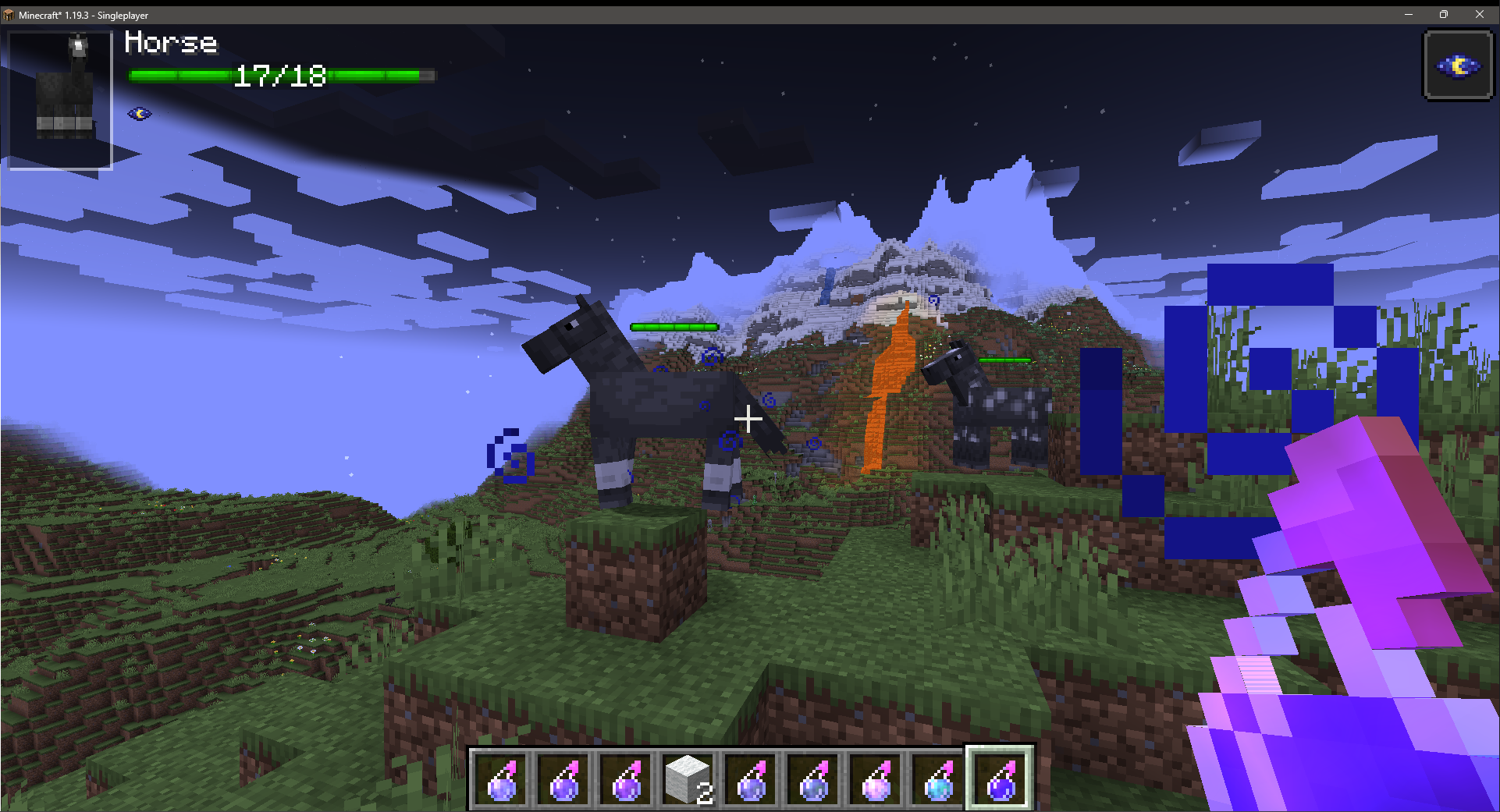
TES
TES 是一个“伤害指示器”风格的模组,旨在为世界中的实体添加重要信息。它力求以完全可配置的方式涵盖尽可能多的信息层面,让任何人都能按需获取自己想要的信息片段。
它还以第三方集成为设计理念,允许其他模组配置或充分利用所提供的系统。

依赖项
1.16.5-1.21.1:Fabric:MidnightLib
1.21.3+:Fabric/Forge:ForgeConfigAPIPort

功能
- HUD 风格的实体状态界面
- 世界内的头顶实体状态界面
- 世界内的伤害和治疗“弹出”粒子
- 基于队伍颜色的伤害粒子(1.20+)
- 多层面的状态元素
- 实体名称
- 实体生命值
- 实体护甲值和盔甲韧性
- 实体类型属性(火焰免疫、近战、远程等)
- 实体药水效果图标
- 完全由用户配置
- 可单独开启/关闭任何元素
- 可单独开启/关闭任何功能
- 调整自动化功能,按你的喜好平衡性能
- 选择 HUD 出现的方式和时机
- 配置生命值条的渲染样式
- 调整屏幕 HUD 和世界内 HUD 的大小
- 更改伤害和治疗粒子的默认颜色
- 按你的喜好调整 HUD 的不透明度
- 面向公众的模组 API
- 触发你自己的任意类型世界内粒子
- 使用默认值或定义你自己的动画样式
- 以文本、数字或你选择的任何其他自定义渲染样式进行渲染
- 添加你自己的 HUD 元素
- 在现有 HUD 中你自有的空闲空间里渲染你选择的任何信息
- 决定你想要世界内渲染还是仅 HUD 渲染
- 替换/修改/扩展/移除内置或其他模组的 HUD 元素
- 动态确定你的元素的可见性和使用情况
- 根据你自己的条件,从服务端自定义客户端粒子处理
- 在客户端根据伤害来源自定义伤害事件的粒子处理(1.20+)
- 从任何地方轻松获取 TES 的配置选项
- 为所有面向开发者的类、字段和方法提供完整文档的实现
- 支持所有平台的多加载器实现
常见问题
这个模组是服务端还是客户端?
这个模组几乎完全是客户端的!不过,药水图标只有在服务端也安装了该模组,并且在配置中启用了药水图标时才会生效。
你会支持 X 版本吗?
我实际上只打算支持以下版本:1.18.2、1.19.2、1.19.3+
如果有人愿意将模组移植到其他版本并提交 PR,我也可以为该版本上传。
X 功能可配置吗?
是的。这个模组中几乎所有内容都可以在配置中配置。
你能添加 X 功能吗?
也许吧!在 Discord 服务器中提出建议,如果我认为它可能有用,就有相当大的机会添加它。
来聊聊吧!
想聊聊 TES 或者只是想问我更多问题?加入 Discord 尽管问吧!
捐赠
想支持我所做的事?考虑成为 Patron 吧!
如何安装 TslatEntityStatus
With Millida Launcher
Install Millida Launcher
The launcher is free: download it at millida.net/launcher and sign in with any nickname.
Click “Install” on this page
The launcher opens and installs the mod for Minecraft 1.16.5–26.3 on Fabric, Forge or NeoForge automatically, together with its dependencies: Fabric API, MidnightLib, Forge Config API Port.
Launch the game
A profile with it appears in the launcher: click “Play”.
Manually
Install Fabric, Forge or NeoForge
The loader must match the game version of the mod file, for example Minecraft 26.3. After installing it, a separate profile appears in your launcher.
Download the file for your version
In the version list above, pick the file tslatentitystatus-neoforge-26.3-1.10.2.jar (220 KB) for your game version and loader.
Put it in the mods folder
The folder is inside .minecraft (Windows: %appdata%\.minecraft\mods). If it does not exist, create it. Required dependencies go there too: Fabric API, MidnightLib, Forge Config API Port.
Launch the loader profile
Open “Mods” in the main menu: TslatEntityStatus should be in the list.
On a server
A server on Fabric, Forge or NeoForge
The mod only works on a server with the same loader and game version, for example 26.3.
File goes into the server’s mods folder
Stop the server, put the mod file into the mods folder and start the server again.
Use the “To server” button
On Millida Hosting, the button at the top of the page uploads the file to your server and restarts it for you.
版本
含依赖项
| Minecraft | 加载器 | 文件 | 日期 | 操作 |
|---|---|---|---|---|
| 1.20.1 | Forge | 1.20.1749 KB 21 | ||
| 1.20.1 | Fabric | 1.20.1177 KB | ||
| 1.21.11 | NeoForge | 1.21.11183 KB | ||
| 1.21.11 | Forge | 1.21.11184 KB | ||
| 1.21.11 | Fabric | 1.21.11184 KB 3 | ||
| 1.20.1 | Forge | 1.20.1749 KB | ||
| 1.20.1 | Fabric | 1.20.1177 KB | ||
| 1.21.1 | NeoForge | 1.21.1152 KB 1 |
运行所需
需要它的内容
评价
成为第一个评价 TslatEntityStatus 的人


