

 NeoForge
 Forge
ForgeTaCZ Addon
TaCZ 的扩展模组。
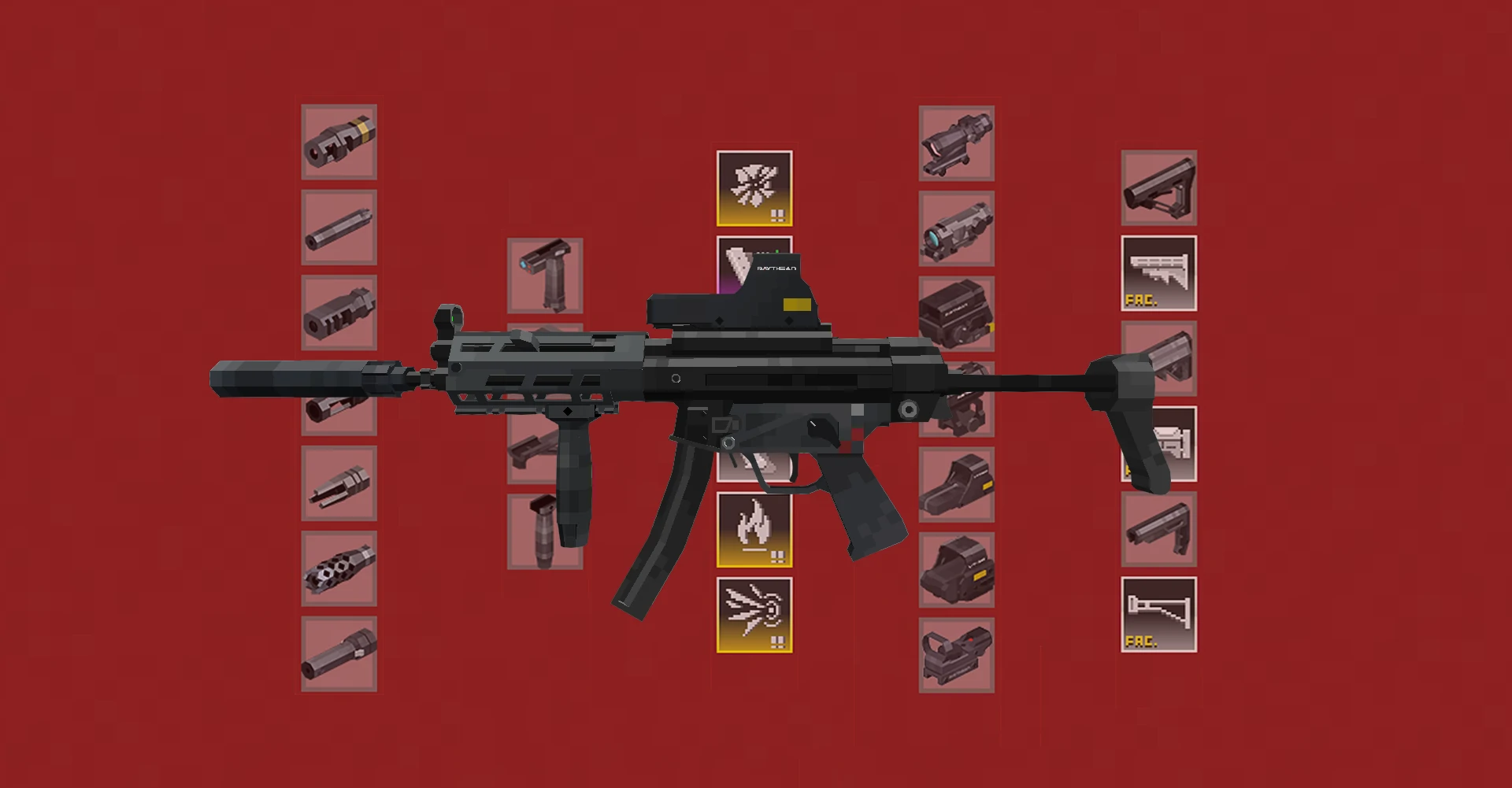
枪械工作台优化
- 当主手或副手持有枪械打开枪械工作台时,只显示与该枪械兼容的配件和弹药。
- 支持按配件的加成属性进行筛选。
- 显示简要材料信息,点击可跳转到 JEI 配方。
- 自动保存当前滚动位置,并在重新打开时恢复。(1.1.4+ 无效)
- SHIFT 点击进行批量合成(可通过配置文件调整合成数量)。
- 从附近容器中提取材料(兼容 Sophisticated Backpacks)。
- 显示当前页码和总页数。
- 合成后显示提示通知。

配件管理优化
- 在提示框中显示配件效果对主手枪械属性的影响。
- 添加游戏规则 liberateAttachment:启用后,任何枪械都可以自由与所有兼容配件交互,无论玩家背包如何。
- 允许指定 SHIFT 悬停配件时显示的最大支持枪械数量,以防止屏幕杂乱和卡顿。
- 将鼠标悬停在物品上会高亮容器中的所有物品,例如哪些弹药或配件对应哪些枪械。
AttachmentPack 系统
AttachmentPack 可以通过数据包配方添加,为你的武器解锁各种可自定义的配件。
{ "type": "taczaddon:gunsmithing", "template": { "item": "minecraft:echoshard" }, "base": { "item": "tacz:modernkineticgun" }, "addition": { "item": "minecraft:nautilusshell" }, "list": [ "tacz:extendedmag1", "tacz:extendedmag2", "tacz:extendedmag3", "tacz:lightextendedmag1", "tacz:lightextendedmag2", "tacz:lightextendedmag3", "tacz:sniperextendedmag1", "tacz:sniperextendedmag2", "tacz:sniperextendedmag3", "tacz:ammomodfmj", "tacz:ammomodhe", "tacz:ammomodhp", "tacz:ammomodi" ] }
以上是本模组自带的默认配方之一。加载后,你可以在锻造台中放入回响碎片、一把枪和一个鹦鹉螺壳。配方会输出原来的枪,但这把枪现在可以通过 NBT 自由切换配方 "list" 字段中列出的配件。
AttachmentPack 稍后会在适当的位置显示。也许以后会更多。
注意:目前,安装了 AttachmentPack 的枪械无法装备单个配件。建议将其作为一个完整的系统使用。
其他
- 通过客户端配置将特定枪械指定为近战武器;它们的射击动画将被替换为近战攻击。
- 按住 TAB + 滚动鼠标滚轮可循环切换背包中的枪械(按键绑定可配置)。
- 在第三人称视角瞄准时自动切换到第一人称瞄准(兼容 Shoulder Surfing Reloaded 和 Leawind's Third Person)。
- 使用 SophisticatedBackpacks 中的弹药。但对 M860 等泵动式枪械无效。
- SHIFT 右键点击弹药盒以收集背包中的所有弹药。
- 完全移除枪械收鞘动画,使枪械体验更接近 CrossFire 等传统快节奏 FPS 游戏。此功能可在配置文件中禁用。
已知问题
- M870 等枪械不会使用 soph-backpack 中的弹药。
未来计划
- WIP:与存储在 Sophisticated Backpacks 中的配件交互。
- 允许带代价的自由配件更换(例如基于记分板的定价),计划通过 KubeJS 兼容实现。
- WIP:为配件添加装填速度和拔枪/收枪速度属性。
- 为换弹成瘾的玩家提供"不真实但提升体验"的换弹期间射击。
- 固定式机枪阵地,具有大弹药容量和流畅射击(但也适用于手枪)。
如何安装 TaCZ addon
With Millida Launcher
Install Millida Launcher
The launcher is free: download it at millida.net/launcher and sign in with any nickname.
Click “Install” on this page
The launcher opens and installs the mod for Minecraft 1.20.1–1.21.1 on Forge or NeoForge automatically, together with its dependencies: Dependency, [TaCZ] Timeless and Classics Zero.
Launch the game
A profile with it appears in the launcher: click “Play”.
Manually
Install Forge or NeoForge
The loader must match the game version of the mod file, for example Minecraft 1.21.1. After installing it, a separate profile appears in your launcher.
Download the file for your version
In the version list above, pick the file taczaddon-1.1.8.3-neoforge-1.21.1.jar (352 KB) for your game version and loader.
Put it in the mods folder
The folder is inside .minecraft (Windows: %appdata%\.minecraft\mods). If it does not exist, create it. Required dependencies go there too: Dependency, [TaCZ] Timeless and Classics Zero.
Launch the loader profile
Open “Mods” in the main menu: TaCZ addon should be in the list.
On a server
A server on Forge or NeoForge
The mod only works on a server with the same loader and game version, for example 1.21.1.
File goes into the server’s mods folder
Stop the server, put the mod file into the mods folder and start the server again.
Use the “To server” button
On Millida Hosting, the button at the top of the page uploads the file to your server and restarts it for you.
Minecraft 1.21.1 runs on Java 21: with a different Java version the game may close right after launch.
版本
含依赖项
| Minecraft | 加载器 | 文件 | 日期 | 操作 |
|---|---|---|---|---|
| 1.21.1 | NeoForge | 1.21.1352 KB 42 | ||
| 1.20.1 | Forge | 1.20.1484 KB 173 | ||
| 1.20.1 | Forge | 1.20.1463 KB 1 | ||
| 1.21.1 | NeoForge | 1.21.1163 KB 4 | ||
| 1.20.1 | Forge | 1.20.1332 KB | ||
| 1.21.1 | NeoForge | 1.21.1144 KB | ||
| 1.20.1 | Forge | 1.20.1326 KB | ||
| 1.21.1 | NeoForge | 1.21.1142 KB |
运行所需
- Dependency必填
- [TaCZ] Timeless and Classics Zero必填
评价
成为第一个评价 TaCZ addon 的人


