
 Fabric
 NeoForge
 Forge
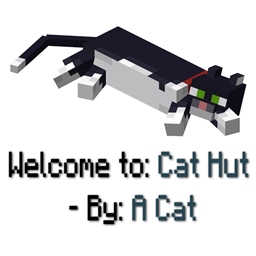
Forge进入任何结构时自动显示其名称和模组来源,便于识别并给予模组作者应有的署名。
可与其他模组的结构无缝集成,确保兼容性。
如果你希望消息也显示在原版 Minecraft 结构中,请前往配置 .json 文件并删除以 "minecraft:" 开头的行
会不会很烦人?
不会!如果你的基地就在某个结构内部,也不用担心!默认情况下,结构消息对每个结构只显示一次。
你也可以更改结构名称!
"customStructureName": { "minecraft:swamphut": "acat:cathut"
Discord:
常见问题
问:会不会很烦人?
答:我已尽最大努力让它不烦人,但如果它对你来说很烦:请查看配置和按键绑定并使用它们
或者,有一个非常好的配置项(默认开启/为 True),它会让每个结构的消息只显示一次。首次访问该结构后,你将永远不会再看到它。
但如果我想禁用该设置呢?别担心,因为如果它被禁用,当你看到某个结构(结构 A)的消息后,必须离开该结构,进入另一个结构(结构 B),再重新进入原来的结构(结构 A),才能再次看到名称。所以现在如果有人住在某个结构里,就不会被打扰
问:我可以提建议吗?
答:当然可以,请提。
问:我可以把它加入我的整合包吗?
答:尽管加!
如何使用配置:
前往你的 config 文件夹,找到 structurecredits-config.json,你会看到如下内容:
{ "active": true, "showOnlyOneTime": true, "chatMessage": false, "customStructureName": { "minecraft:swamphut": "acat:cathut" }, "dontShowAll": [ "minecraft:", "dimdungeons:" ], "dontShow": [ "minecraft:plainsvillage", "minecraft:desertvillage" ] }
此外,还有一个游戏内按键绑定,你可以将其分配用于停用所有消息
致模组开发者:
Structure Credits 会读取 NBT "modname:structurename" 并生成显示消息。如果你想为团队中特定的建造者署名,或只是想使用更好的名称,可以使用该 API。这适用于 1.20.1、1.21.1、Fabric 和 Neo(Forge) 版本。
GitHub:StructureCredits API
要添加依赖,请使用 CurseMaven:curse.maven:structurecredits-978217:6325061(例如用于 NeoForge 1.21.1)。
该模组与 Dimensional Dungeons 兼容——感谢 Catastrophe——只有在 'config dontShowAll' 中配置了以下设置时,消息才会在自定义房间中显示:"dimdungeons:"(默认配置,且推荐)。创建新的自定义房间时请记住,包名对应 "By: X",结构名对应 "Welcome to: X"。
如何安装 Structure Credits
With Millida Launcher
Install Millida Launcher
The launcher is free: download it at millida.net/launcher and sign in with any nickname.
Click “Install” on this page
The launcher opens and installs the mod for Minecraft 1.20.1–26.1.2 on Fabric, Forge or NeoForge automatically.
Launch the game
A profile with it appears in the launcher: click “Play”.
Manually
Install Fabric, Forge or NeoForge
The loader must match the game version of the mod file, for example Minecraft 26.1.2. After installing it, a separate profile appears in your launcher.
Download the file for your version
In the version list above, pick the file structurecredits-fabric-26.1.2-3.0.jar (78 KB) for your game version and loader.
Put it in the mods folder
The folder is inside .minecraft (Windows: %appdata%\.minecraft\mods). If it does not exist, create it.
Launch the loader profile
Open “Mods” in the main menu: Structure Credits should be in the list.
版本
含依赖项
| Minecraft | 加载器 | 文件 | 日期 | 操作 |
|---|---|---|---|---|
| 26.1.2 | Fabric | structurecredits-fabric-26.1.2-3.0.jar77.8 KB | ||
| 26.1.2 | NeoForge | structurecredits-neoforge-26.1.2-3.0.jar78.3 KB | ||
| 1.20.1 | Forge | structurecredits-1.20.1-4.0-forge.jar85.3 KB |
常见问题
Which Minecraft versions does Structure Credits work on?
There are files for 26.1.2, 1.20.1. The newest is 26.1.2.
Is Structure Credits for Forge or Fabric?
There are files for Fabric: 26.1.2, for Forge: 1.20.1 and for NeoForge: 26.1.2.
Does Structure Credits need other mods?
The author lists no required dependencies: the Fabric, Forge or NeoForge loader is enough.
Where can I download Structure Credits safely?
On this page: the file structurecredits-fabric-26.1.2-3.0.jar (78 KB) is stored on Millida’s server, with no link shorteners. SHA-1 checksum: a9242a03804109c71f68dd73bb15fe3e772043c4.
评价
成为第一个评价 Structure Credits 的人


