

 Fabric
 NeoForge
 Forge
Forge Quilt
QuiltWiki | 常见问题 | 鸣谢
一个为 Minecraft 提供的近距离语音聊天模组,拥有多种附加组件,提供额外的特性和功能。
⚠️ 注意:此模组需要在服务器上进行特殊设置才能正常工作。请阅读 Wiki 了解更多信息。

如有疑问,请加入 Discord!
下载
- Fabric
- NeoForge
- Forge
- Bukkit/Spigot/Paper
- Quilt
- Velocity
- BungeeCord/Waterfall
特性
- 按键通话
- 语音激活
- 近距离语音聊天
- 密码保护群组
- 自动语音活动检测
- 自动麦克风增益调整
- Opus 编解码器
- RNNoise 循环神经网络噪声抑制
- OpenAL 音频
- Fabric、NeoForge、Forge、Quilt、Bukkit、Spigot 和 Paper 之间的交叉兼容
- 支持 Velocity、BungeeCord 和 Waterfall
- 兼容 ModMenu(使用 ClothConfig 以获得更好的配置界面)
- 可配置的按键通话键
- 麦克风和扬声器测试播放
- 可配置的语音距离
- whispering
- 单独玩家音量调整
- 麦克风放大
- 3D 音效
- AES 加密
- 使用独立音轨进行音频录制
- 强大的 API
- 众多附加组件
想要搭建一个使用 Simple Voice Chat 的服务器?
在这里租用你自己的语音聊天服务器
在这里查看如何设置的更多信息
图标
图标 描述

你正在说话

你正在低语

玩家正在说话

玩家正在低语

麦克风已静音

语音聊天已禁用

语音聊天未连接 语音聊天未安装
图形界面
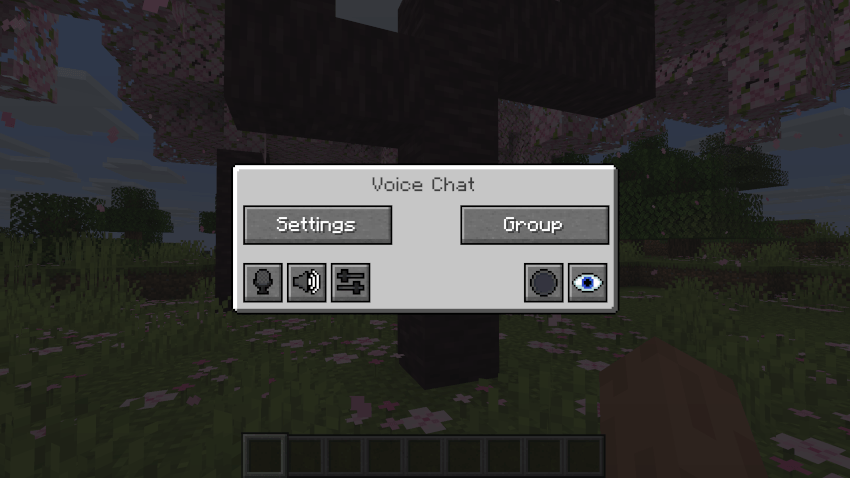
你可以按 V 键打开语音聊天界面。这允许你打开设置、群聊、静音自己、禁用语音聊天、开始/停止录音以及隐藏所有图标。
群聊
群聊允许你与不在你附近的玩家交谈。要打开群聊界面,请按语音聊天界面中的群组按钮,或直接按群组键。
要创建新群组,只需在文本字段中输入名称,然后按底部的按钮。
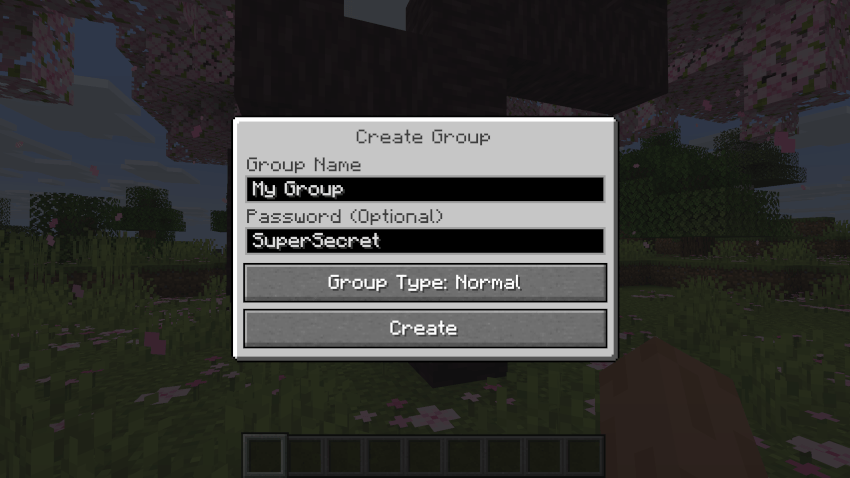
创建或加入群组将带你进入群聊界面。你还会在屏幕左上角看到群组成员的头像。正在说话的玩家将被描边。你可以按左起第三个按钮来禁用这些图标。
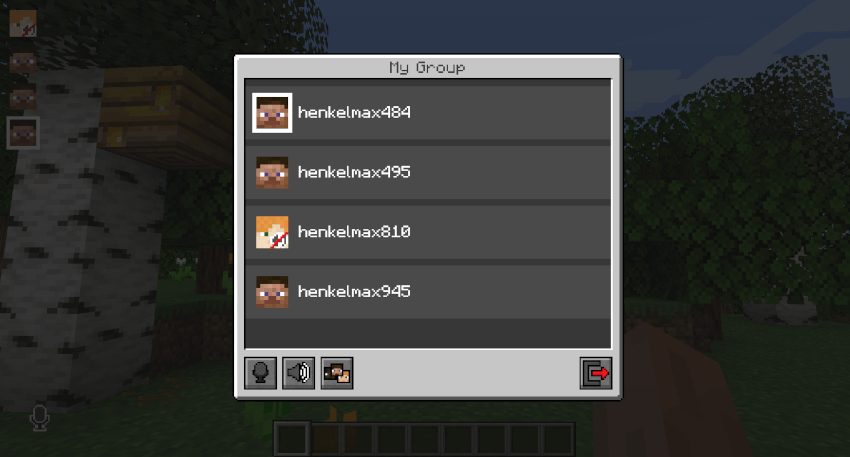
不在群组中的玩家会在你的头像旁边看到一个群组图标,表示你处于群组中。
你可以通过输入命令 /voicechat invite <playername> 或从社交互动界面邀请玩家加入你的群聊。
设置
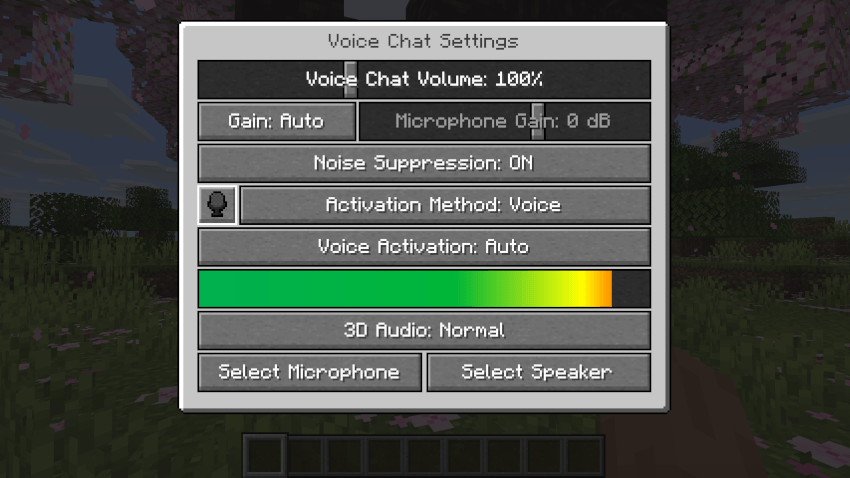
你可以按 V 键并按下设置按钮来访问语音聊天设置。
此菜单提供了设置语音聊天音频设置的功能。
点击麦克风按钮,你可以测试麦克风激活。
重要说明
你需要在服务器上打开一个端口。默认情况下,这是 UDP 端口 24454。如果不打开此端口,语音聊天将无法工作。此端口可以在服务器配置中更改。更多信息请点击此处。
语音聊天是加密的,但我们不保证其安全性。使用风险自负!
如何安装 Simple Voice Chat
With Millida Launcher
Install Millida Launcher
The launcher is free: download it at millida.net/launcher and sign in with any nickname.
Click “Install” on this page
The launcher opens and installs the mod for Minecraft 1.21.1–26.3 on Fabric, Forge, NeoForge or Quilt automatically.
Launch the game
A profile with it appears in the launcher: click “Play”.
Manually
Install Fabric, Forge, NeoForge or Quilt
The loader must match the game version of the mod file, for example Minecraft 26.3. After installing it, a separate profile appears in your launcher.
Download the file for your version
In the version list above, pick the file voicechat-fabric-2.6.24+26.3.jar (5.4 MB) for your game version and loader.
Put it in the mods folder
The folder is inside .minecraft (Windows: %appdata%\.minecraft\mods). If it does not exist, create it.
Launch the loader profile
Open “Mods” in the main menu: Simple Voice Chat should be in the list.
版本
含依赖项
| Minecraft | 加载器 | 文件 | 日期 | 操作 |
|---|---|---|---|---|
| — | Fabric | [FABRIC][26.4-snapshot-2] Simple Voice Chat 2.6.24+26.4-snapshot-25.4 MB 3,261 | ||
| 26.3 | Fabric | [FABRIC][26.3] Simple Voice Chat 2.6.24+26.35.4 MB 283 | ||
| 26.3 | NeoForge | [NEOFORGE][26.3] Simple Voice Chat 2.6.24+26.34.7 MB 82 | ||
| 26.3 | Forge | [FORGE][26.3] Simple Voice Chat 2.6.24+26.34.7 MB 327 | ||
| 26.3 | Quilt | [QUILT][26.3] Simple Voice Chat 2.6.24+26.35.4 MB 1 | ||
| 26.2 | Fabric | [FABRIC][26.2] Simple Voice Chat 2.6.22+26.25.3 MB 184 | ||
| 26.2 | NeoForge | [NEOFORGE][26.2] Simple Voice Chat 2.6.22+26.24.7 MB 33 | ||
| 26.2 | Forge | [FORGE][26.2] Simple Voice Chat 2.6.22+26.24.7 MB 172 |
常见问题
Which Minecraft versions does Simple Voice Chat work on?
There are files for 26.3, 26.2, 26.1, 1.21.1. The newest is 26.3.
Is Simple Voice Chat for Forge or Fabric?
There are files for Fabric: 26.2–26.3, for Forge: 26.1–26.3, for NeoForge: 26.1–26.3 and for Quilt: 1.21.1–26.3.
Does Simple Voice Chat need other mods?
The author lists no required dependencies: the Fabric, Forge, NeoForge or Quilt loader is enough.
Where can I download Simple Voice Chat safely?
On this page: the file voicechat-fabric-2.6.24+26.3.jar (5.4 MB) is stored on Millida’s server, with no link shorteners. SHA-1 checksum: 2ac4bb844e3b23b6e0a729edcf521ba1198ec5d2.
评价
成为第一个评价 Simple Voice Chat 的人


