

 NeoForge
 Fabric
 Forge
Forge关于 Scannable 模组
Scannable 是智能探索者(也就是你)工具带上的一个小小补充。同时也是视觉享受。
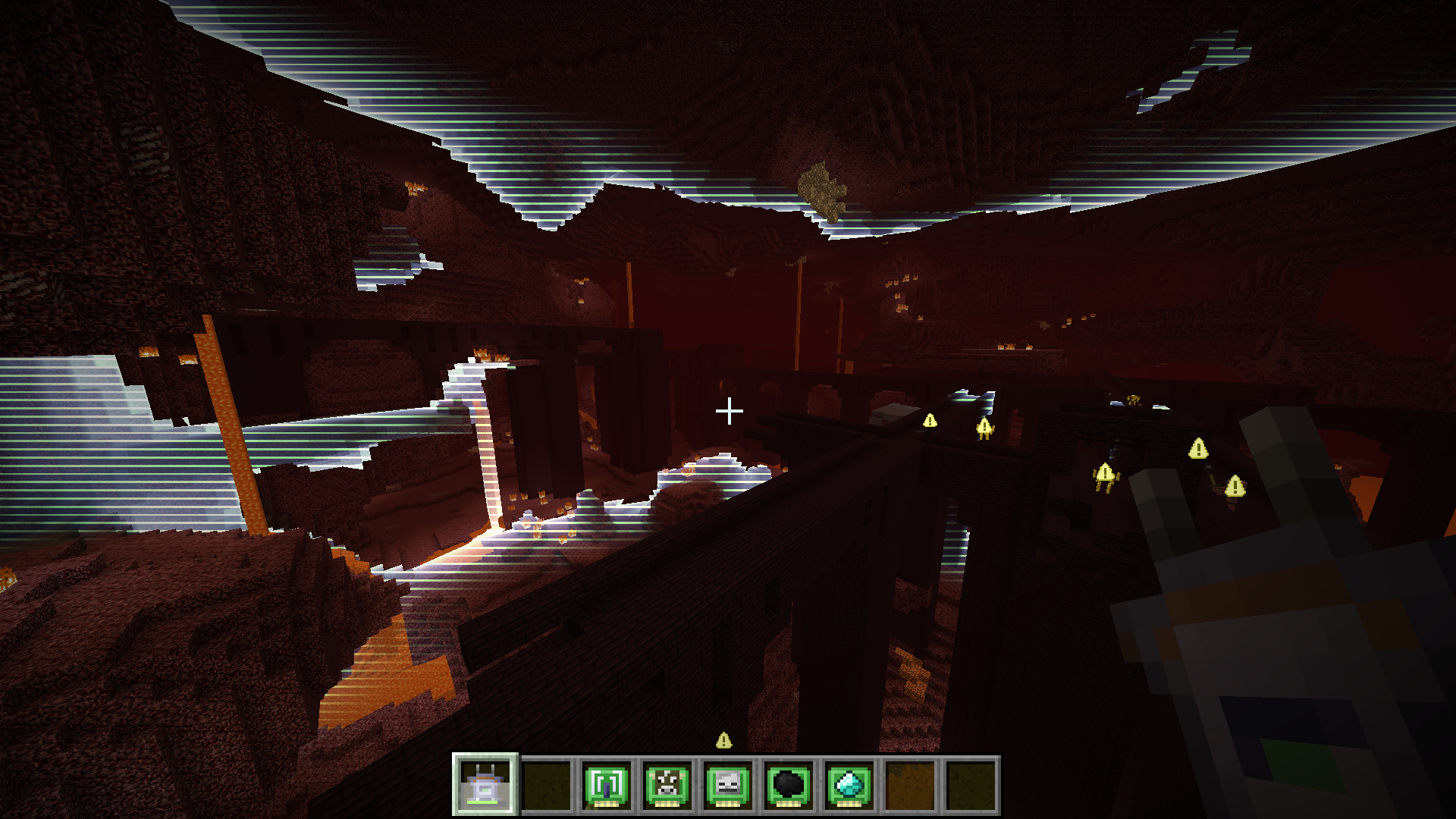
它提供了一个扫描仪物品,可以勘察附近区域以寻找兴趣点。扫描结果会以简洁易读的方式短暂可视化,要么以世界内高亮显示,要么以适当定位的叠加层显示。我提到视觉享受了吗?显示哪些结果取决于扫描仪中的模块。最多可以同时安装三个模块。默认模块包括:
- 动物检测(例如牛、猪)
- 怪物检测(例如僵尸、苦力怕)
- 实体检测(可配置为特定实体)
- 常见矿石检测(例如煤炭、铁)
- 稀有矿石检测(例如金、钻石)
- 流体检测(例如水、岩浆)
- 方块检测(可配置为特定方块)
- 范围增强器
除非在配置中禁用,否则扫描仪将作为可充电物品,使用 Forge 能量 API。每次扫描消耗的能量取决于扫描仪中安装的模块。扫描仪可以在任何与 Forge 能量 API 兼容的充电器模组方块中充电。
最后但同样重要的是——你猜对了——视觉享受。这里有一个快速视频演示该模组。
关于性能的几句话:它很棒。服务器不进行任何实际的扫描计算,因此使用扫描仪不会导致服务器卡顿(不过客户端始终会遵守服务器设置)。此外,扫描分布在多个 tick 中(因此使用扫描仪时有充能时间),所以即使在客户端使用扫描仪也不应有明显影响。至于渲染,扫描波效果使用着色器和单个四边形渲染。这意味着它非常快,应该对 FPS 没有明显影响。也在一台非常旧的笔记本电脑上测试过,FPS 没有下降。使用 OptiFine 时效果会有所不同,不保证能正常工作。
其他模组可以提供额外的模块来生成不同类型的扫描结果。如果你有模块的想法,要么在这个项目的问题跟踪器上开一个 issue,要么如果它涉及另一个模组,试着说服该模组的作者为 Scannable 添加支持。他们会喜欢的。真的。
如何安装 Scannable
With Millida Launcher
Install Millida Launcher
The launcher is free: download it at millida.net/launcher and sign in with any nickname.
Click “Install” on this page
The launcher opens and installs the mod for Minecraft 1.12.2–1.21.11 on Fabric, Forge or NeoForge automatically.
Launch the game
A profile with it appears in the launcher: click “Play”.
Manually
Install Fabric, Forge or NeoForge
The loader must match the game version of the mod file, for example Minecraft 1.21.11. After installing it, a separate profile appears in your launcher.
Download the file for your version
In the version list above, pick the file scannable-MC1.21.11-neoforge-1.8.0+042da65.jar (383 KB) for your game version and loader.
Put it in the mods folder
The folder is inside .minecraft (Windows: %appdata%\.minecraft\mods). If it does not exist, create it.
Launch the loader profile
Open “Mods” in the main menu: Scannable should be in the list.
Minecraft 1.21.11 runs on Java 21: with a different Java version the game may close right after launch.
版本
含依赖项
| Minecraft | 加载器 | 文件 | 日期 | 操作 |
|---|---|---|---|---|
| 1.21.11 | NeoForge | Scannable-MC1.21.11-1.8.0383 KB 1 | ||
| 1.21.11 | Fabric | Scannable-MC1.21.11-1.8.0390 KB 9 | ||
| 1.20.4 | Forge | Scannable-MC1.20.4-1.7.13384 KB 2 | ||
| 1.12.2 | — | Scannable-MC1.12.2-1.6.3.26.jar247 KB |
常见问题
Which Minecraft versions does Scannable work on?
There are files for 1.21.11, 1.20.4, 1.12.2. The newest is 1.21.11.
Is Scannable for Forge or Fabric?
There are files for Fabric: 1.21.11, for Forge: 1.20.4 and for NeoForge: 1.21.11.
Does Scannable need other mods?
The author lists no required dependencies: the Fabric, Forge or NeoForge loader is enough.
Which Java does Scannable need?
Minecraft 1.21.11 runs on Java 21. If the game closes right after launch, the usual cause is the wrong Java version in the profile settings.
Where can I download Scannable safely?
On this page: the file scannable-MC1.21.11-neoforge-1.8.0+042da65.jar (383 KB) is stored on Millida’s server, with no link shorteners. SHA-1 checksum: 8e3f280f6c0b881a25d9768b207dc12697cd1992.
评价
成为第一个评价 Scannable 的人


