

 Fabric
 NeoForge
Respackopts
PSA: Depending on the version you are downloading, a separate installation of cloth config, or LibJF may be required
Respackopts provides resource and data packs with config menus By default, it provides a custom system for conditional resources, resource expansion and integrates with frex, canvas and fabulous shaders
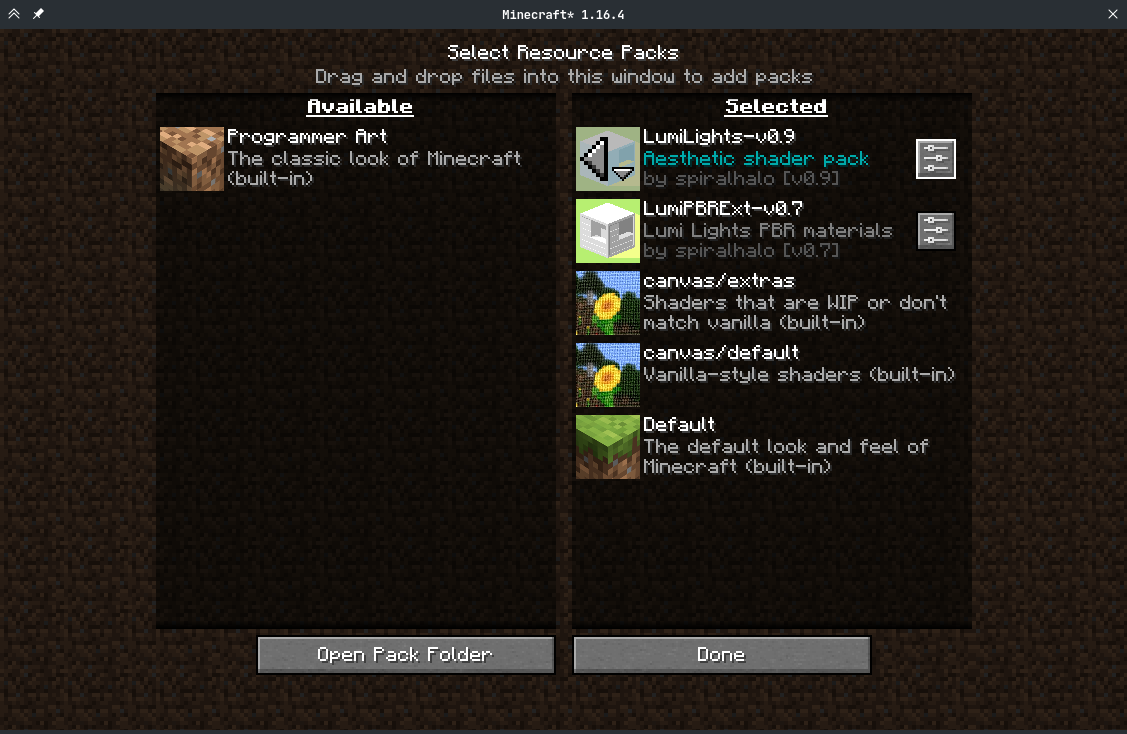
Using Respackopts
Users
After installing respackopts, a menu button will appear besides all supported resource packs. No further configuration is needed.
Pack authors
Please head to the wiki for details on how to use respackopts in a pack.
如何安装 Respackopts
With Millida Launcher
Install Millida Launcher
The launcher is free: download it at millida.net/launcher and sign in with any nickname.
Click “Install” on this page
The launcher opens and installs the mod for Minecraft 1.19.2–26.3 on Fabric or NeoForge automatically.
Launch the game
A profile with it appears in the launcher: click “Play”.
Manually
Install Fabric or NeoForge
The loader must match the game version of the mod file, for example Minecraft 26.3. After installing it, a separate profile appears in your launcher.
Download the file for your version
In the version list above, pick the file respackopts-26.3.0.jar (922 KB) for your game version and loader.
Put it in the mods folder
The folder is inside .minecraft (Windows: %appdata%\.minecraft\mods). If it does not exist, create it.
Launch the loader profile
Open “Mods” in the main menu: Respackopts should be in the list.
版本
含依赖项
| Minecraft | 加载器 | 文件 | 日期 | 操作 |
|---|---|---|---|---|
| 26.3 | Fabric, NeoForge | 26.3.0922 KB 9 | ||
| 1.21.11 | NeoForge | [1.21.11] 4.14.3+forge589 KB | ||
| 1.21.5 | NeoForge | [1.21.5] 4.12.5+forge542 KB | ||
| 1.20.1 | Fabric | [1.20.1] 4.4.0325 KB 1 | ||
| 1.19.2 | Fabric | [1.19.2] 4.0.1253 KB |
评价
成为第一个评价 Respackopts 的人


