
适用于 Minecraft 1.21.1, 1.19.2 的 Raw's Visual keybinder 模组
一个用于按键绑定的可视化解决方案。
 NeoForge
 Forge
Forge关于 Raw's Visual keybinder 模组
这个模组是为解决拥有大量按键绑定的大型整合包而生的解决方案。
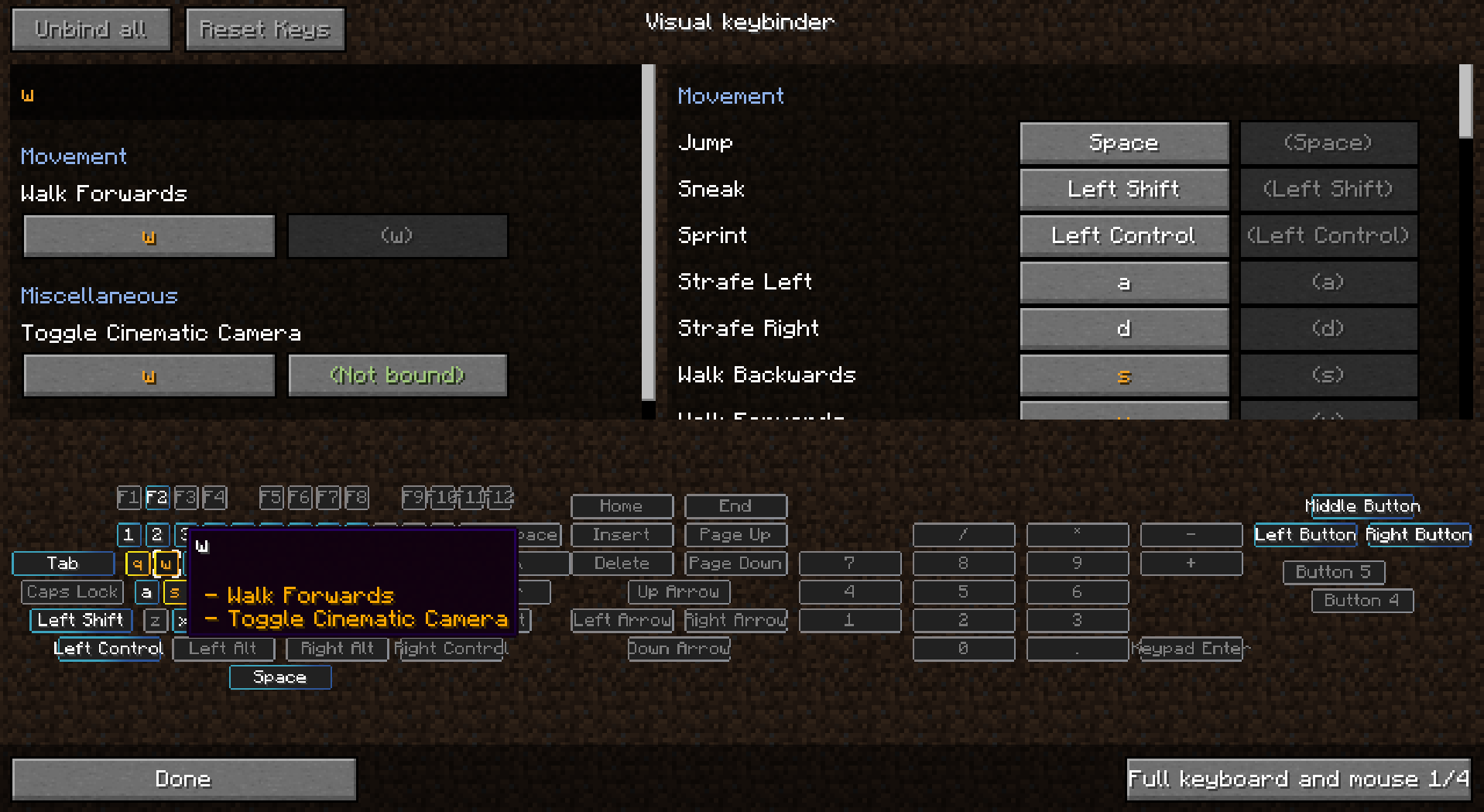
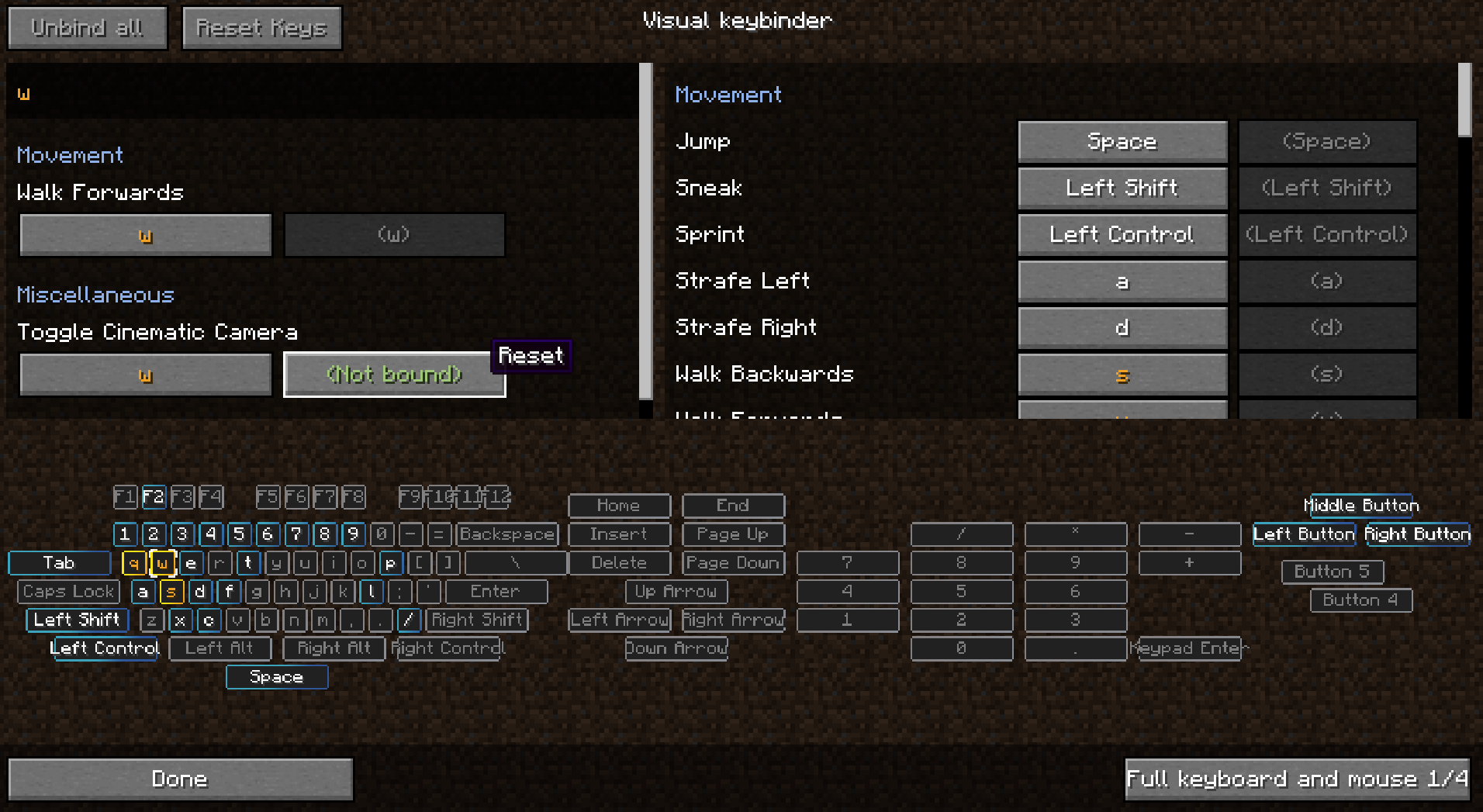
它增加了一种管理按键绑定的额外方式。它提供了一个额外的界面,可以通过选项菜单中默认编辑按键绑定按钮旁边的按钮访问。
该界面的布局类似键盘,所有冲突和已使用的按键都会高亮显示。这样玩家就能很好地总览哪些按键仍然可用,哪些需要注意。
制作这个模组的一个附带效果是,你还可以在鼠标按键上使用修饰键,比如 Shift+左键点击。这在某些情况下可能有用,也可能没用。
有多种布局可供选择,布局可以在配置中更改或添加。
客户端模组。不需要安装在服务器上。
查看图片以了解一些截图。
预设
预设可以加载和保存。它们存储在 .minecraft 文件夹下的 keybinding presets 中。
通过为你最喜欢的预设设置按键绑定,可以快速在预设之间切换。
如何让预设首次启动时加载
使用 presettoloadonfirststartup.txt 来指定启动时应加载的按键绑定。这些绑定随后会在启动时加载。当玩家首次启动游戏时,会创建 initialized.dat 文件。当此文件存在时,presettoloadonfirststartup.txt 中的预设将不会加载。
将预设设为只读
用记事本打开预设时,你可以在第一行添加文本 readonly,然后保存。
随整合包发布按键绑定
- 确保你导出了文件夹 keybinding preset
- 不要导出 keybinding presets/initialized.dat
- 在游戏中保存一个预设
- 用记事本编辑创建的文件
- 在文件开头插入一行,内容为:readonly
- 不多不少
- 然后在文件 presettoloadonfirststartup.txt 的第二行填写你的预设名称,即文件名去掉末尾的 preset.txt 后的部分。
你可以在整合包中附带多个预设,但只能在启动时加载一个预设。文件名中可以使用大写字母。
允许在整合包中使用,无需询问
感谢 Radimous 移植到 1.18.2!
感谢 Bubin7766 移植到 1.21.1 Neoforge!
如何安装 Raw's Visual keybinder
With Millida Launcher
Install Millida Launcher
The launcher is free: download it at millida.net/launcher and sign in with any nickname.
Click “Install” on this page
The launcher opens and installs the mod for Minecraft 1.19.2–1.21.1 on Forge or NeoForge automatically.
Launch the game
A profile with it appears in the launcher: click “Play”.
Manually
Install Forge or NeoForge
The loader must match the game version of the mod file, for example Minecraft 1.21.1. After installing it, a separate profile appears in your launcher.
Download the file for your version
In the version list above, pick the file visual_keybinder-1.21.1-0.1.13-neoforge.jar (345 KB) for your game version and loader.
Put it in the mods folder
The folder is inside .minecraft (Windows: %appdata%\.minecraft\mods). If it does not exist, create it.
Launch the loader profile
Open “Mods” in the main menu: Raw's Visual keybinder should be in the list.
Minecraft 1.21.1 runs on Java 21: with a different Java version the game may close right after launch.
版本
含依赖项
| Minecraft | 加载器 | 文件 | 日期 | 操作 |
|---|---|---|---|---|
| 1.19.2 | Forge | visual_keybinder-1.19.2 - 0.1.12.jar252 KB | ||
| 1.21.1 | NeoForge | visual_keybinder-1.21.1-0.1.13-neoforge.jar345 KB 8 |
常见问题
Which Minecraft versions does Raw's Visual keybinder work on?
There are files for 1.21.1, 1.19.2. The newest is 1.21.1.
Is Raw's Visual keybinder for Forge or Fabric?
There are files for Forge: 1.19.2 and for NeoForge: 1.21.1. There are no files for Fabric: a mod for another loader will not start.
Does Raw's Visual keybinder need other mods?
The author lists no required dependencies: the Forge or NeoForge loader is enough.
Which Java does Raw's Visual keybinder need?
Minecraft 1.21.1 runs on Java 21. If the game closes right after launch, the usual cause is the wrong Java version in the profile settings.
Where can I download Raw's Visual keybinder safely?
On this page: the file visual_keybinder-1.21.1-0.1.13-neoforge.jar (345 KB) is stored on Millida’s server, with no link shorteners. SHA-1 checksum: 58204c60c8f8b983dcb184b6104193ebf488b79f.
评价
成为第一个评价 Raw's Visual keybinder 的人


