

 Fabric
 NeoForge
 Forge
Forge关于 Particle Rain 模组
Particle Rain 用更漂亮的粒子效果取代了默认天气,并添加了一些额外的雾、风和沙尘暴天气效果。你可以通过游戏内配置菜单禁用、添加或自定义天气效果。
Fabric 版本需要 Fabric API。
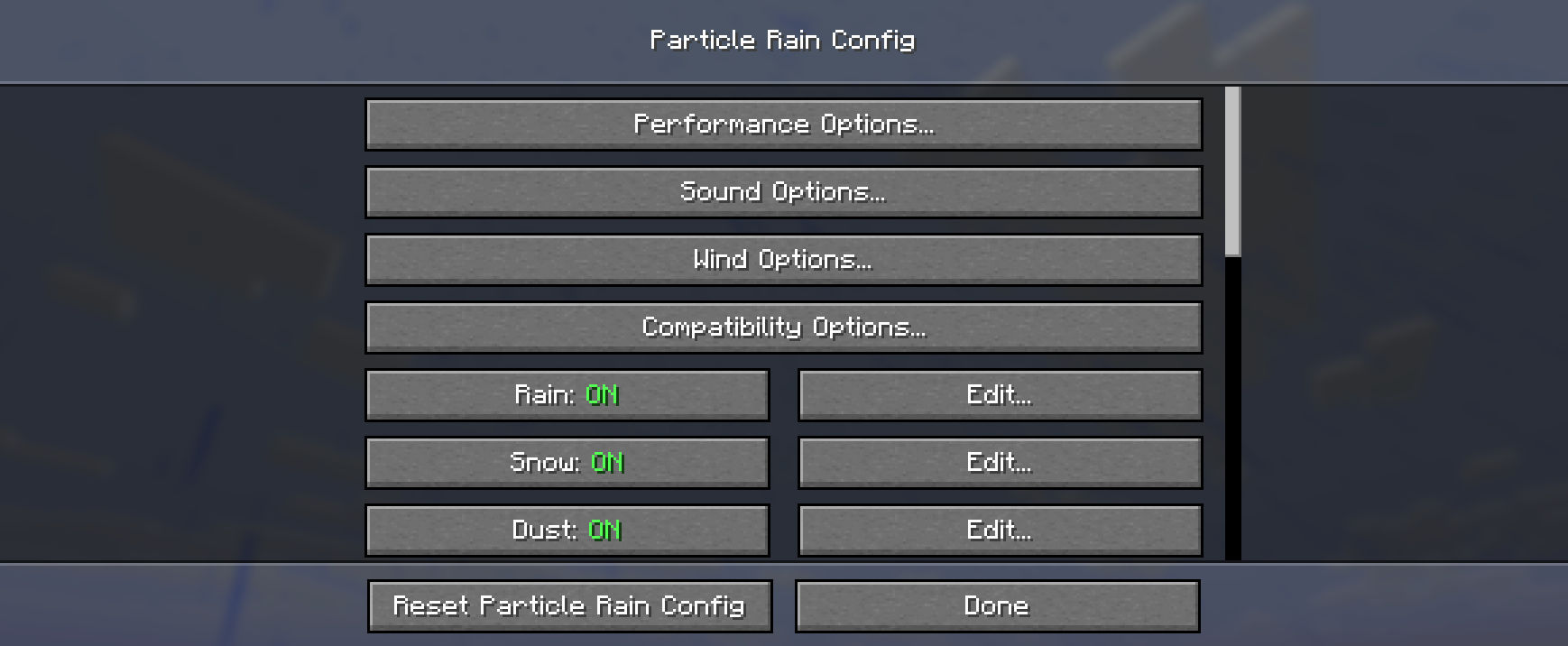
如需配置,请使用命令 /particlerain 或你的加载器的模组列表菜单
关于常见的模组兼容性问题,请参见此处。
视频:(已过时,请改为查看画廊)https://www.youtube-nocookie.com/embed/oan4xH5RvH0

雨粒子
倾斜落下,被风吹动。

在暴风雨天气中,风更强,雨看起来更密集。

雪粒子
下落时缓慢旋转。受风的影响不大,保留了原版雪的宁静质感,同时视觉上更不杂乱。和雨一样,在暴风雨中有一种厚重的变体。


沙尘暴
尘土和灌木吹过沙漠和其他干燥生物群系。

尘土与下方方块的颜色相匹配,从而无需额外配置即可支持一系列生物群系,包括其他模组添加的生物群系。

雾
出现在标记为 c:isspooky / c:iswet 的生物群系中。这是可配置的。

有时雨后会出现雾。这同样是可配置的。

水波纹
当雨落到水面上时出现。将匹配你的资源包的分辨率。

水痕
当雨打到由坚硬材料制成的墙上时出现。(可配置为出现在任何方块上)

生物群系色调
带有强烈色调的模组生物群系也会影响雨和其他水粒子。

配置与自定义效果
你可以使用内置的配置菜单为特定方块和生物群系创建各种大气粒子效果,或编辑现有的效果。
通过命令 /particlerain 或模组菜单访问该菜单。
水坑
水坑功能已移至其自己的模组:https://modrinth.com/mod/puddles-floods/

模组兼容性说明
名称 问题 解决方案
Serene Seasons 及类似模组 沙漠中下雨 这通常是添加季节的模组的功能,而不是 bug 或不兼容。
Particull 天气效果缺失 ¯\(ツ)/¯ 移除 Particull
Particle Core 效果闪烁或消失 在 particle core 的配置中,将剔除模式设置为边界框,或将粒子添加到黑名单。
Particle Tweaks 在 Minecraft 1.20 中崩溃 使用 particle tweaks 1.1.1 而不是最新版本。
Complementary 与 Astrocraft 黑太阳 在 Complementary 的设置中禁用“雨中太阳/月亮”
Eureka helms Eureka helms 有时会破坏随机数生成,导致在某些情况下效果放置不正确。¯\(ツ)/¯
其他光影包问题
光影包支持因 Minecraft 版本而异。一些光影包并不完全支持粒子。
如果你遇到其他问题,请检查或提交问题!
资源包支持
Particle Rain 使用游戏的天气纹理生成其雪和雨纹理,因此它与资源包保持兼容,而无需它们包含额外的粒子纹理。
包含自定义天气效果
资源包可以通过在 assets/particlerain/particles.json 提供文件来包含自定义天气效果,或覆盖现有效果。请参见此处该文件的默认版本。
粒子效果可以使用你的包(或其他模组和包)中 particles 文件夹提供的任何纹理。
你可以使用游戏内菜单创建或编辑粒子,完成后将 config/particlerain 中的 particles.json 复制粘贴到你的资源包中!
如何安装 Particle Rain
With Millida Launcher
Install Millida Launcher
The launcher is free: download it at millida.net/launcher and sign in with any nickname.
Click “Install” on this page
The launcher opens and installs the mod for Minecraft 1.20–26.3 on Fabric, Forge or NeoForge automatically, together with its dependencies: Cloth Config API, Fabric API.
Launch the game
A profile with it appears in the launcher: click “Play”.
Manually
Install Fabric, Forge or NeoForge
The loader must match the game version of the mod file, for example Minecraft 26.3. After installing it, a separate profile appears in your launcher.
Download the file for your version
In the version list above, pick the file particlerain-4.0.2+26.3-fabric.jar (612 KB) for your game version and loader.
Put it in the mods folder
The folder is inside .minecraft (Windows: %appdata%\.minecraft\mods). If it does not exist, create it. Required dependencies go there too: Cloth Config API, Fabric API.
Launch the loader profile
Open “Mods” in the main menu: Particle Rain should be in the list.
Particle Rain works on the player’s side only: there is no need to install it on a server.
版本
含依赖项
| Minecraft | 加载器 | 文件 | 日期 | 操作 |
|---|---|---|---|---|
| 1.20.1 | Forge | 1.20.11.2 MB 24 | ||
| 1.21.1 | NeoForge | 1.21.1609 KB 31 | ||
| 1.20.1 | Fabric | 1.20.1612 KB 15 | ||
| 1.21.10 | Fabric | 1.21.10611 KB 9 | ||
| 26.3 | Fabric | 26.3612 KB 159 | ||
| 26.2 | Fabric | 26.2612 KB 49 | ||
| 26.1.2 | Fabric | 26.1.2612 KB 16 | ||
| 1.21.11 | Fabric | 1.21.11611 KB 143 |
运行所需
- Dependency可选
- Cloth Config API必填
- Fabric API必填
- Mod Menu可选
需要它的内容
常见问题
Which Minecraft versions does Particle Rain work on?
There are files for 1.20–26.3, 12 versions in total. The newest is 26.3.
Is Particle Rain for Forge or Fabric?
There are files for Fabric: 1.20–26.3, for Forge: 1.20–1.20.1 and for NeoForge: 1.21.1.
What does Particle Rain need to work?
Required: Cloth Config API, Fabric API. Without them the mod will not start: dependencies go into the same mods folder. Optional: Dependency, Mod Menu.
Do I need to install Particle Rain on a server?
No. Particle Rain works on the player’s side only: there is no need to install it on a server.
Where can I download Particle Rain safely?
On this page: the file particlerain-4.0.2+26.3-fabric.jar (612 KB) is stored on Millida’s server, with no link shorteners. SHA-1 checksum: e6737febb57e31837d74bede3ce788783b381e23.
评价
成为第一个评价 Particle Rain 的人


