

适用于 Minecraft 1.20.1, 1.21.1 的 Particle Core 模组
粒子优化:剔除、渲染优化、可配置的特定粒子类型生成削减,以及禁用药水粒子。兼容 Sodium,比单独使用 Sodium 性能更好。
 Fabric
 NeoForge
 Quilt
Quilt关于 Particle Core 模组

Particle Core 专注于一件事:优化粒子。原版 Minecraft 在粒子方面存在多种低效问题。Particle Core 旨在改善这一点。
它有什么作用?
剔除
这是整体上最大的性能提升,Particle Core 不会渲染你看不到的粒子。这很合理!在标准 FOV 下,只有约十二分之一的光照盒可见,为什么要渲染你看不到的十二分之十一的粒子呢?
渲染优化
被渲染的粒子经过了优化。顶点变换和光照贴图轮询都得到了优化。顶点优化交由 Sodium 处理。
按类型减少或禁用
提供了三种方法来完全禁用或减少特定粒子类型的生成。任何可以通过 /particle 命令添加的粒子都适用。
- 一个 particletype 标签。将粒子类型添加到 particlecore:excludedparticles 即可完全禁用这些粒子类型。服务器所有者请注意:这将对每个加入服务器的客户端禁用这些粒子,请谨慎使用!
- 基于配置的按类型减少映射。在 particle core 配置中(见下文),用户可以添加粒子类型标识符到概率 double 值的映射。
- 完全关闭药水粒子。如果你觉得屏幕上的药水粒子很烦人,请前往配置将其关闭!
与 invis-particle 资源包不同,这实际上会完全阻止粒子生成,从而提升性能。
调整原版设置
提供了两个配置选项,可以微调 ALL、DECREASED 和 MINIMAL 这些标准原版选项。一个实际上是在 ALL 和 DECREASED 之间调节的旋钮,第二个是在 DECREASED 和 MINIMAL 之间调节的旋钮。如果你只是想稍微调整粒子生成,例如你的电脑在 DECREASED 下运行良好,但你个人不喜欢屏幕上仍然有那么多粒子,你可以将 DECREASED 调低,而不必一直调到 MINIMAL。
配置
Particle Core 提供了一个涵盖所有新增功能的配置。在标准的 .mincraft 配置文件夹中找到该配置。配置名称为 particlecoreconfigv[x].json,其中 [x] 是当前版本号。
该配置在文件顶部有一个全面的“comment”部分。请阅读它以获取配置使用指导。
turnOffPotionParticles
对某些人来说,药水粒子极其烦人。使用此设置将其关闭。
reduceParticlesAllChance
一个在 ALL 和 DECREASED Minecraft 设置之间微调粒子生成的旋钮。
reduceParticlesDecreasedChance
一个在 DECREASED 和 MINIMAL Minecraft 设置之间微调粒子生成的旋钮。
disableParticles
完全禁用所有客户端粒子生成。
reduceParticlesByType
用于减少特定粒子生成的映射。
- key:粒子类型的标识符,例如 minecraft:smoke。
- value:介于 0.0 和 1.0 之间的 double 值。0.0 将完全禁用该粒子,1.0 是正常生成。介于两者之间的任何值都将是粒子成功生成的概率分数。
disableOptimizations
如果 Particle Core 中的任何功能导致冲突或只是不需要,可以通过将其字符串键添加到此列表来单独禁用每个功能。请参阅注释以获取说明。
之前
没有 Particle Core 时,世界渲染占 CPU 时间的 41%,其中 renderParticles 占大头,为 CPU 时间的 25%。
之后
使用 Particle Core 后,渲染现在仅占 CPU 时间的 16%,粒子渲染基本上可以忽略不计。
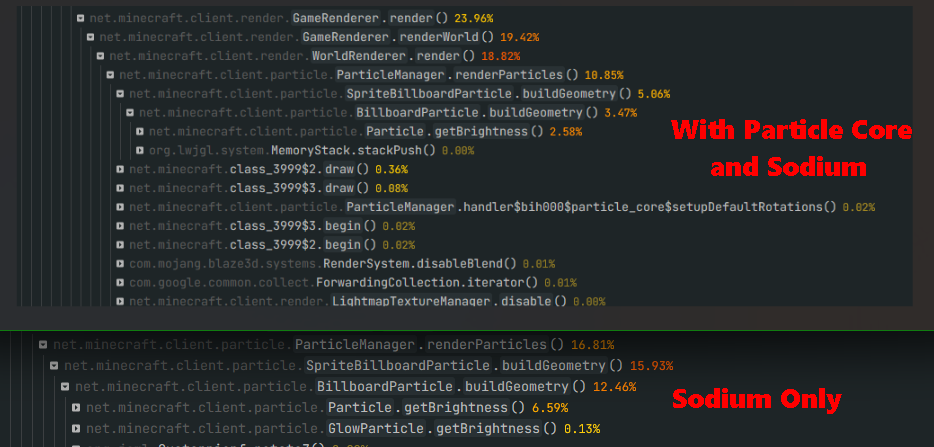
配合 Sodium
在 Sodium 本身的基础上进一步提升性能。截图中上半部分为使用 Particle Core,下半部分为不使用。大约提升了 5% 的 CPU 时间,即相对提升了 50%。
如何安装 Particle Core
With Millida Launcher
Install Millida Launcher
The launcher is free: download it at millida.net/launcher and sign in with any nickname.
Click “Install” on this page
The launcher opens and installs the mod for Minecraft 1.20.1–26.3 on Fabric, NeoForge or Quilt automatically, together with its dependencies: KotlinLangForge, Fabric Language Kotlin, Fabric API, Fzzy Config, Kotlin for Forge.
Launch the game
A profile with it appears in the launcher: click “Play”.
Manually
Install Fabric, NeoForge or Quilt
The loader must match the game version of the mod file, for example Minecraft 26.3. After installing it, a separate profile appears in your launcher.
Download the file for your version
In the version list above, pick the file particle_core-0.3.3+fix1+26.2.jar (138 KB) for your game version and loader.
Put it in the mods folder
The folder is inside .minecraft (Windows: %appdata%\.minecraft\mods). If it does not exist, create it. Required dependencies go there too: KotlinLangForge, Fabric Language Kotlin, Fabric API, Fzzy Config, Kotlin for Forge.
Launch the loader profile
Open “Mods” in the main menu: Particle Core should be in the list.
Particle Core works on the player’s side only: there is no need to install it on a server.
版本
含依赖项
| Minecraft | 加载器 | 文件 | 日期 | 操作 |
|---|---|---|---|---|
| 26.3 | Fabric | 26.3138 KB 77 | ||
| 26.3 | NeoForge | 26.3127 KB 1 | ||
| 26.2 | Fabric, Quilt | 26.2138 KB 14 | — | |
| 26.1 | NeoForge | 26.1127 KB 2 | — | |
| 1.21.11 | Fabric, Quilt | 1.21.11138 KB 116 | — | |
| 1.21 | Fabric, Quilt | 1.21144 KB 11 | — | |
| 1.20.1 | Fabric, Quilt | 1.20.1145 KB 7 | — |
常见问题
Which Minecraft versions does Particle Core work on?
There are files for 1.20.1–26.3, 9 versions in total. The newest is 26.3.
Is Particle Core for Forge or Fabric?
There are files for Fabric: 1.20.1–26.3, for NeoForge: 26.1–26.3 and for Quilt: 1.20.1–26.2. There are no files for Forge: a mod for another loader will not start.
What does Particle Core need to work?
Required: KotlinLangForge, Fabric Language Kotlin, Fabric API, Fzzy Config, Kotlin for Forge. Without them the mod will not start: dependencies go into the same mods folder.
Do I need to install Particle Core on a server?
No. Particle Core works on the player’s side only: there is no need to install it on a server.
Where can I download Particle Core safely?
On this page: the file particle_core-0.3.3+fix1+26.2.jar (138 KB) is stored on Millida’s server, with no link shorteners. SHA-1 checksum: 1e04e1a40ea29c704c5ce008a8e737938a53a7f5.
评价
成为第一个评价 Particle Core 的人


