
 Fabric
 Forge
Forge关于 NBT Tooltip 模组
A little map dev/mod dev utility to help people working with nbt items and tiles.
Item NBT
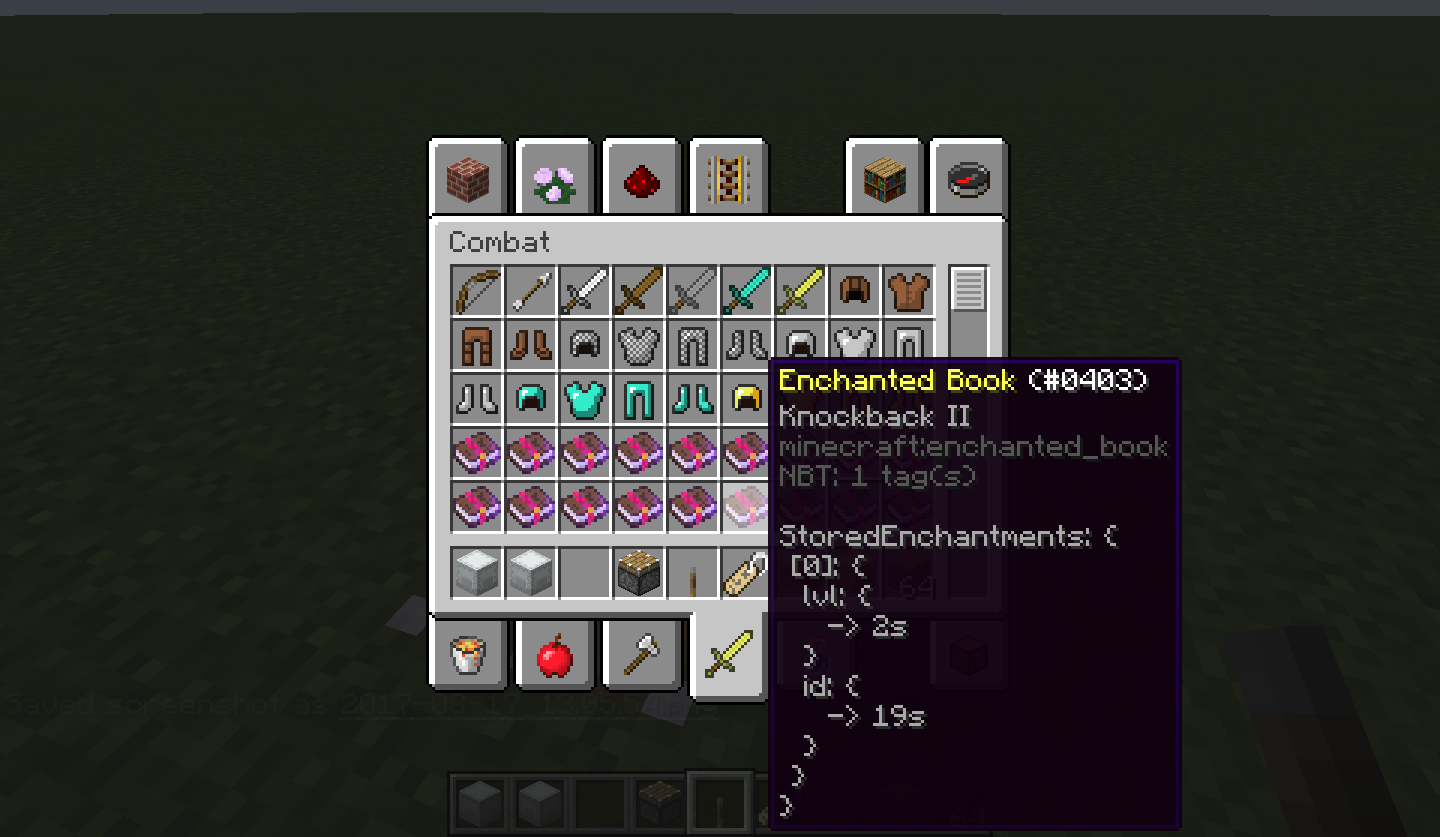
To see an Item NBT tag just activate the advanced tooltips by pressing F3+H, the tag will appear inside the tooltip. Longer tags will be presented in an auto scrolling view, the scroll speed can be controlled with SHIFT, to pause scrolling, and ALT, to speed it up. The default scrolling speed and the maximum number of tag lines shown at once can be configured.
Tile Entity NBT (Not available in newer versions)
To see a Tile Entity NBT right click with an arrow on the block you're interested in. One or two popup windows will appear, depending on your configuration and what mode (SP/MP/LAN) you're playing.
One window will hold the server-side information (Only if you're playing SP) the other one will show client-side information (Both SP and MP). What windows are shown is configurable.
The client tag will often be a subset of the information contained inside the server one, this is because of how minecraft deals with syncing the tags. In general, it's up to the TE's creator to decide what data gets sent to the client (A modder should remove all the data unecessary to the client, to reduce the network load: this prevents you from seeing all the data if playing on a server).
The windows are separate from the Minecraft window, and should appear in the background, without interrupting your game, and they can be closed without effects on the game. Only one set (Server + Client) will be shown at a time, to prevent flooding your screen with popups: opening a new one will just replace the existing one.
Other Info
- This mod is client-side, it does not need to be installed on servers.
- Some servers might consider this mod cheating, check with your server admin if it's fine to install this on your client.
- You are free to use this mod on whatever pack you desire
- Don’t ask for updates. Development is active, just wait, it will eventually be updated
如何安装 NBT Tooltip
With Millida Launcher
Install Millida Launcher
The launcher is free: download it at millida.net/launcher and sign in with any nickname.
Click “Install” on this page
The launcher opens and installs the mod for Minecraft 1.11–1.21.4 on Fabric or Forge automatically.
Launch the game
A profile with it appears in the launcher: click “Play”.
Manually
Install Fabric or Forge
The loader must match the game version of the mod file, for example Minecraft 1.21.4. After installing it, a separate profile appears in your launcher.
Download the file for your version
In the version list above, pick the file nbttooltip-1.2.1.jar (1.0 MB) for your game version and loader.
Put it in the mods folder
The folder is inside .minecraft (Windows: %appdata%\.minecraft\mods). If it does not exist, create it.
Launch the loader profile
Open “Mods” in the main menu: NBT Tooltip should be in the list.
Minecraft 1.21.4 runs on Java 21: with a different Java version the game may close right after launch.
版本
含依赖项
| Minecraft | 加载器 | 文件 | 日期 | 操作 |
|---|---|---|---|---|
| 1.21.4 | Fabric | nbttooltip-1.2.1.jar1 MB 1 | ||
| — | — | nbttooltip-1.14-1.0.2.jar10.4 KB | ||
| 1.12.1 | Forge | nbttooltip-0.6.jar12.3 KB |
常见问题
Which Minecraft versions does NBT Tooltip work on?
There are files for 1.11–1.21.4, 9 versions in total. The newest is 1.21.4.
Is NBT Tooltip for Forge or Fabric?
There are files for Fabric: 1.21.2–1.21.4 and for Forge: 1.11–1.12.2. There are no files for NeoForge: a mod for another loader will not start.
Does NBT Tooltip need other mods?
The author lists no required dependencies: the Fabric or Forge loader is enough.
Which Java does NBT Tooltip need?
Minecraft 1.21.4 runs on Java 21. If the game closes right after launch, the usual cause is the wrong Java version in the profile settings.
Where can I download NBT Tooltip safely?
On this page: the file nbttooltip-1.2.1.jar (1.0 MB) is stored on Millida’s server, with no link shorteners. SHA-1 checksum: a80b4f24e13f6b1dd02bb5697c64558e8da1ebe4.
评价
成为第一个评价 NBT Tooltip 的人


