

关于 Moo Fluids 模组

模组信息:
理念:

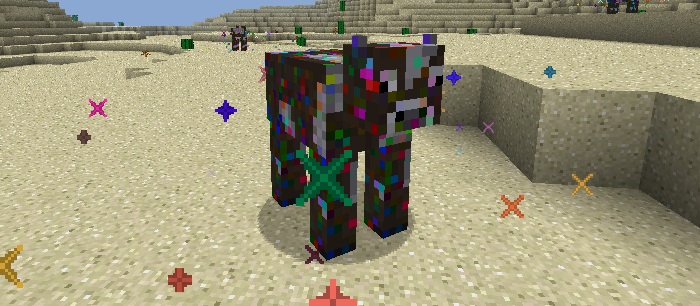
- 这个模组背后的概念是让牛根据 Forge 流体注册表中的内容动态生成。
牛的特性:
- 随机选择流体。
- 当你用空的流体容器(桶、单元等)右键点击牛时,它会尝试给你一个装满该流体的容器。
- 当你用装满流体的容器(桶、单元等)右键点击牛时,它会尝试治疗牛并从容器中移除流体。
- 当你用物品右键点击牛时,它会检查该物品是否为该牛的正确繁殖物品,并将牛设置为“繁殖模式”。
- 某些牛(如果安装了正确的模组)能够与其他拥有不同流体的牛繁殖,从而产生具有固定流体的新牛……(例如 钴牛 + 砷铁牛 = 马努林牛)
- 如果牛的流体密度是熔岩的三倍,牛将无法游泳。
- 如果牛的流体温度与熔岩相同(或更高),当你触碰它或用空手打它时,它会让你着火(可配置)。
- 牛只有在成年时才能被装桶,并且在你能够与它交互(通过右键点击)之间有冷却时间(可配置)。
配方:
- 3 皮革 + 2 线 + 2 铁锭 = 鞍(可在配置中启用/禁用,默认关闭)
配置选项:
- 每头牛的繁殖物品(物品 ID 后跟物品元数据)。
- 每头牛死亡时掉落的物品(物品 ID 后跟物品元数据)。
- 每头牛的成长时间(牛成为成年所需的时间,以刻为单位)。
- 每头牛的交互冷却时间(你可以尝试右键点击牛进行交互之间的时间)。
- 牛是否可以生成。
- 所有牛的全局生成稀有度。
- 每头牛的单独生成稀有度。
- 是否可以制作鞍。
如何安装 Moo Fluids
With Millida Launcher
Install Millida Launcher
The launcher is free: download it at millida.net/launcher and sign in with any nickname.
Click “Install” on this page
The launcher opens and installs the mod for Minecraft 1.12.1–1.12.2 automatically.
Launch the game
A profile with it appears in the launcher: click “Play”.
Manually
Download the file for your version
In the version list above, pick the file MooFluids-1.12.2-1.8.12.02a.jar (88 KB) for your game version.
Put it in the mods folder
The folder is inside .minecraft (Windows: %appdata%\.minecraft\mods). If it does not exist, create it.
Launch the loader profile
Open “Mods” in the main menu: Moo Fluids should be in the list.
Minecraft 1.12.2 runs on Java 8: with a different Java version the game may close right after launch.
版本
含依赖项
| Minecraft | 加载器 | 文件 | 日期 | 操作 |
|---|---|---|---|---|
| 1.12.1 | — | MooFluids-1.12.2-1.8.12.02a.jar87.6 KB | ||
| 1.12.1 | — | MooFluids-1.12.2-1.7.11.02a.jar84.7 KB |
常见问题
Which Minecraft versions does Moo Fluids work on?
There are files for 1.12.2, 1.12.1. The newest is 1.12.2.
Which Java does Moo Fluids need?
Minecraft 1.12.2 runs on Java 8. If the game closes right after launch, the usual cause is the wrong Java version in the profile settings.
Where can I download Moo Fluids safely?
On this page: the file MooFluids-1.12.2-1.8.12.02a.jar (88 KB) is stored on Millida’s server, with no link shorteners. SHA-1 checksum: 163085fe352f0ddbae01a6514ef7c49bb3e910f0.
评价
成为第一个评价 Moo Fluids 的人


