
 Forge
Forge Fabric
 Quilt
Quilt关于 Mimic Mod 模组
此模组旨在对Minecraft中大多数现有原版结构进行原版增强,使体验更具挑战性,并让搜刮过程更加刺激。市面上有一些宝箱怪模组,但大多数都被遗弃在Minecraft的较早版本中,让这个很酷的生物创意停留在过去(-1.12.2),而此模组将这一创意带到了1.16.5,并且是独立的,因此可以加入整合包或用于原版Minecraft体验。这个模组的一个问题是Jei模组会稍微破坏惊喜感,如果可以的话,在查看宝箱和宝箱怪时移除Jei的显示(另外我也很想知道该怎么做)
此模组为宝箱怪提供了完全动画化的自定义伤害……锁定、奔跑、行走、打开/关闭动画

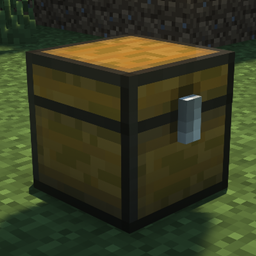
宝箱怪
- 这种敌对生物有几率在Minecraft结构内代替宝箱生成……这些结构包括:雪屋、要塞、下界要塞、末地城、丛林神庙、刷怪笼地牢、金字塔和林地府邸。
- 宝箱怪在被打开或攻击之前处于闲置状态,被激活后它会将你击退并试图攻击玩家……由于它们包含非常好的战利品,它们会造成大量伤害。
- 当它代替宝箱生成时,它的行为会和宝箱一样,直到所有物品都被取出或它被杀死之前都不会消失。
- 使用一种叫做宝箱怪锁的物品可以让玩家锁住宝箱怪的嘴并安全地搜刮它,然而当物品从被锁住的宝箱怪中取出时,它有一定几率尝试逃跑,迫使你杀死它
- 宝箱怪只有在假装成宝箱时才能被打开……当它站起来时就无法打开
- 一种叫做宝箱怪钥匙的物品可以用来驯服宝箱怪,前提是你找到一只并且动作够快能抓住它……这只宝箱怪会像宠物一样跟随玩家,并且可以像宠物一样坐下或站起……它坐下时可以被打开用作便携存储
- 宝箱怪的一个识别特征是打开时出现的血腥GUI(被驯服的宝箱怪GUI不再血腥)
- 你可以使用宝箱怪之心(mimic:fakechest)召唤宝箱怪……制作完成后,对着Minecraft:chest方块shift右键点击,4秒后它会转化为宝箱怪(以这种方式生成时它会带有随机战利品池……(战利品池可通过数据包配置)
- 宝箱怪因为是木制的,会受到斧头的额外伤害
- 当宝箱怪被召唤时,它会试图游荡并寻找宝箱来吞噬(拿走其物品并取代其位置)
- 被锁住的宝箱怪无法被驯服
- 应该驯服的是普通的宝箱怪
- 被驯服的宝箱怪在距离太远时会传送
合成配方:
也去看看我的伙伴lukegrahamlandry,他在此模组的成员部分中……他帮助实现了这一切
luke也接受模组委托,如果你完全不擅长编程或者只是需要帮助(但这会占用他大量时间,所以别指望是免费的)
私信Discord(LukeGrahamLandry6888)

如何安装 Mimic Mod
With Millida Launcher
Install Millida Launcher
The launcher is free: download it at millida.net/launcher and sign in with any nickname.
Click “Install” on this page
The launcher opens and installs the mod for Minecraft 1.16.5–1.19.2 on Fabric, Forge or Quilt automatically.
Launch the game
A profile with it appears in the launcher: click “Play”.
Manually
Install Fabric, Forge or Quilt
The loader must match the game version of the mod file, for example Minecraft 1.19.2. After installing it, a separate profile appears in your launcher.
Download the file for your version
In the version list above, pick the file Mimic-forge-1.19.1-1.2.38.jar (79 KB) for your game version and loader.
Put it in the mods folder
The folder is inside .minecraft (Windows: %appdata%\.minecraft\mods). If it does not exist, create it.
Launch the loader profile
Open “Mods” in the main menu: Mimic Mod should be in the list.
Minecraft 1.19.2 runs on Java 17: with a different Java version the game may close right after launch.
版本
含依赖项
| Minecraft | 加载器 | 文件 | 日期 | 操作 |
|---|---|---|---|---|
| 1.19.2 | Forge | 1.2.38 forge79.4 KB | ||
| 1.19.2 | Fabric, Quilt | 1.2.38 fabric67.6 KB 1 | ||
| 1.16.5 | — | mimic-1.16.5-v1.12.jar72.3 KB | ||
| 1.16.5 | — | mimic-1.10-beta.jar72.2 KB | ||
| 1.16.5 | Forge | mimic-1.8-beta.jar72.1 KB |
常见问题
Which Minecraft versions does Mimic Mod work on?
There are files for 1.19.2, 1.19.1, 1.19, 1.16.5. The newest is 1.19.2.
Is Mimic Mod for Forge or Fabric?
There are files for Fabric: 1.19–1.19.2, for Forge: 1.16.5–1.19.2 and for Quilt: 1.19–1.19.2. There are no files for NeoForge: a mod for another loader will not start.
Does Mimic Mod need other mods?
The author lists no required dependencies: the Fabric, Forge or Quilt loader is enough.
Which Java does Mimic Mod need?
Minecraft 1.19.2 runs on Java 17. If the game closes right after launch, the usual cause is the wrong Java version in the profile settings.
Where can I download Mimic Mod safely?
On this page: the file Mimic-forge-1.19.1-1.2.38.jar (79 KB) is stored on Millida’s server, with no link shorteners. SHA-1 checksum: 3a33db2000ea7b784359eca13f9a463c7f845e67.
评价
成为第一个评价 Mimic Mod 的人


