
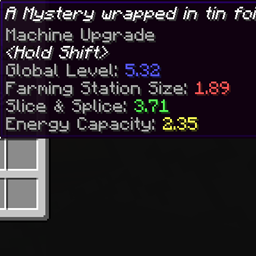
关于 Loot Capacitor Tooltips 模组
是否曾经想看看地牢里找到的电容有多好,却又懒得去查?这个模组就是为此而生。
只需把它放进你的 mods 文件夹,秘密就会揭晓。
作为参考,基础电容的等级为 1,双倍为 2,八倍为 3
提供配置选项,可关闭风味文本以便更易阅读
注意:仅客户端模组,服务器会忽略它。
联系方式
我所有项目的 Discord:https://discord.gg/T6xdX7G
如何安装 Loot Capacitor Tooltips
With Millida Launcher
Install Millida Launcher
The launcher is free: download it at millida.net/launcher and sign in with any nickname.
Click “Install” on this page
The launcher opens and installs the mod for Minecraft 1.12.2 automatically.
Launch the game
A profile with it appears in the launcher: click “Play”.
Manually
Download the file for your version
In the version list above, pick the file lootcapacitortooltips-1.3.jar (9 KB) for your game version.
Put it in the mods folder
The folder is inside .minecraft (Windows: %appdata%\.minecraft\mods). If it does not exist, create it.
Launch the loader profile
Open “Mods” in the main menu: Loot Capacitor Tooltips should be in the list.
Minecraft 1.12.2 runs on Java 8: with a different Java version the game may close right after launch.
版本
含依赖项
| Minecraft | 加载器 | 文件 | 日期 | 操作 |
|---|---|---|---|---|
| 1.12.2 | — | lootcapacitortooltips-1.3.jar9.3 KB |
常见问题
Which Minecraft versions does Loot Capacitor Tooltips work on?
Only Minecraft 1.12.2: there are no files for other versions.
Which Java does Loot Capacitor Tooltips need?
Minecraft 1.12.2 runs on Java 8. If the game closes right after launch, the usual cause is the wrong Java version in the profile settings.
Where can I download Loot Capacitor Tooltips safely?
On this page: the file lootcapacitortooltips-1.3.jar (9 KB) is stored on Millida’s server, with no link shorteners. SHA-1 checksum: f5e36c3d1264202edb6469cacb506636ab2dda72.
评价
成为第一个评价 Loot Capacitor Tooltips 的人


