
 Fabric
 NeoForge
 Forge
ForgeKeybindsPurger
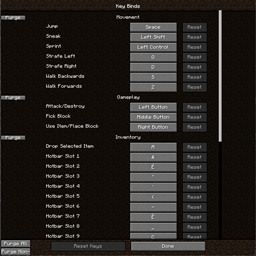
KeybindsPurger 是一个小型实用模组,允许你取消某个分类、所有分类或非原版分类中的所有按键绑定。就是这样
用法
该模组会添加几个按钮。在按键绑定菜单中分类名称的左侧有两个按钮,“x”会清除该分类,“r”会重置它。屏幕左下角也有两个按钮。“A”会取消所有按键绑定,而“M”只会针对模组的按键绑定
为什么?
在开始一个新的整合包时,我倾向于取消所有按键绑定,只在需要时再配置它们。这样对我来说更简单,所以我想可能会有更多人用得上一个能让这项任务更轻松的模组
如何安装 KeybindsPurger
With Millida Launcher
Install Millida Launcher
The launcher is free: download it at millida.net/launcher and sign in with any nickname.
Click “Install” on this page
The launcher opens and installs the mod for Minecraft 1.20.1–26.1.2 on Fabric, Forge or NeoForge automatically.
Launch the game
A profile with it appears in the launcher: click “Play”.
Manually
Install Fabric, Forge or NeoForge
The loader must match the game version of the mod file, for example Minecraft 26.1.2. After installing it, a separate profile appears in your launcher.
Download the file for your version
In the version list above, pick the file KeybindsPurger-1.4.0-fabric-26.1.2.jar (39 KB) for your game version and loader.
Put it in the mods folder
The folder is inside .minecraft (Windows: %appdata%\.minecraft\mods). If it does not exist, create it.
Launch the loader profile
Open “Mods” in the main menu: KeybindsPurger should be in the list.
版本
含依赖项
| Minecraft | 加载器 | 文件 | 日期 | 操作 |
|---|---|---|---|---|
| 26.1.2 | Fabric | KeybindsPurger-1.4.0-fabric-26.1.2.jar39.2 KB 3 | ||
| 26.1.2 | NeoForge | KeybindsPurger-1.4.0-neoforge-26.1.2.jar39.2 KB | ||
| 1.20.1 | Forge | KeybindsPurger-1.4.0-forge-1.20.1.jar39.1 KB 1 |
评价
成为第一个评价 KeybindsPurger 的人


