
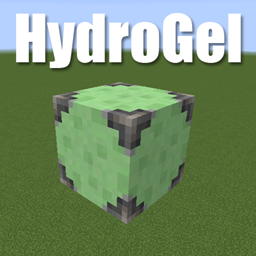
适用于 Minecraft 1.16.5 的 Ignition: HydroGel 模组
一个简单的Minecraft模组,添加一个单一的固体方块来滋润耕地。
关于
Ignition: HydroGel 是 HydroGel 的更新版本。它添加了一个方块,Hydrogel,可作为农田的固体水源方块。
现在你可以用一个方块来滋润高处的农田,而无需担心阻挡水流或覆盖水坑以免掉进去。
使用黏液球、铁栏杆和水桶合成。
联系方式
Discord:https://discord.gg/wdvU5Yz
如何安装 Ignition: HydroGel
With Millida Launcher
Install Millida Launcher
The launcher is free: download it at millida.net/launcher and sign in with any nickname.
Click “Install” on this page
The launcher opens and installs the mod for Minecraft 1.16.4–1.16.5 automatically.
Launch the game
A profile with it appears in the launcher: click “Play”.
Manually
Download the file for your version
In the version list above, pick the file HydroGel-1.16.4-2.2.1.jar (10 KB) for your game version.
Put it in the mods folder
The folder is inside .minecraft (Windows: %appdata%\.minecraft\mods). If it does not exist, create it.
Launch the loader profile
Open “Mods” in the main menu: Ignition: HydroGel should be in the list.
Minecraft 1.16.5 runs on Java 8: with a different Java version the game may close right after launch.
版本
含依赖项
| Minecraft | 加载器 | 文件 | 日期 | 操作 |
|---|---|---|---|---|
| 1.16.5 | — | HydroGel-1.16.4-2.2.1.jar10.4 KB |
常见问题
Which Minecraft versions does Ignition: HydroGel work on?
There are files for 1.16.5, 1.16.4. The newest is 1.16.5.
Which Java does Ignition: HydroGel need?
Minecraft 1.16.5 runs on Java 8. If the game closes right after launch, the usual cause is the wrong Java version in the profile settings.
Where can I download Ignition: HydroGel safely?
On this page: the file HydroGel-1.16.4-2.2.1.jar (10 KB) is stored on Millida’s server, with no link shorteners. SHA-1 checksum: e73f5775166cc186fd11910ccc1ddc2f2d2c9208.
评价
成为第一个评价 Ignition: HydroGel 的人


