

适用于 Minecraft 1.16.5 的 Hwyla 模组
Hwyla(Here's What You're Looking At)是一个 UI 改进模组,旨在直接在游戏中提供方块信息。它也是 Waila 的一个分支。
 Fabric
 Forge
Forge我不再对模组制作感兴趣了。这个项目将不再更新。我不再有兴趣维护它了。更新请求和要求将被忽略。看妈妈,我上电视了。我对模组制作感到厌倦了。我太忙于看Hololive直播了。我的时间花在非Minecraft项目上更好。这够长到能被注意到了吗?curse终于允许你用颜色调整文本大小了,这真好,只花了5年。算了,它还是坏的。
你正在看的是什么
HWYLA(发音为“Hwhy-la”,类似于“Coo-Hwhip”)
Hwyla可用于Forge和Fabric。对于Minecraft 1.14.2及以上版本,请确保你下载的是与你使用的加载器正确标记的文件。
这是ProfMobius的WAILA的一个分支。此分支在CC BY-NC-SA 4.0许可下被允许。
我打算快速且频繁地更新这个分支。
所有用官方模组创建的插件/附加组件/兼容性都与这个分支100%兼容。

版本(又名:嘿,如果你在抱怨版本,请读我)
Hwyla可用于自1.10.2以来的所有版本,适用于Forge和Fabric(1.14快照及以上)。是的,文件存在。别再要求我移植到我已经支持的版本了。Curse很糟糕,显示东西很差,用这个页面找到你想要的文件。
人们是盲目的,所以我把它做成了红色。也许现在会起作用?在我被愚蠢打败之前,我能做的手把手指导只有这么多。
以防你错过了,这一整行都是指向你想要页面的链接。
如果评论被禁用,那是因为大量烦人的东西像龙卷风一样席卷了那里。如果它们被启用,那我一定是疯了。
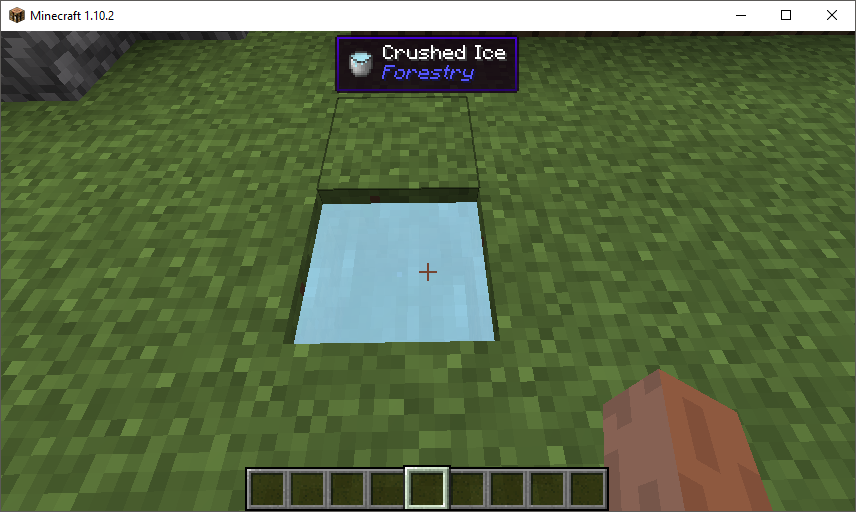
更改
你可以在这里找到大多数更改的列表。
值得注意的鲜为人知的功能
- 默认情况下,小键盘3和小键盘4可用于在JEI中查找世界中方块配方。这需要安装JEI才能工作。
- 你可以通过导航到游戏内配置,打开“Waila”选项屏幕,并选择“Format content...”,在游戏中更改工具提示的颜色和文本格式。
- 如果你遇到模组添加的工具提示处理器的问题,你可以运行“/dumphandlers”,它将生成一个文本文件,包含所有注册的处理器以及它们注册到的类型。
- 从1.12开始,可以为工具提示切换旁白。这将使用系统的文本转语音库来告诉你你正在看什么。
- 如果你觉得在工具提示中显示物品是多余的,可以禁用它。
如何安装 Hwyla
With Millida Launcher
Install Millida Launcher
The launcher is free: download it at millida.net/launcher and sign in with any nickname.
Click “Install” on this page
The launcher opens and installs the mod for Minecraft 1.14.2–1.16.5 on Fabric or Forge automatically.
Launch the game
A profile with it appears in the launcher: click “Play”.
Manually
Install Fabric or Forge
The loader must match the game version of the mod file, for example Minecraft 1.16.5. After installing it, a separate profile appears in your launcher.
Download the file for your version
In the version list above, pick the file Hwyla-fabric-1.16.2-1.9.23-79.jar (262 KB) for your game version and loader.
Put it in the mods folder
The folder is inside .minecraft (Windows: %appdata%\.minecraft\mods). If it does not exist, create it.
Launch the loader profile
Open “Mods” in the main menu: Hwyla should be in the list.
Minecraft 1.16.5 runs on Java 8: with a different Java version the game may close right after launch.
版本
含依赖项
| Minecraft | 加载器 | 文件 | 日期 | 操作 |
|---|---|---|---|---|
| 1.16.3 | Fabric | Hwyla-fabric-1.16.2-1.9.23-79.jar262 KB 23 | ||
| 1.16.3 | Forge | Hwyla-forge-1.10.11-B78_1.16.2.jar171 KB 28 | ||
| — | — | Hwyla-fabric-20w13b-1.9.21-72.jar234 KB 28 | ||
| 1.14.4 | Forge | Hwyla-forge-1.10.4-B65_1.14.2.jar169 KB | ||
| 1.14.2 | — | Hwyla-forge-1.10.3-B64_1.14.2.jar167 KB |
常见问题
Which Minecraft versions does Hwyla work on?
There are files for 1.14.2–1.16.5, 7 versions in total. The newest is 1.16.5.
Is Hwyla for Forge or Fabric?
There are files for Fabric: 1.16.2–1.16.5 and for Forge: 1.14.2–1.16.5. There are no files for NeoForge: a mod for another loader will not start.
Does Hwyla need other mods?
The author lists no required dependencies: the Fabric or Forge loader is enough.
Which Java does Hwyla need?
Minecraft 1.16.5 runs on Java 8. If the game closes right after launch, the usual cause is the wrong Java version in the profile settings.
Where can I download Hwyla safely?
On this page: the file Hwyla-fabric-1.16.2-1.9.23-79.jar (262 KB) is stored on Millida’s server, with no link shorteners. SHA-1 checksum: 8d18eb2c5b0265bb35e21d2ce6f45482889f2ea7.
评价
成为第一个评价 Hwyla 的人


