
- 次下载
- 8 次下载
- 次浏览
- 40 次浏览
- 已更新
- 已更新 28.10.2026
- 1.12.2
 Forge
Forge
关于 Entity Culling 模组
Entity Culling - 1.16.5 - 2.1.4 及更新版本仅兼容 Optifine G8!Entity Culling - 1.16.5 - 2.1.3 及更旧版本仅兼容 Optifine G7!Entity Culling - 1.12.2 - 2.0.8 及更新版本仅兼容 Optifine G5!Entity Culling - 1.12.2 - 2.0.7 及更旧版本仅兼容 Optifine F5!
此模组需要 MixinBootstrap(curseforge、modrinth)和 RenderLib(curseforge、modrinth)才能运行(仅限 MC 1.12.2)!当其他模组使用较旧的 mixin 版本导致你无法启动游戏时,Mixin 0.7-0.8 Compatibility(curseforge、modrinth)可能会有所帮助(仅限 MC 1.12.2)。
Entity Culling 是一个客户端性能模组,旨在跳过对隐藏的(方块)实体的渲染。在原版中,它只会渲染玩家视野范围内的所有(方块)实体。这意味着可能有数百个(方块)实体在消耗你的帧率,而你甚至看不到它们,因为它们被墙挡住了。
隐藏实体的剔除 默认情况下,此模组使用 OpenGL 遮挡剔除实现,可为你提供像素级精确的包围盒剔除,仅有一帧延迟且开销非常小。
如果你的硬件不支持 OpenGL 4.3,那么此模组会使用光线追踪剔除实现。光线追踪剔除更消耗 CPU,而 OpenGL 剔除更消耗 GPU,因此根据你的硬件情况,你可能会更偏好其中一种。当屏幕上有大量(方块)实体但因被遮挡而不可见时,这可以带来巨大的帧率提升。
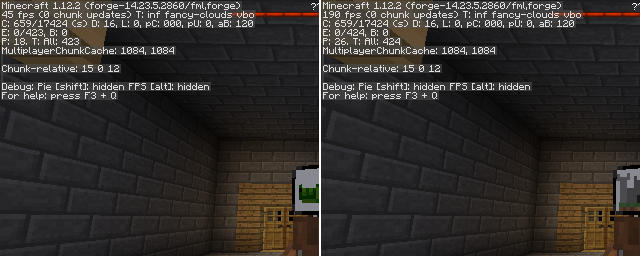
使用 EntityCulling-1.12.2-6.0.2 在 Chocolate Quest Repoured 地牢中进行测试,屏幕上有约 200 个实体,显示出巨大的提升!
如何安装 Entity Culling
With Millida Launcher
Install Millida Launcher
The launcher is free: download it at millida.net/launcher and sign in with any nickname.
Click “Install” on this page
The launcher opens and installs the mod for Minecraft 1.12.2 on Forge automatically.
Launch the game
A profile with it appears in the launcher: click “Play”.
Manually
Install Forge
The loader must match the game version of the mod file, for example Minecraft 1.12.2. After installing it, a separate profile appears in your launcher.
Download the file for your version
In the version list above, pick the file EntityCulling-1.12.2-6.5.0.jar (62 KB) for your game version.
Put it in the mods folder
The folder is inside .minecraft (Windows: %appdata%\.minecraft\mods). If it does not exist, create it.
Launch the loader profile
Open “Mods” in the main menu: Entity Culling should be in the list.
Minecraft 1.12.2 runs on Java 8: with a different Java version the game may close right after launch.
版本
含依赖项
| Minecraft | 加载器 | 文件 | 日期 | 操作 |
|---|---|---|---|---|
| 1.12.2 | Forge | EntityCulling-1.12.2-6.5.0.jar62.4 KB 7 | ||
| 1.12.2 | — | EntityCulling-1.12.2-6.3.1.jar64.4 KB 1 | ||
| 1.12.2 | — | EntityCulling-1.12.2-6.0.2.jar54.1 KB |
常见问题
Which Minecraft versions does Entity Culling work on?
Only Minecraft 1.12.2: there are no files for other versions.
Is Entity Culling for Forge or Fabric?
Only for Forge: 1.12.2. There are no files for Fabric or NeoForge: a mod for another loader will not start.
Does Entity Culling need other mods?
The author lists no required dependencies: the Forge loader is enough.
Which Java does Entity Culling need?
Minecraft 1.12.2 runs on Java 8. If the game closes right after launch, the usual cause is the wrong Java version in the profile settings.
Where can I download Entity Culling safely?
On this page: the file EntityCulling-1.12.2-6.5.0.jar (62 KB) is stored on Millida’s server, with no link shorteners. SHA-1 checksum: cf4a4a6b11b1721fbda1edeb32bdc3b1ac3a8560.
评价
成为第一个评价 Entity Culling 的人


