
 Fabric
 Quilt
Quilt Forge
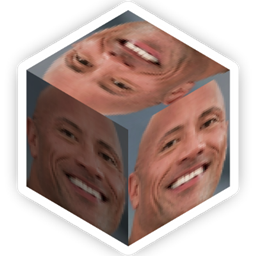
ForgeDwayne "The Block" Johnson
Bring Dwayne "The Block" Johnson into your home with these simple recipes:
Slab, Wall & Stair variants are crafted using multiple Dwayne "The Block" Johnsons in their respective recipe patterns. Craft Dwayne "The Item" Johnson with any flower to get Dwayne "The Flower" Johnson, which can be potted!
Credits
Tetracube (4dcube) ▶ Created the original mod for 1.16.4
Dwayne "The Rock" Johnson ▶ Graced us with his presence
如何安装 Dwayne "The Block" Johnson
With Millida Launcher
Install Millida Launcher
The launcher is free: download it at millida.net/launcher and sign in with any nickname.
Click “Install” on this page
The launcher opens and installs the mod for Minecraft 1.16.4–1.20.1 on Fabric, Forge or Quilt automatically.
Launch the game
A profile with it appears in the launcher: click “Play”.
Manually
Install Fabric, Forge or Quilt
The loader must match the game version of the mod file, for example Minecraft 1.20.1. After installing it, a separate profile appears in your launcher.
Download the file for your version
In the version list above, pick the file dwayne-the-block-johnson-2.2.2.jar (74 KB) for your game version and loader.
Put it in the mods folder
The folder is inside .minecraft (Windows: %appdata%\.minecraft\mods). If it does not exist, create it.
Launch the loader profile
Open “Mods” in the main menu: Dwayne "The Block" Johnson should be in the list.
Minecraft 1.20.1 runs on Java 17: with a different Java version the game may close right after launch.
版本
含依赖项
| Minecraft | 加载器 | 文件 | 日期 | 操作 |
|---|---|---|---|---|
| 1.20.1 | Fabric, Quilt | Release Version 2.2.274.3 KB 2 | ||
| 1.18.2 | Quilt | Release Version 2.1.180.4 KB | ||
| 1.16.4 | Forge | DwayneTheBlockJohnson-1.0.0.jar43.2 KB |
评价
成为第一个评价 Dwayne "The Block" Johnson 的人


