
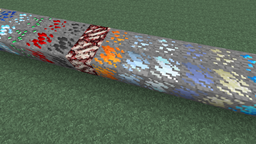
关于 Dense Ores 模组
这个模组添加了矿石方块的“密集”版本,它们会掉落普通矿石 3 倍的物品。每个区块大约生成 1-10 个密集方块(替换已生成的矿石),使矿石总量整体增加约 5%。
密集矿石的纹理是根据基础矿石纹理和对应的“石头”纹理动态生成的。这意味着你无需为你的纹理包创建新纹理(不过如果你对其外观不满意,仍然可以自行创建)。
此外,还可以通过配置系统添加新的矿石,相关细节及示例可在 github 上找到。请注意,这主要面向整合包开发者,因此不建议普通用户使用。
如何安装 Dense Ores
With Millida Launcher
Install Millida Launcher
The launcher is free: download it at millida.net/launcher and sign in with any nickname.
Click “Install” on this page
The launcher opens and installs the mod for Minecraft 1.9.4–1.11.2 automatically.
Launch the game
A profile with it appears in the launcher: click “Play”.
Manually
Download the file for your version
In the version list above, pick the file denseores-1.11-1.0.2.jar (71 KB) for your game version.
Put it in the mods folder
The folder is inside .minecraft (Windows: %appdata%\.minecraft\mods). If it does not exist, create it.
Launch the loader profile
Open “Mods” in the main menu: Dense Ores should be in the list.
Minecraft 1.11.2 runs on Java 8: with a different Java version the game may close right after launch.
版本
含依赖项
| Minecraft | 加载器 | 文件 | 日期 | 操作 |
|---|---|---|---|---|
| 1.9.4 | — | denseores-1.11-1.0.2.jar71.2 KB 1 | ||
| 1.9.4 | — | Dense Ores 1.11 Alpha 1.0.171.1 KB |
常见问题
Which Minecraft versions does Dense Ores work on?
There are files for 1.9.4–1.11.2, 7 versions in total. The newest is 1.11.2.
Which Java does Dense Ores need?
Minecraft 1.11.2 runs on Java 8. If the game closes right after launch, the usual cause is the wrong Java version in the profile settings.
Where can I download Dense Ores safely?
On this page: the file denseores-1.11-1.0.2.jar (71 KB) is stored on Millida’s server, with no link shorteners. SHA-1 checksum: d82730649d1dea55eebeb34e8cea128a7db4477b.
评价
成为第一个评价 Dense Ores 的人


