

适用于 Minecraft 1.20.1, 1.21.1 的 Create: Copper & Zinc 模组
Create 模组的附加包,为 Veridium 和 Asurine 提供配方,让玩家获得可再生的铜和锌来源。
 NeoForge
 Forge
Forge Fabric
 Quilt
Quilt关于 Create: Copper & Zinc 模组
For 1.18.2 and older, refer to the datapack version
About
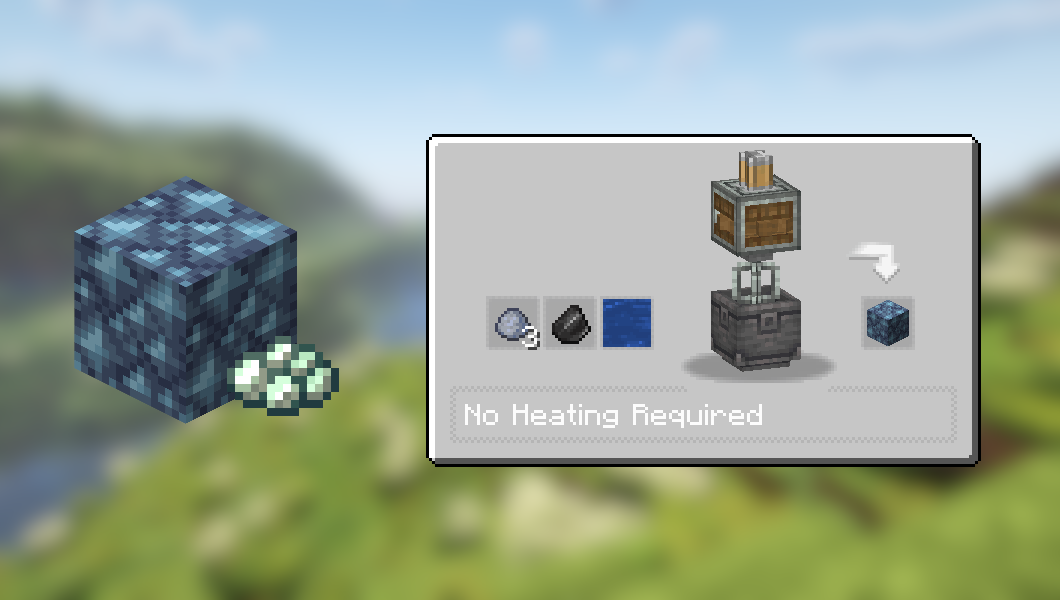
Create: Copper & Zinc is a simple mod adding two new recipes for Create: Asurine and Veridium. These blocks, once processed, provide the player with a renewable source of Copper and Zinc.
Preview (1.6.0+)
Preview (1.5.0)
Dependencies
Only the base Create mod is required for the above recipes to work.
JEI is recommended but not required.
Installation
Add the .jar mod file into your mods folder.
Alternatively, you can browse the CurseForge launcher for the mod (if it doesn't show up, try typing the autor's name). Once found, click "Install" to add it to your modpack.
Permissions
You are free to include this mod in any modpack, public or private.
Support my work
Download my projects on CurseForge
Download my projects on Modrinth
Donate on Paypal
如何安装 Create: Copper & Zinc
With Millida Launcher
Install Millida Launcher
The launcher is free: download it at millida.net/launcher and sign in with any nickname.
Click “Install” on this page
The launcher opens and installs the mod for Minecraft 1.20–1.21.1 on Fabric, Forge, NeoForge or Quilt automatically.
Launch the game
A profile with it appears in the launcher: click “Play”.
Manually
Install Fabric, Forge, NeoForge or Quilt
The loader must match the game version of the mod file, for example Minecraft 1.21.1. After installing it, a separate profile appears in your launcher.
Download the file for your version
In the version list above, pick the file create_copper_and_zinc-2.0.0-neoforge-1.21.1.jar (96 KB) for your game version and loader.
Put it in the mods folder
The folder is inside .minecraft (Windows: %appdata%\.minecraft\mods). If it does not exist, create it.
Launch the loader profile
Open “Mods” in the main menu: Create: Copper & Zinc should be in the list.
Minecraft 1.21.1 runs on Java 21: with a different Java version the game may close right after launch.
版本
含依赖项
| Minecraft | 加载器 | 文件 | 日期 | 操作 |
|---|---|---|---|---|
| 1.21 | NeoForge | create_copper_and_zinc-2.0.0-neoforge-1.21.1.jar96.4 KB 9 | ||
| 1.20.1 | Forge, NeoForge | create_copper_and_zinc-2.0.0-forge-1.20.1.jar95.1 KB 4 | ||
| 1.21 | NeoForge | create_copper_and_zinc-1.6.5-neoforge-1.21.1.jar96.1 KB | ||
| 1.20.1 | Fabric, Quilt | create_copper_and_zinc-1.6.0-fabric-1.20.1.jar92.3 KB 1 | ||
| 1.20.1 | Forge, NeoForge | create_copper_and_zinc-1.6.0-forge-1.20.1.jar93.6 KB |
常见问题
Which Minecraft versions does Create: Copper & Zinc work on?
There are files for 1.21.1, 1.21, 1.20.1, 1.20. The newest is 1.21.1.
Is Create: Copper & Zinc for Forge or Fabric?
There are files for Fabric: 1.20–1.20.1, for Forge: 1.20–1.20.1, for NeoForge: 1.20–1.21.1 and for Quilt: 1.20–1.20.1.
Does Create: Copper & Zinc need other mods?
The author lists no required dependencies: the Fabric, Forge, NeoForge or Quilt loader is enough.
Which Java does Create: Copper & Zinc need?
Minecraft 1.21.1 runs on Java 21. If the game closes right after launch, the usual cause is the wrong Java version in the profile settings.
Where can I download Create: Copper & Zinc safely?
On this page: the file create_copper_and_zinc-2.0.0-neoforge-1.21.1.jar (96 KB) is stored on Millida’s server, with no link shorteners. SHA-1 checksum: de1f363ef0ec8aeb6a9dedc1f3d8b3e224400895.
评价
成为第一个评价 Create: Copper & Zinc 的人


