
 NeoForge
 Fabric
 Forge
Forge关于 Clean Tooltips 模组
简洁提示框
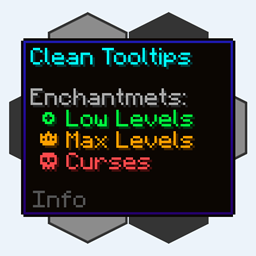
你是否曾觉得默认的提示框可以再精致一些?那么这正是你需要的。
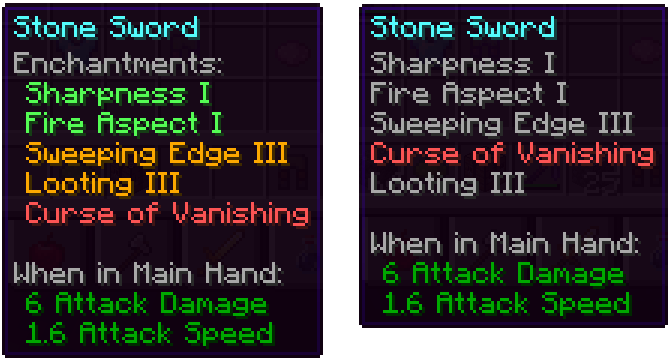
这个模组主要重做了附魔在提示框中的显示方式:
- 它们现在拥有自己的“附魔:”子分类
- 颜色编码,便于区分好的附魔(绿色)和诅咒(红色)
- 最高等级的附魔将以金色显示
- 诅咒始终排列在列表底部
安装模组后:未安装模组时(原版):
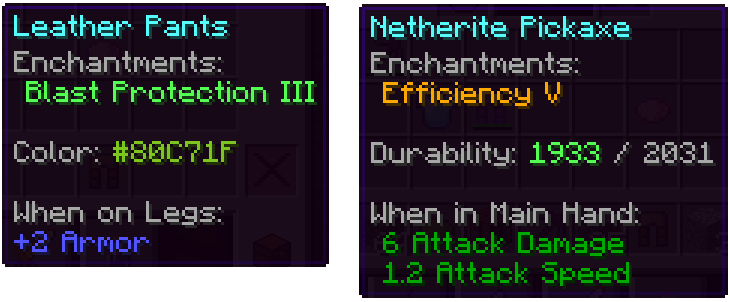
除此之外,其他部分也得到了改进:
- 染色物品上的颜色线条现在会实际显示所使用的颜色
- 受损物品会在提示框中显示其剩余耐久度
对于未来的更新,我们还有许多关于如何改进提示框的想法。除了添加新功能外,接下来的更新还将加入许多可配置选项。
如何安装 Clean Tooltips
With Millida Launcher
Install Millida Launcher
The launcher is free: download it at millida.net/launcher and sign in with any nickname.
Click “Install” on this page
The launcher opens and installs the mod for Minecraft 1.20.1–1.21.10 on Fabric, Forge or NeoForge automatically.
Launch the game
A profile with it appears in the launcher: click “Play”.
Manually
Install Fabric, Forge or NeoForge
The loader must match the game version of the mod file, for example Minecraft 1.21.10. After installing it, a separate profile appears in your launcher.
Download the file for your version
In the version list above, pick the file clean_tooltips-1.1-neoforge-1.21.10.jar (24 KB) for your game version and loader.
Put it in the mods folder
The folder is inside .minecraft (Windows: %appdata%\.minecraft\mods). If it does not exist, create it.
Launch the loader profile
Open “Mods” in the main menu: Clean Tooltips should be in the list.
Minecraft 1.21.10 runs on Java 21: with a different Java version the game may close right after launch.
版本
含依赖项
| Minecraft | 加载器 | 文件 | 日期 | 操作 |
|---|---|---|---|---|
| 1.21.10 | NeoForge | clean_tooltips-1.1-neoforge-1.21.10.jar24.4 KB | ||
| 1.21.10 | Fabric | clean_tooltips-1.1-fabric-1.21.10.jar23.1 KB 3 | ||
| 1.20.1 | Forge | clean_tooltips-1.0-forge-1.20.1.jar25.8 KB 1 |
常见问题
Which Minecraft versions does Clean Tooltips work on?
There are files for 1.21.10, 1.20.1. The newest is 1.21.10.
Is Clean Tooltips for Forge or Fabric?
There are files for Fabric: 1.21.10, for Forge: 1.20.1 and for NeoForge: 1.21.10.
Does Clean Tooltips need other mods?
The author lists no required dependencies: the Fabric, Forge or NeoForge loader is enough.
Which Java does Clean Tooltips need?
Minecraft 1.21.10 runs on Java 21. If the game closes right after launch, the usual cause is the wrong Java version in the profile settings.
Where can I download Clean Tooltips safely?
On this page: the file clean_tooltips-1.1-neoforge-1.21.10.jar (24 KB) is stored on Millida’s server, with no link shorteners. SHA-1 checksum: 594541adddbc0d20e2361a8fef21b5ed960c2588.
评价
成为第一个评价 Clean Tooltips 的人


