
 Forge
Forge NeoForge
关于 Ceramics 模组
Ceramics 是一个旨在利用黏土丰富 Minecraft 玩法的模组。最初灵感来自 Iguana Tinker Tweaks 的黏土桶,这个模组最初只是添加了一个黏土桶,但现在它添加了不少其他由黏土制成的功能,既能改善游戏前期体验,也能用于长期建造。
在模组当前形态下,它添加的功能分为三类。
工具
Ceramics 添加了各种工具,旨在扩展使用黏土制作工具的选择。可用工具包括:
陶瓦桶:游戏前期的桶替代品。
- 可以轻松运输冷液体,但装入热流体时会开裂。
- 开裂的桶在倒空时会损坏,因此对热流体来说实际上是一次性的。
- 冷流体可以自由运输。
- 与其他黏土桶模组不同,这些桶是完全动态的,会自动为所有可用流体添加变体(例如 Tinker Construct 或 Forestry)。
陶瓦板甲:游戏前期的皮革盔甲替代品。
- 在获得铁之前,皮革通常很难获取,因此黏土提供了一种更实惠的替代品。
- 显然黏土板甲曾经真实存在过,所以也算有点历史依据。
流体
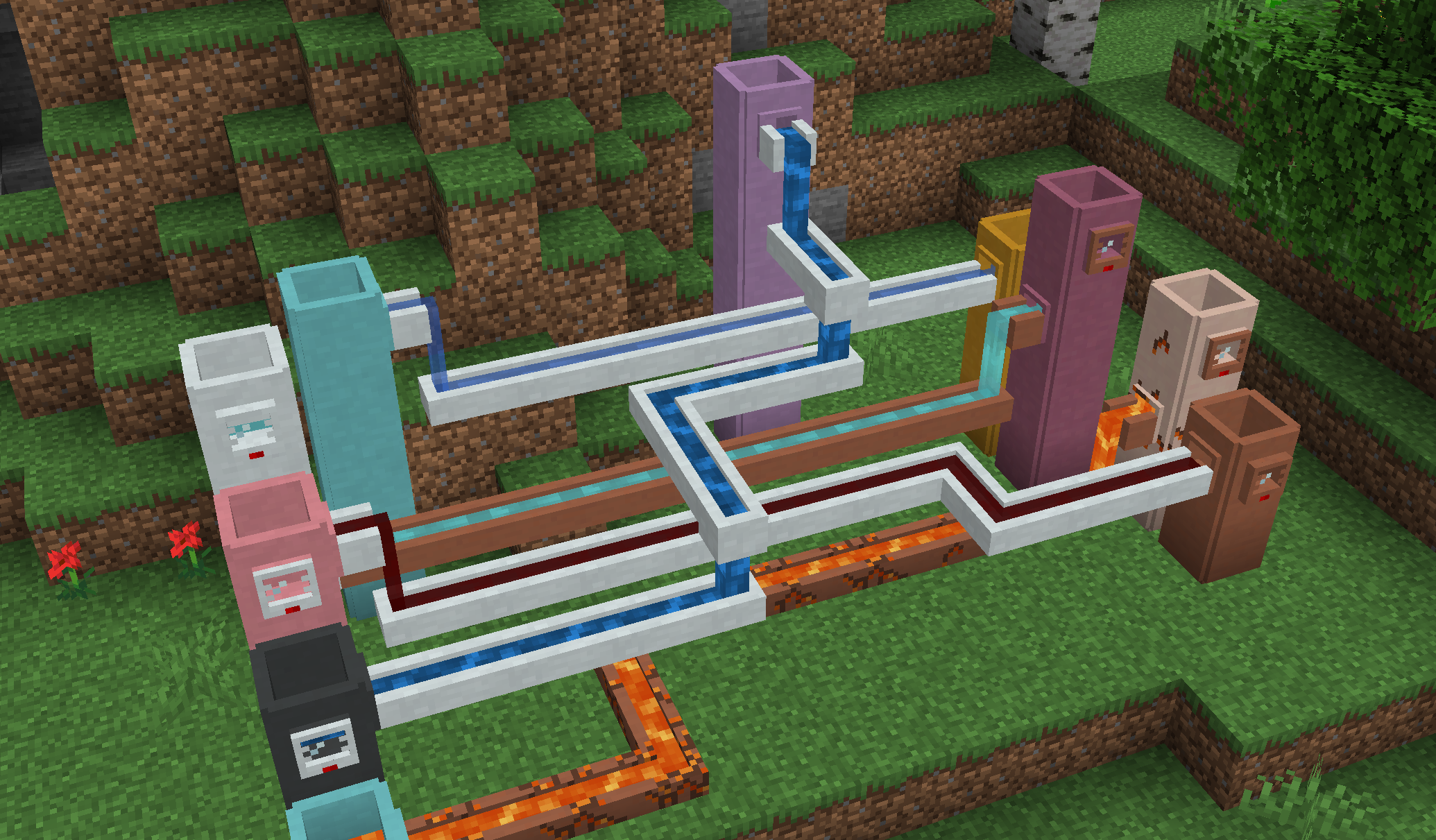
Ceramics 添加了若干与流体相关的方块,用于在世界中储存和运输流体。
蓄水池:可扩展的液体储存方块。
- 它有全部 17 种黏土颜色,每个桶容量为 4,另有 16 种瓷颜色,每个桶容量为 6 桶。
- 容量可以通过垂直堆叠蓄水池进一步扩展,每在上方放置一个扩展都会增加基础容量值。
- 会与龙头、导流槽和计量表在视觉上连接。
计量表:读取流体液位。
- 可放置在任何流体储罐的侧面,包括蓄水池和其他模组的储罐。
- 右键点击可显示所装流体的名称和数量。
龙头:允许简单的流体提取。
- 可以连接到方块的侧面或底部,并倒入龙头下方的方块中。
- 可以通过右键点击或红石激活,并会缓慢倾倒,直到下方储罐装满或流体耗尽。
- 是填充导流槽的主要方式。
导流槽:允许简单的流体运输。
- 不能提取流体,需要龙头来填充。会将流体推入附近的储罐或方块中。
- 每一侧都有方向,放置时会设定,之后可以通过右键点击进行配置。
- 还可以向下倾倒,可以通过手动或红石启用。
所有流体方块都有两种变体:
- 陶瓦:如果装入热流体会随时间开裂,但可以自由运输和储存冷流体。开裂的陶瓦可以用生黏土修复。
- 瓷:耐热,可以运输热流体而不会损坏方块。需要添加瓷。
装饰
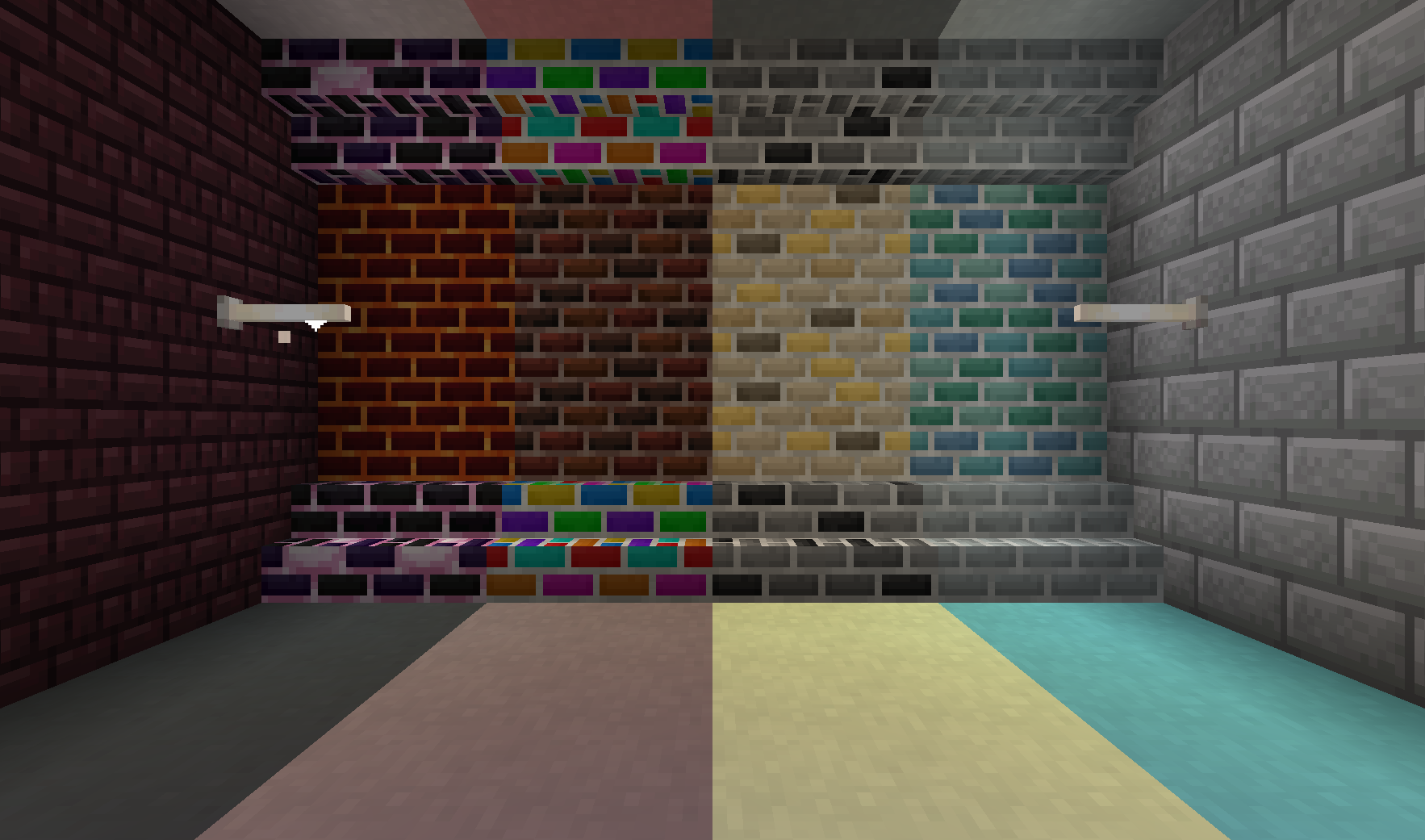
除了功能方块外,Ceramics 还添加了一系列装饰方块,用来美化任何基地。
瓷:装饰方块,类似于带色陶瓦或混凝土,但颜色更柔和。
瓷砖:砖块的白色变体。可以制成台阶、楼梯和墙。
精美砖块:六种额外风格的砖块,图案稍微更随机。每种类型都有台阶、楼梯和墙。
- 深色砖:带有工厂色调的暗红色砖块
- 单色砖:灰色砖块,偶尔带有黑色点缀
- 金砖:明亮的黄色砖块,旨在展示财富
- 海洋砖:海洋风格的砖块,用来装饰海晶石建筑。
- 熔岩砖:岩浆风格的砖块,用来改善下界基地
- 龙砖:末地风格的砖块,提供一种暗色亮点
彩虹砖和黏土:具有色彩丰富但渐变的彩虹动画。
- 黏土有 8 种变体,基于动画开始的位置。
- 砖块可以制成楼梯、台阶和墙。
更多信息
有关 1.12 及更早版本的信息,请查看图片标签页,或在官方 Feed the Beast Wiki 上阅读关于 Ceramics 的内容。你也可以在 SlimeKnights Discord 上讨论 Ceramics。
欢迎在整合包中使用此模组,只要提供返回此页面的链接即可
如果你想在 Patreon 上支持我,请使用以下链接:
如何安装 Ceramics
With Millida Launcher
Install Millida Launcher
The launcher is free: download it at millida.net/launcher and sign in with any nickname.
Click “Install” on this page
The launcher opens and installs the mod for Minecraft 1.10.2–1.20.1 on Forge or NeoForge automatically.
Launch the game
A profile with it appears in the launcher: click “Play”.
Manually
Install Forge or NeoForge
The loader must match the game version of the mod file, for example Minecraft 1.20.1. After installing it, a separate profile appears in your launcher.
Download the file for your version
In the version list above, pick the file Ceramics-1.20.1-1.8.0.jar (882 KB) for your game version and loader.
Put it in the mods folder
The folder is inside .minecraft (Windows: %appdata%\.minecraft\mods). If it does not exist, create it.
Launch the loader profile
Open “Mods” in the main menu: Ceramics should be in the list.
Minecraft 1.20.1 runs on Java 17: with a different Java version the game may close right after launch.
版本
含依赖项
| Minecraft | 加载器 | 文件 | 日期 | 操作 |
|---|---|---|---|---|
| 1.20.1 | Forge, NeoForge | Ceramics 1.8.0 for 1.20.1882 KB | ||
| 1.16.3 | Forge | Ceramics 1.6.0 for 1.16.x824 KB | ||
| 1.15.2 | Forge | Ceramics 1.4.0 for 1.15.2495 KB | ||
| 1.10.2 | — | Ceramics v1.1.293.3 KB | ||
| 1.10.2 | — | Ceramics v1.1.0a72.1 KB |
常见问题
Which Minecraft versions does Ceramics work on?
There are files for 1.20.1, 1.16.4, 1.16.3, 1.16.2, 1.15.2, 1.10.2. The newest is 1.20.1.
Is Ceramics for Forge or Fabric?
There are files for Forge: 1.15.2–1.20.1 and for NeoForge: 1.20.1. There are no files for Fabric: a mod for another loader will not start.
Does Ceramics need other mods?
The author lists no required dependencies: the Forge or NeoForge loader is enough.
Which Java does Ceramics need?
Minecraft 1.20.1 runs on Java 17. If the game closes right after launch, the usual cause is the wrong Java version in the profile settings.
Where can I download Ceramics safely?
On this page: the file Ceramics-1.20.1-1.8.0.jar (882 KB) is stored on Millida’s server, with no link shorteners. SHA-1 checksum: a696fad01b02a88e6d19e5f2cae76375973dfd84.
评价
成为第一个评价 Ceramics 的人


