

Accessories Mod pre Minecraft 1.20.1, 1.21.1
An extendable and data-driven Accessory Mod for Minecraft
 Fabric
 NeoForge
 Forge
ForgeO mode Accessories
Accessories is a Data-Driven Accessory mod for NeoForge and Fabric with emphasis on using a Common API for both platforms when possible.
The style for the library's API is based on the works of Curios and Trinkets with credit going to both TheIllusiveC4 and emilyploszaj for their work on Accessory mods for Minecraft.
Features
Elytra, Totem, and Banner Support Included
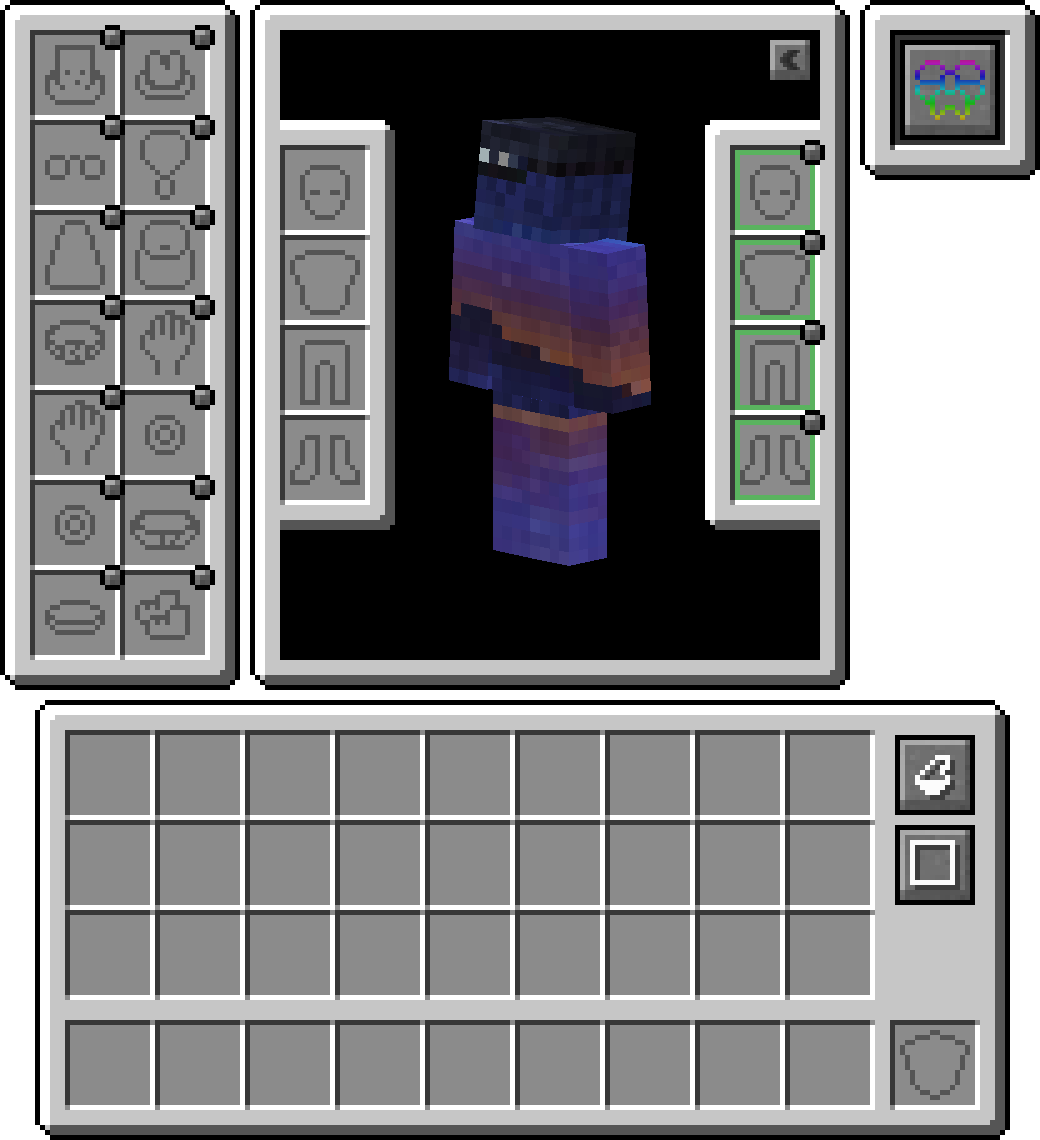
By default, you can equip banners in your head or cape(WIP) slot to show off a custom banner. For elytra, or totem, you will need to enable such within the config as its disabled by default.

Compatibility Layer
Due to existing API's like Trinket and Curios being predominantly used, you can install the Accessories Compatibility Layer to have them work under Accessories for a unified experience

Model Translation API
Included for developers is a proper transformation API used within rendering native Accessories, allowing proper linkage to a given entity model parts, which enables proper support for EMF Resourcepacks like Fresh Animations, and there are future plans to support other rendering mods like Figura.
Managing Equipped Accessories
The ability to access other tamed entities allows other mods to have accessory items for pets or mounts. Combined with it being useful for server owners to manage other players' accessories if needed, without the use of direct management commands. Just hold shift and use the 'Accessories Open Screen' on any entity (If owned, must be the owner) to bring up the screen, or run the command /accessories edit if OPed.
API Additions
Here are some examples of the API implemented in Accessories that may assist you with your mod development:
- Full Support for NBT-based Accessories: Wiki
- Existing API Events for Piglin Neutral Items, Enderman Masks, Looting Adjustments, Fortune Adjustments, and Snow Walking Ability: Wiki
- Unique Slot API for Mod Specific Accessories: Wiki
Ako nainštalovať Accessories
With Millida Launcher
Install Millida Launcher
The launcher is free: download it at millida.net/launcher and sign in with any nickname.
Click “Install” on this page
The launcher opens and installs the mod for Minecraft 1.20–1.21.1 on Fabric, Forge or NeoForge automatically, together with its dependencies: Cloth Config API, Fabric API, oωo (owo-lib).
Launch the game
A profile with it appears in the launcher: click “Play”.
Manually
Install Fabric, Forge or NeoForge
The loader must match the game version of the mod file, for example Minecraft 1.21.1. After installing it, a separate profile appears in your launcher.
Download the file for your version
In the version list above, pick the file accessories-fabric-1.1.0-beta.54+1.21.1.jar (1.1 MB) for your game version and loader.
Put it in the mods folder
The folder is inside .minecraft (Windows: %appdata%\.minecraft\mods). If it does not exist, create it. Required dependencies go there too: Cloth Config API, Fabric API, oωo (owo-lib).
Launch the loader profile
Open “Mods” in the main menu: Accessories should be in the list.
On a server
A server on Fabric, Forge or NeoForge
The mod only works on a server with the same loader and game version, for example 1.21.1.
File goes into the server’s mods folder
Stop the server, put the mod file into the mods folder and start the server again.
Use the “To server” button
On Millida Hosting, the button at the top of the page uploads the file to your server and restarts it for you.
Minecraft 1.21.1 runs on Java 21: with a different Java version the game may close right after launch.
Verzie
So závislosťami
| Minecraft | Loader | Súbor | Dátum | Akcie |
|---|---|---|---|---|
| 1.20.1 | Fabric | 1.20.1751 KB 3 | ||
| 1.20.1 | Forge | 1.20.11 MB 36 | ||
| 1.21.1 | Fabric | 1.21.11.1 MB 13 | ||
| 1.21.1 | NeoForge | 1.21.11 MB 35 | ||
| 1.21 | NeoForge | 1.2110.3 MB 14 | — | |
| 1.20.1 | Fabric | 1.20.1751 KB 3 | — |
Čo potrebuje na spustenie
- Cloth Config APIpovinné
- Fabric APIpovinné
- oωo (owo-lib)povinné
Obsah, ktorý to vyžaduje
FAQ
Which Minecraft versions does Accessories work on?
There are files for 1.21.1, 1.21, 1.20.1, 1.20. The newest is 1.21.1.
Is Accessories for Forge or Fabric?
There are files for Fabric: 1.20–1.21.1, for Forge: 1.20–1.20.1 and for NeoForge: 1.21–1.21.1.
What does Accessories need to work?
Required: Cloth Config API, Fabric API, oωo (owo-lib). Without them the mod will not start: dependencies go into the same mods folder.
Does Accessories work on a server?
Yes. Accessories works both in singleplayer and on a server.
Which Java does Accessories need?
Minecraft 1.21.1 runs on Java 21. If the game closes right after launch, the usual cause is the wrong Java version in the profile settings.
Where can I download Accessories safely?
On this page: the file accessories-fabric-1.1.0-beta.54+1.21.1.jar (1.1 MB) is stored on Millida’s server, with no link shorteners. SHA-1 checksum: e1165f3d5b31d4296f932ec1bc428f2a832c5def.
Recenzie
Buď prvý, kto ohodnotí Accessories


