
 Fabric
 Forge
 NeoForge
 Quilt
Acerca del mod Epic Structures: Villages



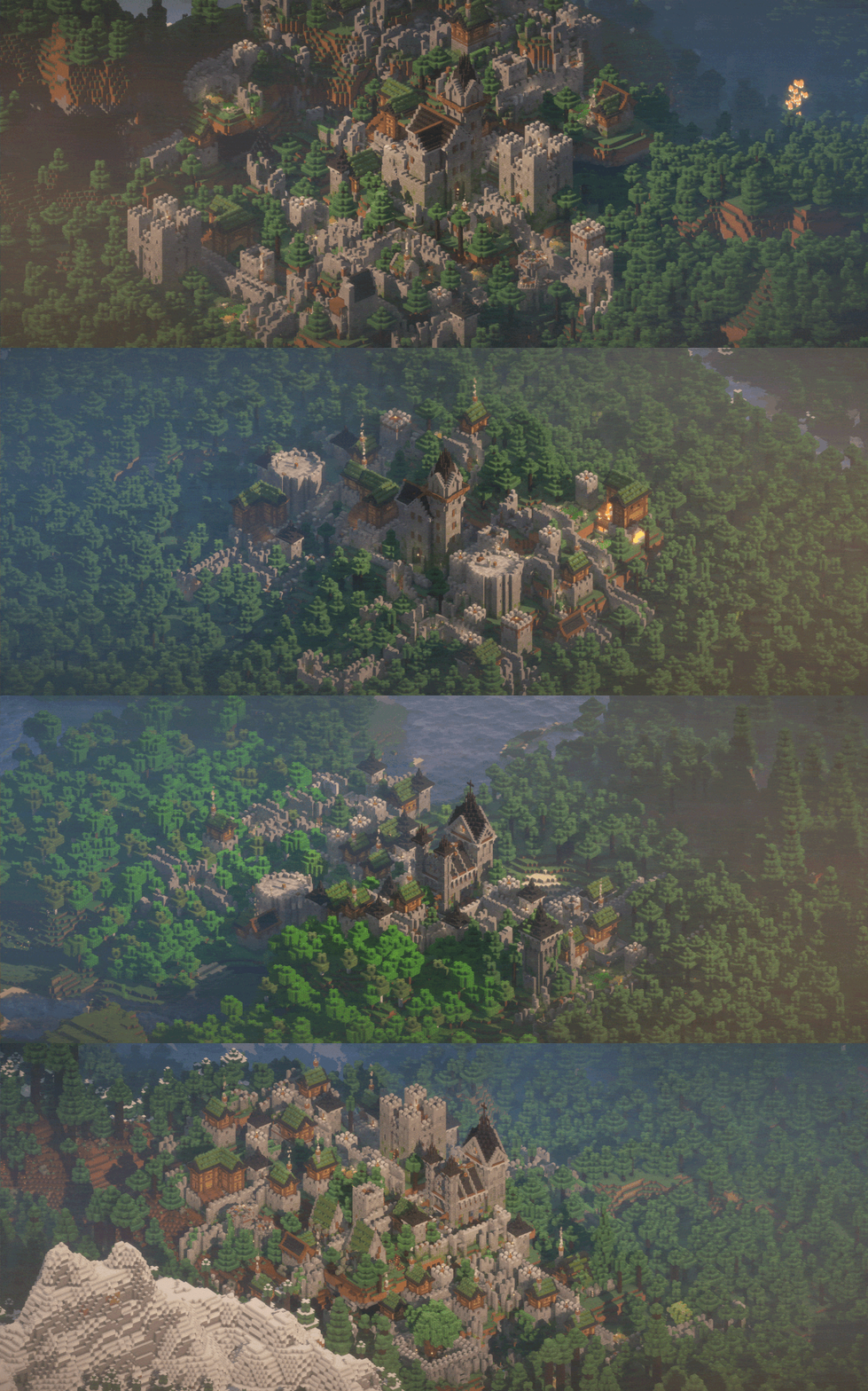
This mod completely replaces and overhauls minecraft villages with sprawling cities and towns based on medieval architecture. All built using vanilla features only, meaning no custom blocks or entities included. (FEEL FREE TO ADD TO ANY MODPACK)
Recommended mods to help with lag: Enhanced Block Entities ImmediatelyFast Sodium Entity Culling FerriteCore Chunky

Recent Changes: 1.21.11 support Improved spawning Compatiblity with mods that add structures to villages
🆕 5 out of 5 vanilla villages are complete: ✅ Plains Village ✅ Taiga Village ✅ Snowy Village ✅ Savanna Village ✅ Desert Village

LIST OF MODS THAT ARE WORK IN PROGRESS:
✅ Epic Villages ✅ Epic Witch huts ✅ Epic Dungeons ✅ Epic Igloos 🟨 Epic Jungle Temples

- ✅ Fully compatible with Almost all generation mods
- ✅ Fully compatible with ChoiceTheorem's Overhauled Village
- ✅ Fully compatible with Guard Villagers
- ✅ Fully compatible with Waystones
- 🚧 Might cause issues when used with other Village overhaul mods
Cómo instalar Epic Structures: Villages
With Millida Launcher
Install Millida Launcher
The launcher is free: download it at millida.net/launcher and sign in with any nickname.
Click “Install” on this page
The launcher opens and installs the mod for Minecraft 1.19–26.3 on Fabric, Forge, NeoForge or Quilt automatically.
Launch the game
A profile with it appears in the launcher: click “Play”.
Manually
Install Fabric, Forge, NeoForge or Quilt
The loader must match the game version of the mod file, for example Minecraft 26.3. After installing it, a separate profile appears in your launcher.
Download the file for your version
In the version list above, pick the file epic-structures-villages-2.0.0.jar (18 MB) for your game version and loader.
Put it in the mods folder
The folder is inside .minecraft (Windows: %appdata%\.minecraft\mods). If it does not exist, create it.
Launch the loader profile
Open “Mods” in the main menu: Epic Structures: Villages should be in the list.
Versiones
Con dependencias
| Minecraft | Cargador | Archivo | Fecha | Acciones |
|---|---|---|---|---|
| 1.21 | Fabric, Forge, NeoForge, Quilt | Epic Villages 2.0.0.jar17.8 MB 244 | ||
| 1.21 | Forge | Epic Villages v1.0.0 (1.21+) BROKEN3 MB |
FAQ
Which Minecraft versions does Epic Structures: Villages work on?
There are files for 1.19–26.3, 27 versions in total. The newest is 26.3.
Is Epic Structures: Villages for Forge or Fabric?
There are files for Fabric: 1.19–26.3, for Forge: 1.19–26.3, for NeoForge: 1.19–26.3 and for Quilt: 1.19–26.3.
Does Epic Structures: Villages need other mods?
The author lists no required dependencies: the Fabric, Forge, NeoForge or Quilt loader is enough.
Where can I download Epic Structures: Villages safely?
On this page: the file epic-structures-villages-2.0.0.jar (18 MB) is stored on Millida’s server, with no link shorteners. SHA-1 checksum: fc4f4998c5cfc35484101a9254bd0bd52ed431b2.
Reseñas
Sé el primero en valorar Epic Structures: Villages


