
Entity Culling Mod para Minecraft 1.12.2
Omite el renderizado de entidades ocultas
- descargas
- 7 descargas
- visualizaciones
- 20 visualizaciones
- Actualizado
- Actualizado 17.10.2026
- 1.12.2
 Forge
Forge
Acerca del mod Entity Culling
Entity Culling - 1.16.5 - 2.1.4 y versiones más recientes solo son compatibles con Optifine G8. Entity Culling - 1.16.5 - 2.1.3 y versiones anteriores solo son compatibles con Optifine G7. Entity Culling - 1.12.2 - 2.0.8 y versiones más recientes solo son compatibles con Optifine G5. Entity Culling - 1.12.2 - 2.0.7 y versiones anteriores solo son compatibles con Optifine F5.
Este mod requiere MixinBootstrap (curseforge, modrinth) y RenderLib (curseforge, modrinth) para funcionar (solo MC 1.12.2). Mixin 0.7-0.8 Compatibility (curseforge, modrinth) podría ser útil cuando otro mod usa una versión de mixin más antigua y por lo tanto no puedes iniciar el juego (solo MC 1.12.2).
Entity Culling es un mod de rendimiento del lado del cliente que busca omitir el renderizado de (tile-)entities ocultas. En vanilla, simplemente renderiza todas las (tile-)entities que están en el campo de visión del jugador. Esto significa que puede haber cientos de (tile-)entities consumiendo tus fps mientras ni siquiera puedes verlas porque están ocultas detrás de una pared.
Culling de entidades ocultas Por defecto, este mod usa una implementación de oclusión por culling de OpenGL que te ofrece un culling de bounding box perfecto a nivel de píxel con solo un fotograma de retraso y una sobrecarga muy pequeña.
Si tu hardware no es compatible con OpenGL 4.3, este mod usa una implementación de culling por raytracing. El culling por raytracing consume más CPU mientras que el culling por OpenGL consume más GPU y, por lo tanto, según tu hardware, podrías preferir uno sobre el otro. Esto puede dar como resultado mejoras masivas de FPS cuando hay muchas (tile-)entities en pantalla pero no son visibles porque están ocluidas.
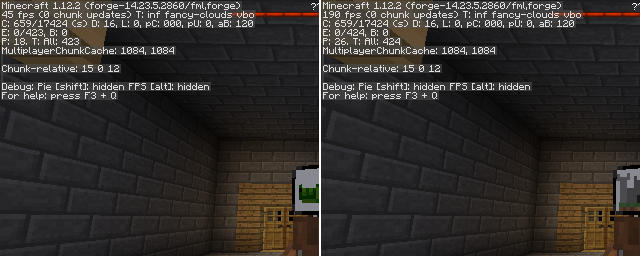
Una prueba con EntityCulling-1.12.2-6.0.2 dentro de una mazmorra de Chocolate Quest Repoured con unas 200 entidades en pantalla muestra mejoras enormes.
Cómo instalar Entity Culling
With Millida Launcher
Install Millida Launcher
The launcher is free: download it at millida.net/launcher and sign in with any nickname.
Click “Install” on this page
The launcher opens and installs the mod for Minecraft 1.12.2 on Forge automatically.
Launch the game
A profile with it appears in the launcher: click “Play”.
Manually
Install Forge
The loader must match the game version of the mod file, for example Minecraft 1.12.2. After installing it, a separate profile appears in your launcher.
Download the file for your version
In the version list above, pick the file EntityCulling-1.12.2-6.5.0.jar (62 KB) for your game version.
Put it in the mods folder
The folder is inside .minecraft (Windows: %appdata%\.minecraft\mods). If it does not exist, create it.
Launch the loader profile
Open “Mods” in the main menu: Entity Culling should be in the list.
Minecraft 1.12.2 runs on Java 8: with a different Java version the game may close right after launch.
Versiones
Con dependencias
| Minecraft | Cargador | Archivo | Fecha | Acciones |
|---|---|---|---|---|
| 1.12.2 | Forge | EntityCulling-1.12.2-6.5.0.jar62.4 KB 6 | ||
| 1.12.2 | — | EntityCulling-1.12.2-6.3.1.jar64.4 KB 1 | ||
| 1.12.2 | — | EntityCulling-1.12.2-6.0.2.jar54.1 KB |
FAQ
Which Minecraft versions does Entity Culling work on?
Only Minecraft 1.12.2: there are no files for other versions.
Is Entity Culling for Forge or Fabric?
Only for Forge: 1.12.2. There are no files for Fabric or NeoForge: a mod for another loader will not start.
Does Entity Culling need other mods?
The author lists no required dependencies: the Forge loader is enough.
Which Java does Entity Culling need?
Minecraft 1.12.2 runs on Java 8. If the game closes right after launch, the usual cause is the wrong Java version in the profile settings.
Where can I download Entity Culling safely?
On this page: the file EntityCulling-1.12.2-6.5.0.jar (62 KB) is stored on Millida’s server, with no link shorteners. SHA-1 checksum: cf4a4a6b11b1721fbda1edeb32bdc3b1ac3a8560.
Reseñas
Sé el primero en valorar Entity Culling


