
Minecraft mods — page 292
9,029 itemsMods: list


Harvestable Flowers
Harvestable Flowers allows you to get flowers by using bone meal on it.InstallOn a server

Stackable Stew and Soup
By making use of this mod, you will be able to stack the default stews and soups up to a maximum of 8 items in the same inventory slot.InstallOn a server

Global GameRules
A mod that allows for global/default gamerulesInstallOn a server

Relics: Alex's Mobs Compat
Compatibility addon between Relics and Alex's MobsInstallOn a server

Extended Bone Meal
☘ Extends bonemeal behaviour. Instant grow with sneak, grow netherwart+cacti+sugarcane and other tweaks.InstallOn a server

Ender Trigon
A mod that makes the Ender Dragon fight more difficultInstallOn a server
Hoe Tweaks
🌾 Faster crop block breaking, increased hoe radius and the ability to un-till soil.Install

Elytra Trinket
A Minecraft Fabric mod that adds the Elytra to the cape slot in the Trinkets API.InstallOn a server

StartInv
You will start with a few seconds of immortality! You will never start dying againInstallOn a server
Connectedness
Unofficial Fork of Continuity that works with ForgeInstall
Book Wyrms
Colorful lizards that can recycle your enchanting books.InstallOn a server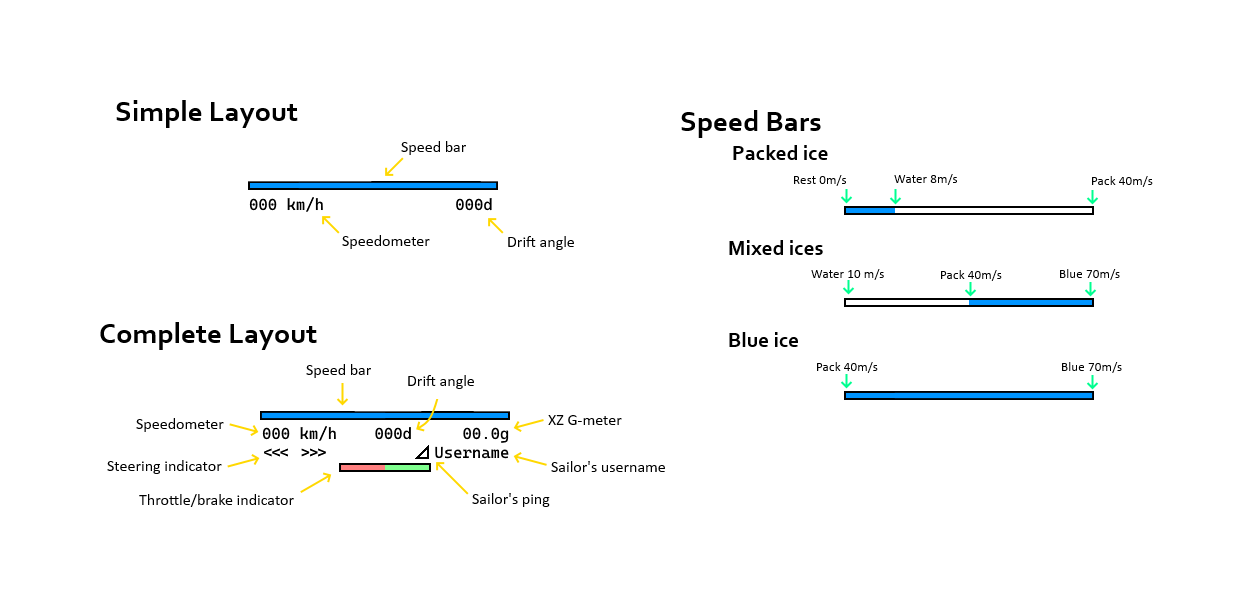

Boat Hud
Sailing fast in style! A small and vanilla friendly way to sail with more ease.Install

FADG
A mod packed with bizarre and eerie creatures—Tomie, Chu Renmei, Saya, and more.InstallOn a server

CraftingPad
Adds a portable crafting table to the gameInstallOn a server
Simple Magnets
Simple Magnets adds Magnets that pickup items around the player!InstallOn a server
Create: Missions
Economy for Create mod servers by granting weekly missionsInstall

X to Xray
An Powerfull Xray Mod That Allows You To See Ores And More By Pressing X! [Requires Serverside!]InstallOn a server

More Mouse Tweaks
Complements MouseTweaks by adding more mouse functionality from MouseWheelie.Install

Armorful
Adds armor for various mobs naturally. Illagers, Witches, Drowned and more!InstallOn a server
Legacy4J
This mod adapts all the features from old Minecraft Legacy Console editionInstall
Liteminer
Mine an entire vein of ore, chop an entire tree or break any group of blocks by holding a hotkey.Install
Too Many Players
Allows you to increase FPS with a large crowd of playersInstall
SimpleVillagers
Easier villagers mod. Serverside, of course.InstallOn a serverFAQ
How is Forge different from Fabric?
They're two different mod loaders that aren't compatible with each other. Forge is the older one and better suited to big tech and magic modpacks; Fabric is lighter, updates to new game versions faster, and hosts most performance mods. NeoForge is a Forge fork for newer versions, and Quilt is a Fabric fork. A Forge mod won't run on Fabric, and vice versa. Millida Launcher installs the right loader for you.
How do I know which mod version I need?
The one that matches your game version and loader. The “Install” button picks the file for you: Millida Launcher grabs the version for your modpack. A mod for 1.20.1 usually won't work on 1.21.
How do I install a mod?
Click “Install” and Millida Launcher will download the mod, its dependencies and the right loader for you. To install a downloaded file manually, put it in the mods folder inside the game directory.
Do I need CurseForge to install mods?
No. The Install button on a mod page opens Millida Launcher: it downloads the mod, its dependencies and the right loader into the chosen instance by itself. No CurseForge and no manual file copying.
Which mods are there for 1.20.1?
1.20.1 is one of the most modded versions, especially on Forge: tech, magic, RPG, furniture, weapons. Pick 1.20.1 in the version filter to keep only mods with a file built exactly for it, then pick Forge or Fabric next to it.
Can I install mods on my phone?
On Android, yes: Millida Launcher runs the Java edition on a phone, and mods work there just like on a PC, though light ones run much better than heavy ones. Minecraft PE (Bedrock) cannot load PC mods — it has add-ons instead, in the Minecraft PE mods section.
Which mods are best to play with friends?
The usual picks are Simple Voice Chat for proximity voice chat, Waystones for fast travel, Xaero's Minimap and something big to work on together, such as Create. Mods that change the world must be installed by every player and on the server, while client-side ones like a minimap or performance mods are up to each player.
Minecraft mods
A mod is an add-on that changes the game itself: it adds blocks, mobs and mechanics, or speeds up world rendering. It isn't installed into the game directly but on top of a loader — Forge, Fabric, NeoForge or Quilt — and it's the loader that decides whether the file will run. That's why every card here lists both the game version and the loader: two mods with the same name for 1.12.2 Forge and 1.21 Fabric are two different files, and mixing them up means a crash on launch.
The most searched Minecraft mods are weapon, furniture, horror and performance mods: each theme has its own collection, and links to the themes and the most wanted versions are in the Popular block. Version 1.20.1 on Forge still holds the most big tech, magic and RPG mods, while the fresh 1.21.11 and 26.2 get Fabric and NeoForge mods fastest.
One mod in the catalog, one page. Every version the author has released is listed on its card: pick your game version and loader right there instead of jumping between ten similar pages. Each file shows its size, release date and checksum, and the mod itself shows the author, license and a link to the original source. Files whose license allows rehosting are stored with us and download directly — no link shorteners, timers or ad redirects. If the license forbids rehosting, the button honestly takes you to the author.