
Datapacks for Minecraft Java — page 6
2,543 itemsData packs: list


Repurposed Structures - Better Desert Temples Compat
Change RS Pyramids to be in Better Desert Temple's styleInstallOn a server

Tree Vein Miner
Tree Vein Miner Removes entire trees (logs and leaves) when crouchingInstallOn a server

More Mobs
Humanoid mobs get new variants through over 85 custom player heads or unused vanilla mobs! No Resource Pack needed!InstallOn a server

Luki's Woodland Mansions
New Mansions to explore and traverse.InstallOn a server

BoniMons [Cobblemon]
Datapack that adds a bunch of Pokemon that are missing in Cobblemon!InstallOn a server

Shingeki no Craft | Attack on Titan
Titan Shifters, ODM, Cannons, Pure Titans, Thunder Spears, Modified Villages, Firearms, Royal Blood, Quests and more! Made using only Command Blocks, Minecraft Vanilla!InstallOn a server

CTOV - Villagers Plus Compat
Compatibility datapack between ChoiceTheorem's overhauled village and VillagersPlus modInstallOn a server

CobbleCats [cobblemon]
Adds cat pokemon to cobblemon. Requires Cobblemon.InstallOn a server
Farmer's Delight Cutting Compat
Adds compatibility between Farmer's Delight and many other mods through cutting board recipes!InstallOn a server

CloudMons 【Cobblemon】
A pack made for some Pokemon without a modelInstallOn a server

Dungeons and Taverns Ocean Monument Overhaul
This Mod/Datapack Overhauls the Ocean Monument, turning it into a jigsaw structure, every room has randomized walls and floors, and some loot chests are scattered aroundInstallOn a server

Portfolio
Adds in a large catalogue of 100+ paintings to the game!InstallOn a server

Immersive structures
Additional structure packsInstallOn a server

Dungeons and Taverns Jungle Temple Overhaul
Overhauls Jungle Temples with 4 Variants using new loot tables alongside the Vanilla Loot Table and can have archeology elements inside as well as new puzzlesInstallOn a server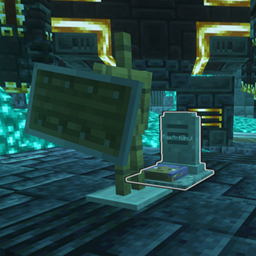
Grave Destruction fix for "You're in Grave Danger" and "L_Ender 's Cataclysm" bosses
Literally just adds the YIGD grave tag to the files in the Cataclysm mod that are immune to the bosses, fixing the issue with the graves being destroyedInstallOn a server

Red’s More Structures
Adds more structures and dungeons to MinecraftInstallOn a server

Pigeon's Poke Pack [1.7.0] - Fang and Claw
Models for Pokémon that may or may not have them. Newly added: Zangoose and SeviperInstallOn a server

Loot Tweaks For Artifacts - Utility Datapack for Prominence II
This Datapack Removes Feral Claws from any of the Loot tables and replaces it with Pickaxe heaters by default. This Datapack can be used to Modify Artifacts Loottables, Advancements, Recipes and the Worldgen of the Campsites.InstallOn a server

Tierify - Prominence II Tweaks
A datapack to tweak the default attribute values provided by the Tierify mod, specifically tweaked for the Prominence II modpack by ElocinDev, includes proper reforging material support for various mods in the modpackInstallOn a server

All Mob Heads
A datapack that allows the head drop of all mobs.InstallOn a server

Mythic Upgrades x Advanced Netherite
Makes Mythic Upgrades armors an upgrade from Advanced Netherite sets.InstallOn a server

Dagger Fix
Fixes items from Simply Swords and Mine Cells that aren't tagged as daggers in Better CombatInstallOn a server

Droppable Iron Barrels Fix
Fixes barrels from Iron Chests Restocked not being mineableInstallOn a serverFAQ
How is a datapack different from a mod?
A datapack uses the game's own tools: it changes recipes, loot, structures and advancements. A mod changes the game's code and can add something genuinely new — a block, a mob, an interface. A datapack doesn't need a loader to work.
How do I install a datapack?
Click “Install” and Millida Launcher will add the datapack to the world you choose. To do it manually, put the archive in the datapacks folder inside the world folder and rejoin the world.
Does a datapack work on a server?
Yes, on a regular server without mods: the datapacks folder sits inside the server's world folder. Players don't need to install anything on their clients.
What is a data pack?
A set of files that changes the game with its own tools: recipes, loot, world generation, advancements and command functions. It works from version 1.13 without mods or loaders and is installed into a specific world.
Are there data packs for world generation?
Yes, it is one of their most common jobs: new biomes, terrain, caves and structures. Generation only changes in chunks that have not been created yet, so such a data pack is best added when creating a new world.
Datapacks for Minecraft Java
A datapack changes the game's rules without touching its code: crafting recipes, loot tables, world structures, advancements, command functions. The game supports all of this natively since 1.13, so a datapack needs neither Forge nor Fabric — it's installed into a specific world and works on the vanilla client and a regular server.
Data packs do different jobs: some change world generation — biomes, terrain and structures, others add mechanics, challenges and horror events, and others are made for servers — economy, ranks, command-based minigames. Generation applies only to new chunks, so such packs are added when a world is created. On Millida Hosting a data pack goes onto the server with the On a server button on its page.
That's the main difference from mods: a datapack doesn't show up in the mod list, and it can't add anything the game doesn't have at all — you can't make a new block with its own model this way. On the other hand, it doesn't clash with other packs, doesn't need updating when you switch loaders and doesn't stop you from playing with friends on a regular server. Installing a datapack is simple: put the archive in the datapacks folder inside the world folder, then reload the world or run the reload command. The card lists the game version, author and license, and all releases are gathered in one place.