Thunder Strike Enchantment
by lullaby · ModrinthNew mace enchantment that summons lightning bolts whenever you land a charged attack!
New mace enchantment that summons lightning bolts whenever you land a charged attack!
The original Skyblock has been modernized and updated to the latest versions of Minecraft...
Experience the classic Enchanted Golden Apple from older versions in Minecraft 1.9+
Transfer enchantments from tools to books with a fully customizable datapack
A Datapack that backports the bundle, saddle and lodestone crafting recipes.
Allows Duplication via Nether star. (DISCOUNTINUED)
A datapack that adds AI cars to Minecraft!
Nightvision when looking through a spyglass! Configurable as an enchantment!
Leash Everything allows you to attach leads to every living entity in the game (like villagers, creepers, endermen, etc.).
Removes phantoms from the game and provides an alternative crafting recipe for phantom membranes.
This datapack simulates a slightly modified version of the popular infuse smp.
Adds 18 new recipes for some uncraftable items in Minecraft.
Adds ore deposits on the surface which generate ore.
Allows you to write names in the Death Note!
This datapack / mod allows you to smelt raw ore blocks, saving you a bit of time and fuel. Formerly known as "Raw Ore to Blocks".
This datapack improves horses, camels, sniffers, undead horses and llamas!
Easily call (whistle) your parrot with a goat horn to teleport it to you
Adds a fully functional power armor system inspired by the Fallout series!
Datapack adding support for Mowzie's Mobs and Epic Fight.
Recycle Leather is a Datapack for Minecraft that adds recipes for scrapping saddles and leather armors (human or horse).
Introduces fruit-bearing apple trees! Trade for apple saplings with wandering traders or find them growing in forests!
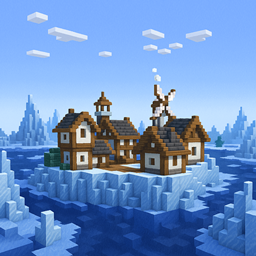
This datapack adds a village floating in the ocean, offering a safe haven for travelers and traders. But beware — rumors speak of dangerous secrets hidden deep within the iceberg.
A customisable datapack for the MVS mod, allowing for easy control over the mod
This pack adds oilrigs to your Minecraft world! Even though they dont serve any purpose, they are a great copper mine and fun exploring or for being your starter base! 🪙🔦
A datapack uses the game's own tools: it changes recipes, loot, structures and advancements. A mod changes the game's code and can add something genuinely new — a block, a mob, an interface. A datapack doesn't need a loader to work.
Click “Install” and Millida Launcher will add the datapack to the world you choose. To do it manually, put the archive in the datapacks folder inside the world folder and rejoin the world.
Yes, on a regular server without mods: the datapacks folder sits inside the server's world folder. Players don't need to install anything on their clients.
A set of files that changes the game with its own tools: recipes, loot, world generation, advancements and command functions. It works from version 1.13 without mods or loaders and is installed into a specific world.
Yes, it is one of their most common jobs: new biomes, terrain, caves and structures. Generation only changes in chunks that have not been created yet, so such a data pack is best added when creating a new world.
A datapack changes the game's rules without touching its code: crafting recipes, loot tables, world structures, advancements, command functions. The game supports all of this natively since 1.13, so a datapack needs neither Forge nor Fabric — it's installed into a specific world and works on the vanilla client and a regular server.
Data packs do different jobs: some change world generation — biomes, terrain and structures, others add mechanics, challenges and horror events, and others are made for servers — economy, ranks, command-based minigames. Generation applies only to new chunks, so such packs are added when a world is created. On Millida Hosting a data pack goes onto the server with the On a server button on its page.
That's the main difference from mods: a datapack doesn't show up in the mod list, and it can't add anything the game doesn't have at all — you can't make a new block with its own model this way. On the other hand, it doesn't clash with other packs, doesn't need updating when you switch loaders and doesn't stop you from playing with friends on a regular server. Installing a datapack is simple: put the archive in the datapacks folder inside the world folder, then reload the world or run the reload command. The card lists the game version, author and license, and all releases are gathered in one place.