
Datapacks for Minecraft Java — page 4
2,540 itemsData packs: list


Farmer's Cutting: Biomes O' Plenty
Adds Farmer's Delight cutting recipes for Biomes O' PlentyInstallOn a server

Geophilic Reforged
A subtle overhaul of vanilla and mod Overworld biomesInstallOn a server

Repurposed Structures - Chef's Delight Compat
Adds Chefs and Cook houses to RS villages!InstallOn a server

CTOV - Incubation Compat
Compatibility add-on for Incubation mod and CTOVInstallOn a server

CTOV - Savage and Ravage Compat
Compatibility datapack between ChoiceTheorem's overhauled village and Savage and Ravage modInstallOn a server

Armor Stand Arms
Armor stands have arms by default!InstallOn a server

Tool Trims
Allows you to trim your weapons and tools on a Smithing Table. There are almost 2000 trim combinations!InstallOn a server
Cobblemon: Better Caps!
Dislike the simplistic two-dimensional & flat caps from Cobblemon? - Well, I might just have what you need!InstallOn a server
Ender Dragon Loot x Advanced Netherite Compat
Enderdragon Loot x Advanced Netherite Compatibility DatapackInstallOn a server

Cobblemarks+ (Cobblemon)
Adds additional marks to Cobblemon, and improves some already existing ones!InstallOn a server

Scarecrow Obliterator | Datapack
Removes those annoying scarecrows that spawn every few blocks.InstallOn a server
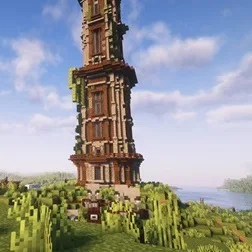
Improved Pillager Outpost
The "Improved Pillager Outpost" Datapack revamps the standard Minecraft Pillager Outpost into a challenging, multi-level tower. This overhaul adds detailed architecture, tougher enemies, and exclusive loot, creating a more immersive and rewarding experieInstallOn a server

Hopo Better Ruined Portals
Improve how the portals look in your worldInstallOn a server

HiddenMons [Cobblemon]
Cobblemon Add-on that implements Pokémon not yet in the official mod!InstallOn a server

Bygone Nether: Soul Stone Recipe | Datapack
Makes Soul Stone craftable using Soul Soil and Soul Sand.InstallOn a server

Unnamed Desert
Additional structures for the desert and badlands biomes, focusing on an immersive expansion for the vanilla game.InstallOn a server
Spell Enchants for All! - Prominence II
Adds spell enchants to most weapons.InstallOn a server

Dungeons and Taverns Woodland Mansion Overhaul
This Mod Overhauls the Woodland Mansion with 184 different rooms and 8 type of rooms. adding a basement layer and a road leading away from the woodland mansionInstallOn a server

ATi Structures
Custom vanilla dungeons and structures for both Fabric and ForgeInstallOn a server

DeCubed Dungeons (Formerly Dungeons+)
Brand new vanilla dungeons remade with biome specific designs and new mob spawner typesInstallOn a server

Gardener's Dream
Allows you to place any plant in flower pots, decorated pots, player heads and half-pots (NEW). Survival friendly! No resource pack required!InstallOn a server

Dungeons and Taverns Swamp Hut Overhaul
This Splinter Standalone version of Dungeons and Tavern adds the Swamp Hut rework. Adding 2 variants, an loot chest, an brewing stand and an bedInstallOn a server

qrafty's Jungle Villages
This pack adds random generating jungle villages in the game to honor the forgotten jungle villagers! 🌹🍉InstallOn a serverFAQ
How is a datapack different from a mod?
A datapack uses the game's own tools: it changes recipes, loot, structures and advancements. A mod changes the game's code and can add something genuinely new — a block, a mob, an interface. A datapack doesn't need a loader to work.
How do I install a datapack?
Click “Install” and Millida Launcher will add the datapack to the world you choose. To do it manually, put the archive in the datapacks folder inside the world folder and rejoin the world.
Does a datapack work on a server?
Yes, on a regular server without mods: the datapacks folder sits inside the server's world folder. Players don't need to install anything on their clients.
What is a data pack?
A set of files that changes the game with its own tools: recipes, loot, world generation, advancements and command functions. It works from version 1.13 without mods or loaders and is installed into a specific world.
Are there data packs for world generation?
Yes, it is one of their most common jobs: new biomes, terrain, caves and structures. Generation only changes in chunks that have not been created yet, so such a data pack is best added when creating a new world.
Datapacks for Minecraft Java
A datapack changes the game's rules without touching its code: crafting recipes, loot tables, world structures, advancements, command functions. The game supports all of this natively since 1.13, so a datapack needs neither Forge nor Fabric — it's installed into a specific world and works on the vanilla client and a regular server.
Data packs do different jobs: some change world generation — biomes, terrain and structures, others add mechanics, challenges and horror events, and others are made for servers — economy, ranks, command-based minigames. Generation applies only to new chunks, so such packs are added when a world is created. On Millida Hosting a data pack goes onto the server with the On a server button on its page.
That's the main difference from mods: a datapack doesn't show up in the mod list, and it can't add anything the game doesn't have at all — you can't make a new block with its own model this way. On the other hand, it doesn't clash with other packs, doesn't need updating when you switch loaders and doesn't stop you from playing with friends on a regular server. Installing a datapack is simple: put the archive in the datapacks folder inside the world folder, then reload the world or run the reload command. The card lists the game version, author and license, and all releases are gathered in one place.