
Datapacks for Minecraft Java — page 3
2,540 itemsData packs: list


Vanilla Refresh
Enhancing Minecraft's experience with a variety of 30+ QOL features, like player sitting and a day counter.InstallOn a server

Repurposed Structures - Friends and Foes Compat
Add Copper Golems and Beekeepers to RS VillagesInstallOn a server

CTOV - Beautify Compat
Compatibility datapack for beautify mod and CTOVInstallOn a server

More Radical Trainers: SV
Additional Trainers for the Radical Cobblemon Trainers modInstallOn a server

Repurposed Structures - Better Strongholds Compat
Change RS Strongholds to be in Better Stronghold's styleInstallOn a server

Dungeons and Taverns Stronghold Overhaul
This Datapack, the Standalone version of Dungeons and Taverns Overhaul of the Stronghold, Overhauls the Stronghold from the ground up With 417 Different rooms and 5 sub stronghold types Fair warning, your world will Freeze Upon first Structure generation.InstallOn a server

Repurposed Structures - VillagerPlus Compat
Adds new houses and workstations to RS villages!InstallOn a server
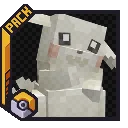
Pokopia Cosmetic Forms [Cobblemon]
Adds Peakychu, Smearguru, and Mosslax, Professor Tangrowth, and Trainer Ditto to the game.InstallOn a server

Repurposed Structures - Better Dungeons Compat
Change RS Dungeons to be in Better Dungeon's styleInstallOn a server

Repurposed Structures - Bygone Nether Compat
A partially buried Jungle Fortress to explore with towers above!InstallOn a server

Repurposed Structures - Bountiful Compat
Adding Bounties to RS villages!InstallOn a server

Ender Dragon Fight Remastered
A difficulty increase of Minecraft's final boss, with a focus on a somewhat Vanilla feel.InstallOn a server

More Radical Trainers Localization Pack
Added localization support for More Radical Trainers and added correct badge displays in achievements.InstallOn a server

MelloMons
A datapack adding a remodel for Mew to Cobblemon.InstallOn a server

Anytag
Place tags on anything, anywhere!InstallOn a server

CTOV - Chef's delight Compat
Compatibility add-on for Chef's delight mod and CTOVInstallOn a server

Hopo Better Underwater Ruins
Explore new ocean ruins to your worldInstallOn a server

Dungeons and Taverns Pillager Outpost Overhaul
Standalone split version of the Pillager Outpost Overhaul from Dungeons and TavernsInstallOn a server

Day Counter (Original)
For Minecraft 1.16 - Latest! This datapack/mod add text on top of your hotbar that will count the day realtime.InstallOn a server

Hopo Better Mineshaft
More and better mineshafts to exploreInstallOn a server

Amplified Nether
The nether explorer's simple dream: doubled height and amplified terrain. What more is needed?InstallOn a server

Repurposed Structures - Better Ocean Monuments Compat
Change RS Monuments to be in Better Ocean Monument's styleInstallOn a server

Guns ++
Multiplayer and Survival Friendly Vanilla Guns Datapack, Many versions starting from 1.17, Adds 50+ Guns and 4 Grenades all with Custom Models and Sounds!InstallOn a serverFAQ
How is a datapack different from a mod?
A datapack uses the game's own tools: it changes recipes, loot, structures and advancements. A mod changes the game's code and can add something genuinely new — a block, a mob, an interface. A datapack doesn't need a loader to work.
How do I install a datapack?
Click “Install” and Millida Launcher will add the datapack to the world you choose. To do it manually, put the archive in the datapacks folder inside the world folder and rejoin the world.
Does a datapack work on a server?
Yes, on a regular server without mods: the datapacks folder sits inside the server's world folder. Players don't need to install anything on their clients.
What is a data pack?
A set of files that changes the game with its own tools: recipes, loot, world generation, advancements and command functions. It works from version 1.13 without mods or loaders and is installed into a specific world.
Are there data packs for world generation?
Yes, it is one of their most common jobs: new biomes, terrain, caves and structures. Generation only changes in chunks that have not been created yet, so such a data pack is best added when creating a new world.
Datapacks for Minecraft Java
A datapack changes the game's rules without touching its code: crafting recipes, loot tables, world structures, advancements, command functions. The game supports all of this natively since 1.13, so a datapack needs neither Forge nor Fabric — it's installed into a specific world and works on the vanilla client and a regular server.
Data packs do different jobs: some change world generation — biomes, terrain and structures, others add mechanics, challenges and horror events, and others are made for servers — economy, ranks, command-based minigames. Generation applies only to new chunks, so such packs are added when a world is created. On Millida Hosting a data pack goes onto the server with the On a server button on its page.
That's the main difference from mods: a datapack doesn't show up in the mod list, and it can't add anything the game doesn't have at all — you can't make a new block with its own model this way. On the other hand, it doesn't clash with other packs, doesn't need updating when you switch loaders and doesn't stop you from playing with friends on a regular server. Installing a datapack is simple: put the archive in the datapacks folder inside the world folder, then reload the world or run the reload command. The card lists the game version, author and license, and all releases are gathered in one place.