
Minecraft datapacks — page 100
2,540 itemsData packs: list


MoreTaggedRecipies
Adds much more ways to craft stone tools including common tags like forge:stone and forge:sandstone. also contains its own tag for vanilla blocks like end stone, red sandstone, stone bricks, Also backports some new recipies like saddles and leadsInstallOn a server

No Crops Griefing
Stops mobs and players from being able to trample crops so easily when jumping on them.InstallOn a server

Disable Zombie Baby
Just little tweak that totally disables all of kinds of hostile kids. No more ugly undead broods.InstallOn a server

Soul Pyres
Datapack to prevent hostile mob spawns in a radiusInstallOn a server

Invisible Human Origin
Adds an Origin to turn invisible or to constantly glowInstallOn a server

Player Head Drops
Drop player heads when exploded by a charged Creeper or playerInstallOn a server

no elytra boosting
A Datapack which disables elytra rocket boostingInstallOn a server
Mob Kill Counter
A simple mob kill counter display above your hotbar that will tell you the current world death, useful for Survival world and 100 days challengesInstallOn a server

Debug stick crafting
This pack adds a simple way to craft the debug stick in survival, which is great for those who wanna create detailed builds.InstallOn a server
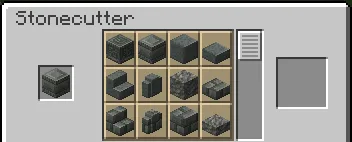
[Crafting] Improved Stonecutting
Overhauls the stonecutting recipes for QoL improvementsInstallOn a server

HWG - Custom Recipes
A custom recipe Data pack for Happiness (is a) Warm Gun mod.InstallOn a server

CoalDye
A datapack that allows you to craft black dye using coal or charcoal.InstallOn a server

DayCounter
This datapack makes a day counter in minecraft.InstallOn a server

Silktouchless Ender Chests
Allows the player to break Ender Chests without the need for the Silk Touch enchantment.InstallOn a server
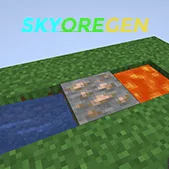
SkyOreGen
SkyOreGen is a data pack that will replace the cobblestone and basalt from generators with ores and blocks determined by the tier of generator.InstallOn a server

No Squid
Disable Squid in Minecraft by preventing its spawning and removing any that appear in the worldInstallOn a server

No Sniffer
Disable Sniffer in Minecraft by preventing its spawning and removing any that appear in the worldInstallOn a server

Craftable Spawner
Adds a crafting recipe for the spawner item in Minecraft.InstallOn a server

Caelari Knight Monument
This datapack adds a unique structure belonging to the Caelari Knight Monument, bringing their distinctive style to your Minecraft world! Compatibility 1.20 to 26.3InstallOn a server

More Tool Upgrades
Adds Smithing Table recipes to upgrade wood/leather, iron, and gold tools/armor.InstallOn a server

Compact UHC Run
UHC Run data pack that you can install in any world you want, plus you can include your preferred add-ons to make it more unique in your own way.InstallOn a server

Better Furnaces: Saplings
This data pack adds the ability to smelt saplings in Minecraft, which previously could not be processed in a furnace. Burning a sapling produces dead bush, offering a new way to use resources, especially in buildingInstallOn a server

No Vindicator
Disable Vindicator in Minecraft by preventing its spawning and removing any that appear in the worldInstallOn a serverFAQ
How is a datapack different from a mod?
A datapack uses the game's own tools: it changes recipes, loot, structures and advancements. A mod changes the game's code and can add something genuinely new — a block, a mob, an interface. A datapack doesn't need a loader to work.
How do I install a datapack?
Click “Install” and Millida Launcher will add the datapack to the world you choose. To do it manually, put the archive in the datapacks folder inside the world folder and rejoin the world.
Does a datapack work on a server?
Yes, on a regular server without mods: the datapacks folder sits inside the server's world folder. Players don't need to install anything on their clients.
What is a data pack?
A set of files that changes the game with its own tools: recipes, loot, world generation, advancements and command functions. It works from version 1.13 without mods or loaders and is installed into a specific world.
Are there data packs for world generation?
Yes, it is one of their most common jobs: new biomes, terrain, caves and structures. Generation only changes in chunks that have not been created yet, so such a data pack is best added when creating a new world.
Minecraft datapacks
A datapack changes the game's rules without touching its code: crafting recipes, loot tables, world structures, advancements, command functions. The game supports all of this natively since 1.13, so a datapack needs neither Forge nor Fabric — it's installed into a specific world and works on the vanilla client and a regular server.
Data packs do different jobs: some change world generation — biomes, terrain and structures, others add mechanics, challenges and horror events, and others are made for servers — economy, ranks, command-based minigames. Generation applies only to new chunks, so such packs are added when a world is created. On Millida Hosting a data pack goes onto the server with the On a server button on its page.
That's the main difference from mods: a datapack doesn't show up in the mod list, and it can't add anything the game doesn't have at all — you can't make a new block with its own model this way. On the other hand, it doesn't clash with other packs, doesn't need updating when you switch loaders and doesn't stop you from playing with friends on a regular server. Installing a datapack is simple: put the archive in the datapacks folder inside the world folder, then reload the world or run the reload command. The card lists the game version, author and license, and all releases are gathered in one place.