
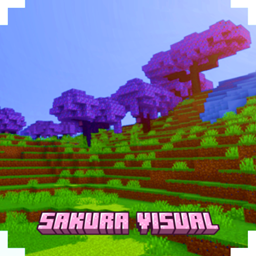
适用于 Minecraft 26.30 的 SAKURA VISUAL 资源包
Sakura Visual 让你的世界感觉更温暖、更美丽,就像日出或日落。
关于 SAKURA VISUAL 资源包
(no player.json) (no experimental) (achievement friendly) (join discord for feedback)
With the Sakura Pack, you can play survival with a warmer and more dynamic feel. You can also adjust the levels in the settings.
如何安装 SAKURA VISUAL
With Millida Launcher
Install Millida Launcher
The launcher is free: download it at millida.net/launcher and sign in with any nickname.
Click “Install” on this page
The launcher opens and installs the resource pack for Minecraft 26.30 automatically.
Launch the game
A profile with it appears in the launcher: click “Play”.
Manually
Download the archive
Pick the file sakura visual 0.7.mcpack (13 MB) for your game version. No need to unpack it.
Put it in the resourcepacks folder
The easiest way: “Options”, then “Resource Packs”, then “Open Pack Folder”, and drag the archive there.
Enable the pack
In the same window, move the pack to the right-hand “Selected” column and click “Done”.
版本
含依赖项
| Minecraft | 加载器 | 文件 | 日期 | 操作 |
|---|---|---|---|---|
| 26.30 | — | sakura visual 0.713.1 MB |
常见问题
Which Minecraft versions does SAKURA VISUAL work on?
Only Minecraft 26.30: there are no files for other versions.
Where can I download SAKURA VISUAL safely?
On this page: the file sakura visual 0.7.mcpack (13 MB) is stored on Millida’s server, with no link shorteners. SHA-1 checksum: 2c3b262b4989d60564c93804dcd115abe5bff4c0.
评价
成为第一个评价 SAKURA VISUAL 的人



