

适用于 Minecraft 1.16.5, 1.19.2 的 Essential UI 资源包
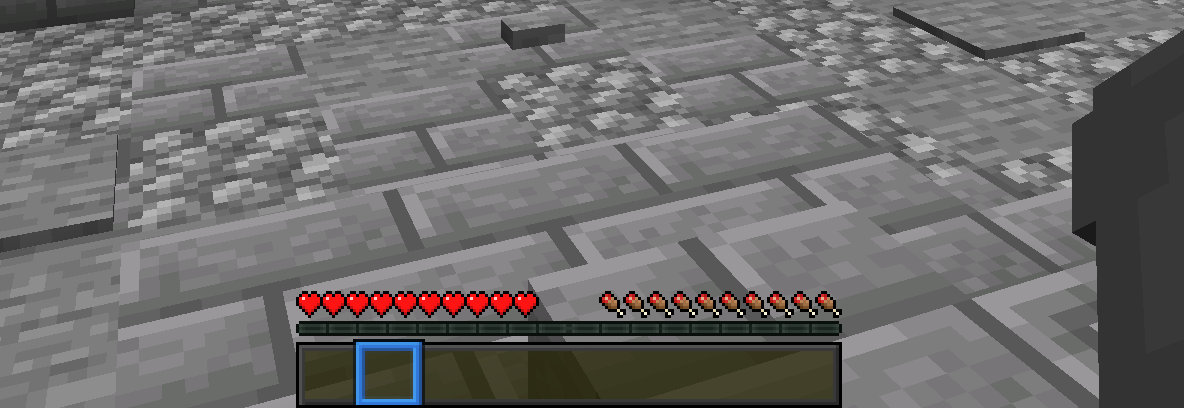
一个小型纹理包,将所有按钮和快捷栏改为符合 Essential 模组风格。使用此纹理包后,你的 Minecraft 在使用 Essential 模组时会看起来更加整洁
- 次下载
- 7 次下载
- 次浏览
- 88 次浏览
- 已更新
- 已更新 04.09.2026
- 1.16 — 26.2
 原版游戏
- 客户端
Essential UI
Essential UI is a small texturepack, that changes all buttons and the hotbar to fit the style of the Essential mod. With This texturepack, your Minecraft will look much cleaner when using the Essential mod.
If you want some preview images, check out the Gallery!

Compatibility
For this Resource Pack to work, you do not need Optifine!

Bugs and Suggestions
If you find any bugs or want to suggest something, you can join my Discord and message me there.
Hotbar
如何安装 Essential UI
With Millida Launcher
Install Millida Launcher
The launcher is free: download it at millida.net/launcher and sign in with any nickname.
Click “Install” on this page
The launcher opens and installs the resource pack for Minecraft 1.16–26.2 automatically.
Launch the game
A profile with it appears in the launcher: click “Play”.
Manually
Download the archive
Pick the file EssentialUI.zip (91 KB) for your game version. No need to unpack it.
Put it in the resourcepacks folder
The easiest way: “Options”, then “Resource Packs”, then “Open Pack Folder”, and drag the archive there.
Enable the pack
In the same window, move the pack to the right-hand “Selected” column and click “Done”.
版本
含依赖项
| Minecraft | 加载器 | 文件 | 日期 | 操作 |
|---|---|---|---|---|
| 1.21.11 | — | 1.21.1191 KB | ||
| 26.2 | — | 26.291 KB 6 | — | |
| 26.1 | — | 26.191 KB | — | |
| 1.19.2 | — | 1.19.214.7 KB | — | |
| 1.18.2 | — | 1.18.214.7 KB | — | |
| 1.16.5 | — | 1.16.514.7 KB | — |
评价
成为第一个评价 Essential UI 的人


