

适用于 Minecraft 1.21.1, 1.21 的 Population Density 插件
即使在人口众多的服务器上,也能保证玩家拥有可用的空间、资源和活跃的邻居。
关于 Population Density 插件
Automatically places new players where they can find wood, animals, ore, and space to build. Also priority-based login queue, reserved slots for admins, idle boot ONLY when nearly full, entity thinning for lag reduction, and optional limited teleportation. Never again will your players experience a marathon run, spawn room full of portals, or maze of abandoned builds. This is a zero maintenance solution for administrators, and players don't need to learn any commands!
"This is THE plugin for large servers." - Mumblerit of muttsworldmine.com
Looking for a 1.12.2 or earlier-compatible version? Check here.
Got a question, suggestion, or problem? Post it on the issue tracker.
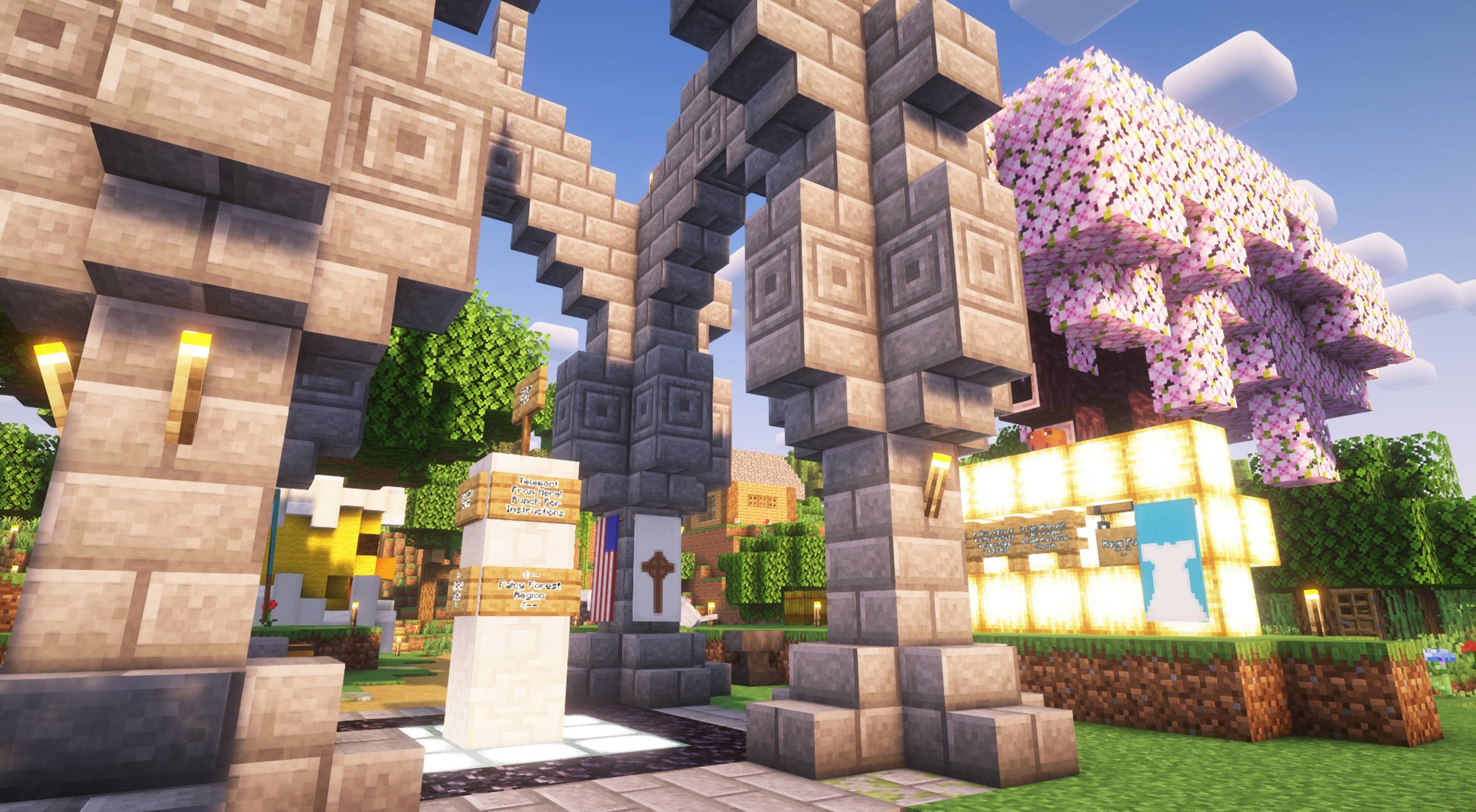
This video explains the region post system to new players. See below for information on administrative features.

Feature Summary
- Assigns starting points for new players so that they can ALWAYS find space to build and beginner resources nearby. Players may be spawned directly there, or you can tell them about a slash command which will take them there.
- Respawns animals, regrows grass, and replants trees in the new player area to guarantee important new player resources.
- Removes idle players ONLY when the server is nearly full.
- Login queue to ensure fairness when your server is full, can prioritize some players over others if you like.
- Reserved slots for administrators.
- Optional teleportation posts which help players socialize and trade, but aren't abuse-able to escape combat or save a lost or hungry player.
- "Thins" extremely-dense crowds of monsters and animals, preventing ridiculous levels of farming or monster grinding from lagging your server.
Overview
Server owners often underestimate the badness in starting a player in a crowded area. Sure seeing builds makes your server look legitimate, but having to explore a long time just to find space to build and beginner resources is a major turn off for players who want to start playing right away. Even when players do find a place to start playing, they're often alone because other new players wandered into different areas.
PopulationDensity is the low-maintenance, easy-for-players answer to all these problems.
It works by automatically locating a region with lots of wood and ore, and then dropping new players in that region until they collect most of the easily accessible ore, cut down most of the trees, or crowd it with builds. Then PopulationDensity finds a new resource-wealthy region for future newbies and starts dropping new players there. If you have a great spawn area built up, you can instead spawn players there, and later tell them to use /HomeRegion when they're ready to start adventuring (or another command you define in commands.yml).
Additionally, optional teleportation commands help players move around quickly to admire builds and socialize while not compromising the game's integrity - players can only teleport from automatically-placed teleportation posts, so teleportation can't be used as an "easy-out" for players who mine or adventure themselves into trouble. That way, players keep the challenge of single player without the "players are too far apart" multiplayer issue.
Finally, if you have a "my server is always full" problem, then congratulations on your successful server! :) With PopulationDensity, you may optionally boot players who are idling so more players can log in and have fun, increasing your feel-good factor (or fattening your wallet, for some). when the server IS full, a login queue guarantees fairness, and administrative slots are set aside to guarantee administrators can always get in.
You can also assign players a queue priority to help them get on the server faster during peak times, to reward them for contributing to the server monetarily or through your community.
Requirements
- v6.0 and higher require Java 21
Setup, Configuration, and Commands documentation
Metrics: Like most other plugins this plugin collects anonymous metrics to see who's actually using this plugin, and this information is used to determine popularity as well as what features matter or not in the grand scheme of things.
Sponsors:
Got a question, suggestion, or problem? Post it on the issue tracker.
如何安装 Population Density
A server on Paper or Spigot
The plugin runs on the server core for Minecraft 1.12–1.21.10; players do not need to install anything.
File goes into the plugins folder
Download the file PopulationDensity-6.2.jar (144 KB) and put it into the server’s plugins folder.
Restart the server
On startup the plugin creates its own settings folder in plugins.
Use the “To server” button
On Millida Hosting, the button at the top of the page uploads the file to your server and restarts it for you.
Minecraft 1.21.10 runs on Java 21: with a different Java version the game may close right after launch.
版本
含依赖项
| Minecraft | 加载器 | 文件 | 日期 | 操作 |
|---|---|---|---|---|
| 1.20.6 | — | v6.2144 KB | ||
| 1.12 | — | 5.11.beta83 KB |
常见问题
Which Minecraft versions does Population Density work on?
There are files for 1.12–1.21.10, 13 versions in total. The newest is 1.21.10.
Do players need to install Population Density?
No, the plugin goes only on the server, into the plugins folder: players do not need to download anything.
Which Java does Population Density need?
Minecraft 1.21.10 runs on Java 21. If the game closes right after launch, the usual cause is the wrong Java version in the profile settings.
Where can I download Population Density safely?
On this page: the file PopulationDensity-6.2.jar (144 KB) is stored on Millida’s server, with no link shorteners. SHA-1 checksum: 8e7980a2aaac6e47748556a34abc50e750b8c01a.
评价
成为第一个评价 Population Density 的人



