

适用于 Minecraft 1.0.0 的 HawkEye 插件
Track those griefers like a bird of prey!
关于 HawkEye 插件
HawkEye is the ultimate tool for hunting down rule breakers and keeping track of what goes down on your server. It gives you the ability to log changes, search through them, roll edits back and much, much more.

What makes HawkEye different?
As most people are aware there are already two perfectly good logging plugins out there - BigBrother and LogBlock. These plugins are fine, but they haven't changed an awful lot since their first steps in the days of hMod. It is high time for a new plugin that takes inspiration from existing plugins and combines it with a host of new features to create the perfect anti-grief and logging tool out there.
So what are these 'unique features'?
- Logging of over 30 different actions
- Rollback commands with simple-to-use parameters
- Advanced interactive web interface for viewing logs
- Rollback previews - have the rollback only appear to you at first
- WorldEdit selection rollbacks - rollback everything in your WE selection
- Configurable search tool to quickly see edits on single blocks
- API so other plugins can interact with the HawkEye database
I don't want to lose my existing data!?
No problem! Simply use one of the import scripts I have created. See this wiki page for more details: Importing from other logging plugins
What do I need?
- Recent version of CraftBukkit
- MySQL Database (preferrably on the Minecraft server)
- (Optional) Web Server (preferrably on the Minecraft server)
Installation and Configuration?
- MySQL and Web Server
- Installation
- Configuration
- Permissions
Got any more information?
- Dev Builds
- Usage
- Importing from other logging plugins
- What does it log?
- API for other plugins
- Screenshots
- Language Packs
- JavaDoc
I can't set it up! I can't use the commands
Go over the links above again. If you still can't do it, go to the forums: http://dev.bukkit.org/server-mods/hawkeye/forum/ and make a new thread in the right section
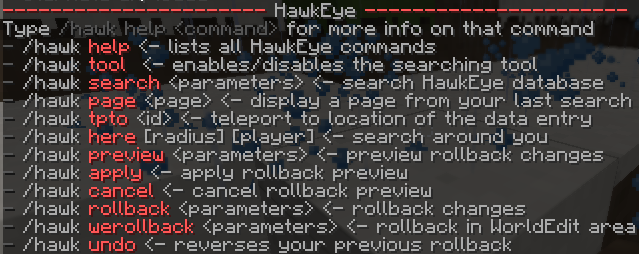
I enjoy bagels and can't remember commands?
One of the mods on my server made a 'cheat sheet' just for people like you! Give this to your derp moderators so they won't keep bugging you about how the commands work:
How can I help you?
Making Bukkit plugins takes a lot of time, however I do it as a hobby. Because of this I don't expect any kind of donation from anyone. The best way people can help me out is by simply spreading the word about HawkEye and providing me with decent bug reports if you find issues. You can also help me by translating the web interface into other languages: Get Localization . If you would still like to make a donation to my coding-beer fund, feel free to use the following link:
如何安装 HawkEye
A server on Paper or Spigot
The plugin runs on the server core for Minecraft 1.0.0; players do not need to install anything.
File goes into the plugins folder
Download the file HawkEye_v1.0.5b.zip (328 KB) and put it into the server’s plugins folder.
Restart the server
On startup the plugin creates its own settings folder in plugins.
Use the “To server” button
On Millida Hosting, the button at the top of the page uploads the file to your server and restarts it for you.
Minecraft 1.0.0 runs on Java 8: with a different Java version the game may close right after launch.
版本
含依赖项
| Minecraft | 加载器 | 文件 | 日期 | 操作 |
|---|---|---|---|---|
| — | — | Web Interface v1.0.7d226 KB | ||
| 1.0.0 | — | HawkEye v1.0.5b328 KB |
常见问题
Which Minecraft versions does HawkEye work on?
Only Minecraft 1.0.0: there are no files for other versions.
Do players need to install HawkEye?
No, the plugin goes only on the server, into the plugins folder: players do not need to download anything.
Which Java does HawkEye need?
Minecraft 1.0.0 runs on Java 8. If the game closes right after launch, the usual cause is the wrong Java version in the profile settings.
How do I download HawkEye?
With Millida Launcher: it installs HawkEye into a modpack by itself, for the right game version and loader. The launcher is free.
评价
成为第一个评价 HawkEye 的人


