

关于 Corruption 插件

Corruption
Current Version: v2.4
Description
This plugin was originally made by bm01. We have received his permission to distribute this updated version.
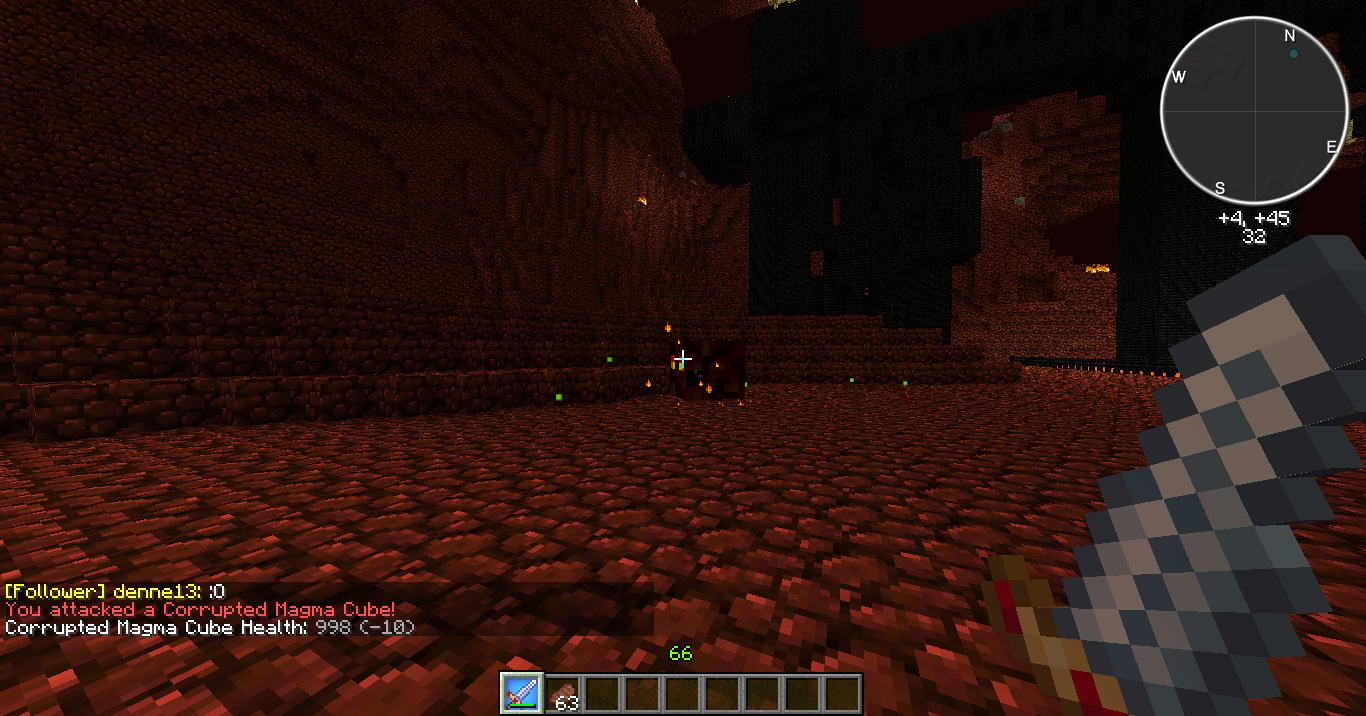
This plugin occasionally turns some monsters into a stronger version, boss-like. Its main purpose is to add a little diversity and randomness to the game. It can be used as a difficulty enhancer, or even as a reward system for your players, depending on your configuration. Technically every monster spawning naturally in your world has a chance to become a boss, which hits harder, has more hit points, possess some immunities and drops better. Of course all of this is configurable. Moreover, they can notify you of their presence by sending you a message when you hit them, when they hit you, or after a certain amount of time when you're close enough. They can also have a flaming effect around them (the one used by mob spawners).
Features
- Custom bosses - You can customise the health, damage, experience, drops and much more. You can make your bosses as tough and rewarding as you want.
- Supports any minecraft entity - A list of entity types that are confirmed to be working can be found here.
- Customisable equipment - Create your own epic equipment sets with enchantments and, if you feel like it, add a bit of randomness to it.
- Customisable abilities - With 8 cool abilities (and more on the way), make fighting your bosses even more of a challenge.
- Name your boss - Give your bosses epic names to leave an everlasting impression on their foes.
- Viewer - Give people the ability to view the health of any boss nearby if it receives damage (requires the cor.viewer permission).
- Per world configuration - Choose which bosses spawn in what world, use world specific drops and more.
- Custom Spawners - Create spawners that will spawn whatever Corrupted monster you have created with highly customisable settings without having to touch the config files.
- Leaderboard - Want to see how well you've fared at slaying hordes of Corrupted? Use /cor stats to see the top 10 players with their kill count. Want to see what bosses your nemesis killed most? Use /cor stats <playername> to find out.
- Permissions support - Corruption supports nearly all permissions systems. Are you using a permissions system that we don't support? No worries, we also support Vault.
- mcMMO support - Get yourself some extra mcMMO experience for hitting a boss.
- Heroes support - Combine an RPG style server with an added bit of challenge provided by Corruption.
- Automatic updater - Never wonder if there is a new version of Corruption, use the automatic updater to check for updates and update when necessary. Don't want to update just yet? No problem, it won't unless someone with the cor.update permission uses /cor update install.
- Automatic configuration updater - Worry about updating to a new version because you don't want to dig through your configs and change everything to make it work with the new version? Worry no longer, our configuration updater will automatically update your configuration files to the latest version.
Configuration files
Config.yml
Bosses.yml
Equipment.yml
Items.yml
Worldname.yml
Abilities.yml
MagicSpells.yml
Updating from old versions
See this page for the guide explaining how to update from old versions of Likeaboss(1.5) or Likeaboss-mcdr(2.0) to the latest version of Corruption.
Commands and permissions
<argument> is required, [argument] is optional and '|' seperates multiple options
- (cor.*) - All the Corruption permissions.
- (cor.help) - /cor help - Display ingame help
- (cor.info) - /cor info - Display some global and non-lasting stats.
- (cor.reload) - /cor reload - Reload configuration files.
- (cor.clear) - /cor clear - Clear informations given by /cor info.
- (cor.viewer) - /cor viewer - Toggle viewer state, which allows to see boss healths.
- (cor.ignore.*) - All the ignore permissions.
- (cor.ignore) - /cor ignore - Toggle ignore state, which allows to not be affected by bosses.
- (cor.ignore.immediate) - Allow to bypass /cor ignore delay.
- (cor.list) - /cor list - Display the location of active bosses.
- (cor.stats) - /cor stats [player] - Display the leaderboard, or player stats.
- (cor.spawn) - /cor spawn <type> [amount] [x] [y] [z] [world]- Spawn one or multiple bosses on the targeted block or given coordinates.
- (cor.spawn) - /cor spawn <type> <amount> <player>- Spawn one or multiple bosses on the player's targeted block.
- (cor.spawn.region.*) - All the Spawn region permissions.
- (cor.spawn.region.list) - /cor region <l|list> [world]- List all the spawners (in a given world)
- (cor.spawn.region.info) - /cor region <i|info> [id|name]- Gives detailed information about nearby spawners or a spawner matching the id or name given.
- (cor.spawn.region.toggle) - /cor region <enable|disable> [id|name]- Enable or disable a spawner in the area you're standing or with the given id or name.
- (cor.spawn.region.manage) - /cor region <a|add> <name> [options]- Add a new spawner. To see all available options use /cor region <a|add>
- (cor.spawn.region.manage) - /cor region <r|rem|remove> [id|name]- Remove the nearby spawner or a spawner matching the id or name given.
- (cor.spawn.region.edit) - /cor region <e|edit> <id|name> <ab|addboss> <bossName> <spawnChance>- Add a Corrupted to the spawner matching the id or name given.
- (cor.spawn.region.edit) - /cor region <e|edit> <id|name> <rb|removeboss> <bossName>- Remove a Boss matching <bossName> from the spawner
- (cor.spawn.region.edit) - /cor region <e|edit> <id|name> <eb|editboss> <bossName> [chance:<spawnChance>] [name:<bossName>]- Edit the boss from a spawner with the id or name given.
- (cor.spawn.region.edit) - /cor region <e|edit> <id|name> <property> <value>- Change the <property> of the spawner with matching name or id to <value>. For a list of adjustable properties use /cor region <e|edit> <name|id> help.
- (cor.update) - /cor update <c|check|install|i>- Check for updates or install one if available.
- (cor.version) - /cor <v|ver|version> - Display the version of Corruption currently installed
Upcoming Changes
Ready:
In progress:
Planned:
- Add more abilities and activation conditions.
- Improving the API to add events and whatnot.
- Boss mounts
Recent Changes

Read the full list of changes
v2.4: Added Features
- Made it possible to create regions where certain bosses will spawn with a (configurable) maximum number of bosses per spawner region.
- Improved drop system to support enchantments and naming. New items for use in drops/equipment will have to be defined in items.yml first. Existing drops/equipment will be taken care of by the config updater.
- Added Summon ability
Under the hood
- Changed from bukget to official Servermods API (Unfortunately, this means Corruption can no longer check if a new update was downloaded successfully, if/when the official API makes this possible, it will be reimplemented)
- Updated MCStats to revision 7 (Decreases network usage)
v2.3.3: This build requires at least Bukkit 1.6.1 Fixes
- Fixed a bug where mobs with a health multiplier would increase in health every time they were reloaded. Again.
Added Features
- The spawn command now supports coordinates or a username and can now also be used from console and command blocks.
Source and API
The source can be found here.
The API:
- Source
- Doxygen
- Apidocs
Statistics
Corruption utilizes Hidendra's plugin metrics system, mcstats, which means that the following information is collected and sent to mcstats.org:
- A unique identifier
- The server's version of Java
- Whether the server is in offline or online mode
- The plugin's version
- The server's version
- The OS version/name and architecture
- The core count for the CPU
- The number of players online
- The Metrics version
And also some Corruption specific data:
- The amount of different Bosses per EntityType alive
- The amount of Bosses killed since the last time statistics were sent
This data is sent about once every 15 minutes. Opting out of this service can be done by editing plugins/Plugin Metrics/config.yml and changing opt-out to true.
如何安装 Corruption
A server on Paper or Spigot
The plugin runs on the server core for Minecraft 1.7.4; players do not need to install anything.
File goes into the plugins folder
Download the file Corruption.jar (267 KB) and put it into the server’s plugins folder.
Restart the server
On startup the plugin creates its own settings folder in plugins.
Use the “To server” button
On Millida Hosting, the button at the top of the page uploads the file to your server and restarts it for you.
Minecraft 1.7.4 runs on Java 8: with a different Java version the game may close right after launch.
版本
含依赖项
| Minecraft | 加载器 | 文件 | 日期 | 操作 |
|---|---|---|---|---|
| 1.7.4 | — | Corruption-2.4267 KB |
常见问题
Which Minecraft versions does Corruption work on?
Only Minecraft 1.7.4: there are no files for other versions.
Do players need to install Corruption?
No, the plugin goes only on the server, into the plugins folder: players do not need to download anything.
Which Java does Corruption need?
Minecraft 1.7.4 runs on Java 8. If the game closes right after launch, the usual cause is the wrong Java version in the profile settings.
Where can I download Corruption safely?
On this page: the file Corruption.jar (267 KB) is stored on Millida’s server, with no link shorteners. SHA-1 checksum: f5aedc706a55690b24d7cbdf4d1f163155cf7aba.
评价
成为第一个评价 Corruption 的人



