
关于 ColoredTablist 插件
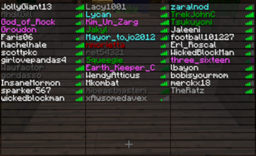
Very Simple Plugin to color your Playerlist! Support my Work and visit my Homepage!
French translation
ColoredTablist for Sponge
FAQ Click me before you ask something!
How it works:
- Install Vault
- Install the Plugin. (Drop the coloredtablist.jar file into your /plugins folder)
- Choose a Permissions Node named by the color.
Example: 'coloredtablist.blue' stands for blue :) OR set 'UserPermissions' to false in the config and choose a color-code !scroll down!
- Give a User (or a Group) the specifc Permissions Node.
OR give a Group the specific Color Code in the Config Now when the User joins he automatically gets colored in the Playerlist (press Tab).
Commands:
You can use /ctl instead of /coloredtablist
- /coloredtablist help = Shows a help Page with available Commands.
- /coloredtablist reload = Reloads Config and Playerlist
- /coloredtablist colors = View List of Color-Codes.
- /coloredtablist nick <nickname> = Changes your Name in the Tablist until you reconnect or the Server reloads.
Config Commands:
- /coloredtablist set usepermissions <true/false>
- /coloredtablist set usechatnames <true/false>
- /coloredtablist set prefix<1> <colors>
- /coloredtablist set groups <group> <prefix/suffix> <value>
Configuration:
Version: 2.1.0
#Whether or not Permissions should be used instead of Groups: UsePermissions: true #Whether or not Displaynames should be used UseChatNames: false #If it should update a player name every 15 seconds UpdateEvery15Seconds: true #Write the Groups in, like here. Use "" as Prefix to dont have one. You can use Colors in Prefix using & so &4 would be red. Groups: Member: prefix: '&e' suffix: '[M]' Admin: prefix: '&a' suffix: '[A]' #Set text for coloredtablist.prefix1 here: prefix1: '&b' #Set text for coloredtablist.prefix2 here: prefix2: exp #Set text for coloredtablist.prefix3 here: prefix3: mod #Set text for coloredtablist.prefix4 here: prefix4: admin #Set text for coloredtablist.prefix5 here: prefix5: boss #Set text for coloredtablist.prefix6 here: prefix6: idk
Permissions:
Click here
Color Codes:
Use them in Config with "&" instead of "#" and as Fullname in Permissions
Symbol Effect/Name
k Magic/Random
l Bold
m Strikethrough
n Underlined
o Italic
Videos:
English
German
French
Known Bugs:
- Max 14 Characters are shown in the Tablist, longer Names are shortened to 14 (Otherwise it would show an Error because 16 Characters is max. (and we are using Colors so its 16 -2 = 14 O.o)
Dont forget to Subscribe for File Updates! Visit my Homepage!
This Plugin collects anonymous datas about your Server for mcstats.org
如何安装 ColoredTablist
A server on Paper or Spigot
The plugin runs on the server core for Minecraft 1.2.5–1.9; players do not need to install anything.
File goes into the plugins folder
Download the file coloredtablist.jar (45 KB) and put it into the server’s plugins folder.
Restart the server
On startup the plugin creates its own settings folder in plugins.
Use the “To server” button
On Millida Hosting, the button at the top of the page uploads the file to your server and restarts it for you.
Minecraft 1.9 runs on Java 8: with a different Java version the game may close right after launch.
版本
含依赖项
| Minecraft | 加载器 | 文件 | 日期 | 操作 |
|---|---|---|---|---|
| 1.9 | — | ColoredTablist 2.1.4 (Java 7+)44.5 KB | ||
| 1.2.5 | — | ColoredTablist 0.7.19.6 KB |
常见问题
Which Minecraft versions does ColoredTablist work on?
There are files for 1.9, 1.2.5. The newest is 1.9.
Do players need to install ColoredTablist?
No, the plugin goes only on the server, into the plugins folder: players do not need to download anything.
Which Java does ColoredTablist need?
Minecraft 1.9 runs on Java 8. If the game closes right after launch, the usual cause is the wrong Java version in the profile settings.
Where can I download ColoredTablist safely?
On this page: the file coloredtablist.jar (45 KB) is stored on Millida’s server, with no link shorteners. SHA-1 checksum: f1ca4f6031c65511ced1f7c343e1c054240f3f03.
评价
成为第一个评价 ColoredTablist 的人


