
 NeoForge
 Forge
关于 Slab Machines 模组
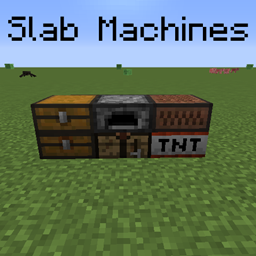
这个模组的主要内容是为原版(也包括模组)机器添加台阶变体。
目前模组包含以下内容:
- 台阶工作台(兼容 Fast Workbench 模组)
- 台阶熔炉(兼容 Fast Furnace 模组)
- 台阶音符盒
- 台阶 Tnt
- 台阶箱子(以及陷阱箱子)
模组支持:
- Tinkers' Construct(安装后会添加所有工作台类型的台阶变体。(包括工具锻造台)
- Just Enough Items (JEI)(安装后允许你使用 + 来插入配方)
- Crafting Tweaks(安装后会为台阶工作台添加按钮
在 1.12.2 中,此模组需要 McMultiPart;
在 Slab Machines 的 1.16+ 版本中,目前台阶还不能混合使用。
此模组基于 Crafting Slabs。
需要一个服务器?使用优惠码 "mrbysco" 即可享受首月 20% 优惠
如有疑问,欢迎加入我的 Discord。
如何安装 Slab Machines
With Millida Launcher
Install Millida Launcher
The launcher is free: download it at millida.net/launcher and sign in with any nickname.
Click “Install” on this page
The launcher opens and installs the mod for Minecraft 1.12.2–26.1.2 on Forge or NeoForge automatically.
Launch the game
A profile with it appears in the launcher: click “Play”.
Manually
Install Forge or NeoForge
The loader must match the game version of the mod file, for example Minecraft 26.1.2. After installing it, a separate profile appears in your launcher.
Download the file for your version
In the version list above, pick the file SlabMachines-26.1.2-11.0.0.jar (151 KB) for your game version and loader.
Put it in the mods folder
The folder is inside .minecraft (Windows: %appdata%\.minecraft\mods). If it does not exist, create it.
Launch the loader profile
Open “Mods” in the main menu: Slab Machines should be in the list.
版本
含依赖项
| Minecraft | 加载器 | 文件 | 日期 | 操作 |
|---|---|---|---|---|
| 26.1.2 | NeoForge | SlabMachines-26.1.2-11.0.0.jar151 KB | ||
| 1.21.1 | NeoForge | SlabMachines-1.21.1-6.1.1.jar154 KB | ||
| 1.20 | NeoForge, Forge | SlabMachines-1.20-2.1.1.jar140 KB | ||
| 1.20 | Forge | SlabMachines-1.20-2.1.0.jar140 KB | ||
| 1.12.2 | — | Slab_Machines-1.0.6.jar231 KB |
评价
成为第一个评价 Slab Machines 的人


