
 Forge
关于 More Overlays 模组
这个模组添加了一些来自 NEI 的覆盖层。
仅客户端模组!
更新 / 信息:
你们大多数人可能注意到这个模组仍停留在 1.14。虽然我过去曾尝试更新这个模组,但这需要完全重写。由于我目前并不太活跃于 Minecraft,尤其是模组化 Minecraft,我没有太大兴趣更新它。很抱歉,你可以在这里查看由 RiDGo8 独立更新的版本:https://www.curseforge.com/minecraft/mc-mods/more-overlays-updated
请在此处报告任何问题和建议(Github 上的 Issue 页面)。
我可能不会注意到评论中的问题或建议。
(在写 Issue 之前请检查模组 / 整合包版本)
覆盖层:
- 区块边界
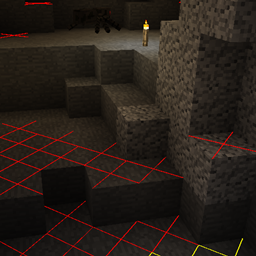
- 光照等级 / 怪物生成(16 格范围)
- 物品搜索(仅在安装了 JEI 时可用)
默认按键:
- F9:区块边界
- F7:光照等级 / 怪物生成
- 双击 JEI 搜索栏进行物品搜索
在 0.5 或更高版本中,你可以在游戏内更改配置:
- 从主界面:Mods -> MoreOverlays -> Config
- 从暂停菜单:Mod Options... -> MoreOverlays -> Config [在 Minecraft 1.14.x 中无法使用,因为暂停菜单中缺少“Mod Options...”]
怪物生成 / 光照等级:
如果怪物可以在夜间生成,则在方块上显示黄色 X;如果始终可以生成,则显示红色 X。
区块边界:
有三种模式,它在角落显示红线,并在区块中间显示黄线。
在第 2 种模式中,它还会在区块边缘显示绿色网格。
在第 3 种模式中,绿色网格勾勒出 minecraft 或 cubicchunks 区域,并在左上角显示相应的区域存档文件。(自适用于 minecraft 1.12.2 的 1.15.0 版本起)
物品栏搜索:
仅在安装了 JEI 时可用。
如果启用,你可以在 JEI 中搜索物品,当前打开的物品栏中所有不匹配过滤器的物品将被变暗。
在 1.10 之前(适用于 MC 1.10.2/1.11.2),有一个按键绑定可以启用该功能。
自 1.10 起,你可以双击 JEI 搜索栏来启用该功能(就像在 NEI 中一样)。
集成
这个模组与一些其他模组集成,以修复错误或添加功能。
- JustEnoughItems(作者 mezz):物品搜索仅在安装了 JEI 时可用,因为它使用 JEI 的搜索算法来高亮物品。
- Custom Mob Spawner(作者 DrZharks):光照覆盖层与该模组集成,根据该模组实现的自定义生成处理来显示怪物可以生成的位置。(在 1.16.0 中暂时移除)
- OpenCubicChunks(作者 barteks2x):区域覆盖层显示 cubic chunks 使用的存档文件。(区块和区域网格需要改进)
- Mantle:物品搜索与 mantle 中的 GUI API 集成,以便在物品出现在屏幕上的位置显示槽位。
我允许在整合包中分发我的模组。如果你注明出处就更好了
允许重新上传文件(但仅限免费下载,因为商业使用这个模组违反 Minecraft EULA,但你可以随意使用我的代码)
请尽量保持你网站上的文件为最新,并且不要谎报模组和 Minecraft 版本。(如果没有适用于 MC 1.13 的文件,不要在标题中写“More Overlays 1.12 / 1.13”)
如何安装 More Overlays
With Millida Launcher
Install Millida Launcher
The launcher is free: download it at millida.net/launcher and sign in with any nickname.
Click “Install” on this page
The launcher opens and installs the mod for Minecraft 1.9–1.14.4 on Forge automatically.
Launch the game
A profile with it appears in the launcher: click “Play”.
Manually
Install Forge
The loader must match the game version of the mod file, for example Minecraft 1.14.4. After installing it, a separate profile appears in your launcher.
Download the file for your version
In the version list above, pick the file moreoverlays-1.16.1.jar (68 KB) for your game version.
Put it in the mods folder
The folder is inside .minecraft (Windows: %appdata%\.minecraft\mods). If it does not exist, create it.
Launch the loader profile
Open “Mods” in the main menu: More Overlays should be in the list.
Minecraft 1.14.4 runs on Java 8: with a different Java version the game may close right after launch.
版本
含依赖项
| Minecraft | 加载器 | 文件 | 日期 | 操作 |
|---|---|---|---|---|
| 1.14.4 | Forge | moreoverlays-1.16.1-mc1.14.4.jar67.6 KB | ||
| 1.12.2 | — | moreoverlays-1.15.1-mc1.12.2.jar50.1 KB 2 | ||
| 1.9 | — | moreoverlays-0.7-mc1.9.jar24.5 KB |
常见问题
Which Minecraft versions does More Overlays work on?
There are files for 1.14.4, 1.12.2, 1.9. The newest is 1.14.4.
Is More Overlays for Forge or Fabric?
Only for Forge: 1.14.4. There are no files for Fabric or NeoForge: a mod for another loader will not start.
Does More Overlays need other mods?
The author lists no required dependencies: the Forge loader is enough.
Which Java does More Overlays need?
Minecraft 1.14.4 runs on Java 8. If the game closes right after launch, the usual cause is the wrong Java version in the profile settings.
Where can I download More Overlays safely?
On this page: the file moreoverlays-1.16.1.jar (68 KB) is stored on Millida’s server, with no link shorteners. SHA-1 checksum: a49853b40c07c234bc36dbc125d55e2cd5eb23ab.
评价
成为第一个评价 More Overlays 的人


