

 NeoForge
 Fabric
关于 Load Support 模组
Shows when the player has too less Java memory allocated, and plays a sound when the game has finished loading.
It is fully configurable in config/loadsupport.toml.
Config 🚀
The config in config/loadsupport.toml is pretty self explainatory:
loadFinishSound = "minecraft:ui.toast.challenge_complete" minMemory = 4.0 errorTitle = "Error: Not enough Java memory!" errorMinMemory = "Please allocate at least {minMemory} GB of Java memory to your Minecraft instance!" errorCurrentMemory = "You have currently {currentMemory} GB allocated." memoryInfoLink = "https://github.com/vaporvee/LoadSupport/wiki/How-to-allocate-more-memory-to-your-Minecraft-instance"
{minMemory} and {currentMemory} get replaced by their actual values.
Planned Features 👀
- 🪛 Ingame settings (Modlist support)
- 🧩 More features letting the player know why Minecraft is not loading
Features
Directly show a warning when too less Java Memory was selected 🚨
The player doesn't need to wait just to know that they selected the wrong amount of Java Memory.
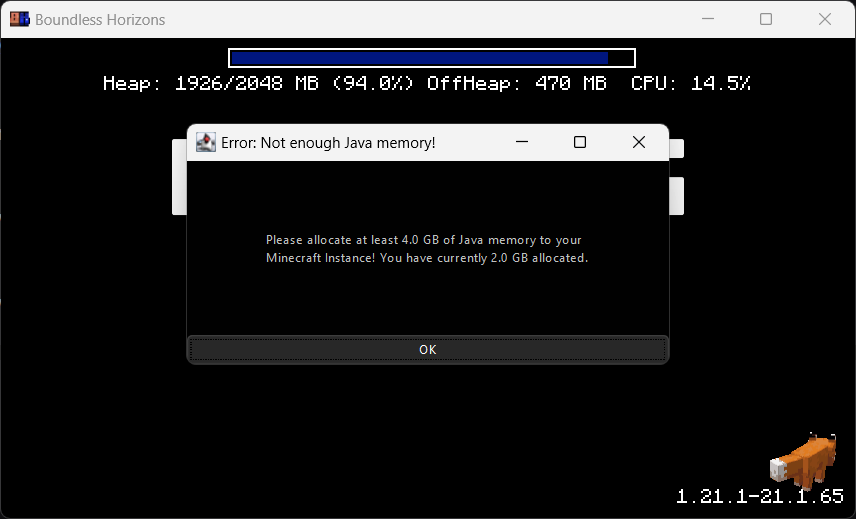
Blocks the game window🚧
Make sure the player gets the correct performance experience.
Play a sound when Minecraft finished loading 🔊
Directly know when Minecraft started when beeing in the background.
如何安装 Load Support
With Millida Launcher
Install Millida Launcher
The launcher is free: download it at millida.net/launcher and sign in with any nickname.
Click “Install” on this page
The launcher opens and installs the mod for Minecraft 1.21.1–1.21.8 on Fabric or NeoForge automatically, together with its dependencies: Cloth Config API, Fabric API.
Launch the game
A profile with it appears in the launcher: click “Play”.
Manually
Install Fabric or NeoForge
The loader must match the game version of the mod file, for example Minecraft 1.21.8. After installing it, a separate profile appears in your launcher.
Download the file for your version
In the version list above, pick the file loadsupport-neoforge-1.21.6-1.2.2.jar (23 KB) for your game version and loader.
Put it in the mods folder
The folder is inside .minecraft (Windows: %appdata%\.minecraft\mods). If it does not exist, create it. Required dependencies go there too: Cloth Config API, Fabric API.
Launch the loader profile
Open “Mods” in the main menu: Load Support should be in the list.
Load Support works on the player’s side only: there is no need to install it on a server.
Minecraft 1.21.8 runs on Java 21: with a different Java version the game may close right after launch.
版本
含依赖项
| Minecraft | 加载器 | 文件 | 日期 | 操作 |
|---|---|---|---|---|
| 1.21.8 | NeoForge | 1.21.823.3 KB | ||
| 1.21.8 | Fabric | 1.21.823.6 KB | ||
| 1.21.6 | NeoForge | 1.21.623.3 KB | ||
| 1.21.6 | Fabric | 1.21.623.6 KB | ||
| 1.21.5 | NeoForge | 1.21.523.2 KB | ||
| 1.21.5 | Fabric | 1.21.523.5 KB | ||
| 1.21.5 | NeoForge | 1.21.524.1 KB | ||
| 1.21.5 | Fabric | 1.21.524.6 KB |
运行所需
常见问题
Which Minecraft versions does Load Support work on?
There are files for 1.21.1–1.21.8, 8 versions in total. The newest is 1.21.8.
Is Load Support for Forge or Fabric?
There are files for Fabric: 1.21.1–1.21.8 and for NeoForge: 1.21.1–1.21.8. There are no files for Forge: a mod for another loader will not start.
What does Load Support need to work?
Required: Cloth Config API, Fabric API. Without them the mod will not start: dependencies go into the same mods folder.
Do I need to install Load Support on a server?
No. Load Support works on the player’s side only: there is no need to install it on a server.
Which Java does Load Support need?
Minecraft 1.21.8 runs on Java 21. If the game closes right after launch, the usual cause is the wrong Java version in the profile settings.
Where can I download Load Support safely?
On this page: the file loadsupport-neoforge-1.21.6-1.2.2.jar (23 KB) is stored on Millida’s server, with no link shorteners. SHA-1 checksum: 50ae6f70716490c88180e3bd03fae05868c992f6.
评价
成为第一个评价 Load Support 的人


