
 Forge
欢迎来到异域鸟类!
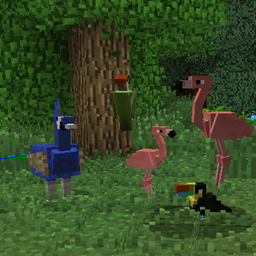
这个模组为你的 Minecraft 世界添加了 30 多种新鸟类,它们会在各种不同的生物群系中生成。聆听啄木鸟在高高的树上啄木,看天鹅在河中游弋,或听琴鸟模仿周围环境的声音。这个模组能让你的世界栩栩如生!

鸟类
安装模组后,你会在世界各地发现不同种类的鸟。每种鸟还有多个物种,使鸟类总数超过 100 种!
该模组包含种类繁多的新鸟类,包括:
冠蓝鸦 蓝脚鲣鸟
虎皮鹦鹉 北美红雀 鹤鸵 玄凤鹦鹉 鹤 鸭 火烈鸟 七彩文鸟 海鸥 鹭 蜂鸟 翠鸟 几维鸟 笑翠鸟 琴鸟 喜鹊 鸵鸟 猫头鹰 鹦鹉 雉类 鹈鹕 企鹅 凤凰(1.14 中已移除,但很快会重新加入) 鸽子 走鹃 知更鸟 天鹅 巨嘴鸟 秃鹫(1.14 中已移除) 啄木鸟

鸟蛋
每种鸟都有自己的蛋,它们会不时在世界中生成。鸟蛋的孵化成功率为 30%,不过可以通过两种方式提高:
- 将鸟蛋与烈焰粉结合,可将生成率提高 15%(1.14+ 中为 10%)。
- 使用蛋孵化器可同时为许多鸟蛋将成功率提高 5%(1.14+ 中为 10%)。
鸟巢
鸟巢是可交互的方块,可用于存放鸟蛋和蛋壳。右键点击可打开物品栏。它们会在世界各地自然生成,常见于树顶。生成的鸟巢中可能含有鸟蛋,有时也可能含有未识别的蛋。
鸟巢也可以合成,如果附近有鸟,它们会非常缓慢地积累鸟蛋。
注意:鸟巢并不用于孵化鸟蛋——孵化需要用到蛋孵化器。
鸟类百科全书
该模组包含一本详细的鸟类百科全书,提供模组中鸟类的信息。你可以使用搜索栏搜索鸟类,或在列表中找到它的条目。每个条目都会显示鸟类的模型及其数据,例如它最喜欢的食物、栖息地和性别。它还会列出用于引诱、繁殖和驯服它们(如果可能)的不同物品。用羽毛围住一本书即可合成!
用这本书来尝试发现你世界中的所有鸟类吧!
鸟笼
鸟笼是 1.12.2 版本新增的内容,可用于长距离运输鸟类。共有 8 种不同类型的笼子可以合成,用来美化你的世界。这些方块可以放置下来,用来保护你的鸟!
使用鸟笼的方法:
- 右键点击一只鸟,将其捕获到笼子里。
- 放置并破坏笼子即可将鸟从笼中放出。
- 潜行并破坏笼子,可将鸟留在笼内。
蛋识别器
蛋识别器用于分析在鸟巢中发现的未识别的蛋。将未识别的蛋放入左上角的槽位,并在其下方的槽位放入红石粉。蛋会被缓慢识别,并可能变成任何鸟蛋——甚至是神秘的凤凰蛋!
注意:分析蛋总有失败的可能。如果失败,可能只会产出蛋壳——有时甚至什么都不会产出!
蛋孵化器
蛋孵化器用于提高鸟蛋的孵化几率。将任意鸟蛋放入孵化器顶部,并用烈焰粉为机器供能。机器会温和地加热你的蛋,并将每个蛋的生成几率提高到 100%。
兼容性
该模组的所有版本都与 Biomes O' Plenty 完全兼容。
鸟蛋与 Pam's HarvestCraft 的配方完全兼容。PH2 即将推出。
该模组的 1.12.2 版本与 Bird's Nests 模组兼容。
同样在 1.12.2 中,黑森林特有的鸟类会在暮色森林中生成。
如果你想了解最新进展,可以加入 Exotic Birds 的 Discord 社区。非常欢迎建议和友善的评论!https://discord.gg/9S6NAjd
如果你愿意以其他方式支持我,可以在这里找到我的 Patreon:https://www.patreon.com/Pavocado
非常感谢 AOL、JEREDEK、Maxxx360、Pharrao、Pidrosax 和 TKMTAniki 提供的翻译!
如何安装 Exotic Birds
With Millida Launcher
Install Millida Launcher
The launcher is free: download it at millida.net/launcher and sign in with any nickname.
Click “Install” on this page
The launcher opens and installs the mod for Minecraft 1.14.4–1.20.1 on Forge automatically.
Launch the game
A profile with it appears in the launcher: click “Play”.
Manually
Install Forge
The loader must match the game version of the mod file, for example Minecraft 1.20.1. After installing it, a separate profile appears in your launcher.
Download the file for your version
In the version list above, pick the file exoticbirds-1.20.1-1.0.1.jar (2.1 MB) for your game version.
Put it in the mods folder
The folder is inside .minecraft (Windows: %appdata%\.minecraft\mods). If it does not exist, create it.
Launch the loader profile
Open “Mods” in the main menu: Exotic Birds should be in the list.
Minecraft 1.20.1 runs on Java 17: with a different Java version the game may close right after launch.
版本
含依赖项
| Minecraft | 加载器 | 文件 | 日期 | 操作 |
|---|---|---|---|---|
| 1.20.1 | Forge | exoticbirds-1.20.1-1.0.1.jar2.1 MB 1 | ||
| 1.14.4 | — | exoticbirds-1.14.4-1.1.0.jar1.9 MB |
常见问题
Which Minecraft versions does Exotic Birds work on?
There are files for 1.20.1, 1.14.4. The newest is 1.20.1.
Is Exotic Birds for Forge or Fabric?
Only for Forge: 1.20.1. There are no files for Fabric or NeoForge: a mod for another loader will not start.
Does Exotic Birds need other mods?
The author lists no required dependencies: the Forge loader is enough.
Which Java does Exotic Birds need?
Minecraft 1.20.1 runs on Java 17. If the game closes right after launch, the usual cause is the wrong Java version in the profile settings.
Where can I download Exotic Birds safely?
On this page: the file exoticbirds-1.20.1-1.0.1.jar (2.1 MB) is stored on Millida’s server, with no link shorteners. SHA-1 checksum: 4fc6dfdee7aa9b5c947b359a9019b4b7656ed40b.
评价
成为第一个评价 Exotic Birds 的人


