

 Fabric
 Forge
Adds new items and recipes to allow automating Cobblemon item production using Create, as well as plenty of other QoL features.
PLEASE USE JEI/REI/EMI FOR RECIPES.
PLEASE READ BEFORE YOU LEAVE A COMMENT/DM ABOUT AN UPDATE:
it's likely the mod wont be updated for quite a while, if ever again. i recommend that you use alternatives like Cobblemon Manufactory by ramen5914, or work on your own port/alternative for the time being.
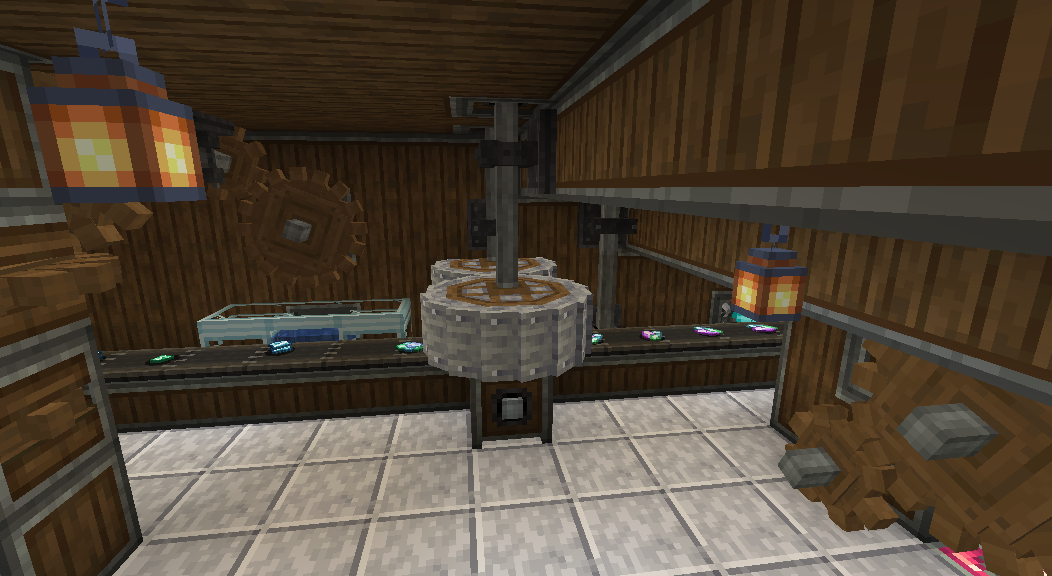
Current Features:
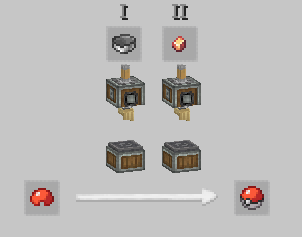
Sequenced Assembly for Every Pokéball
Potion Items Mixing & Fluid Storage
Intuitive EXP Candy Production
Apricorn & Coloured Pokéball Dyeing
Crushable Cobblemon Ores & Items
New Decorative Blocks
Renewable Copper
Upcoming/Incomplete Features:
Recipes For Most Current Unobtainable Items
Support for Cobblemon 1.6
Misc. Extra Item Uses
Cobblemon Addon Compat
More about the mod:
This mod is inspired by Create: Pixelfactory and CreateMon! Go give them a try if you'd like.
If you'd like to help in the development of the mod or if you have any other inquiries check out our GitHub page or shoot me (Bracken40) a message over Curseforge!
This project was originally made in MCreator.
brack's small (literally) development update: thanks so much for 1 million downloads :) here's to beating our self proclaimed rival Create Interiors (the chair mod). in other news if cobblemon 1.6 comes out like tomorrow we wont be able to update for it since create isnt even on 1.21 yet so wait a bit for that :))
如何安装 Create: Cobblemon Industrialized
With Millida Launcher
Install Millida Launcher
The launcher is free: download it at millida.net/launcher and sign in with any nickname.
Click “Install” on this page
The launcher opens and installs the mod for Minecraft 1.19.2–1.20.1 on Fabric or Forge automatically.
Launch the game
A profile with it appears in the launcher: click “Play”.
Manually
Install Fabric or Forge
The loader must match the game version of the mod file, for example Minecraft 1.20.1. After installing it, a separate profile appears in your launcher.
Download the file for your version
In the version list above, pick the file Create-Cobblemon-Fabric-v0.5.02HOTFIX.jar (307 KB) for your game version and loader.
Put it in the mods folder
The folder is inside .minecraft (Windows: %appdata%\.minecraft\mods). If it does not exist, create it.
Launch the loader profile
Open “Mods” in the main menu: Create: Cobblemon Industrialized should be in the list.
Minecraft 1.20.1 runs on Java 17: with a different Java version the game may close right after launch.
版本
含依赖项
| Minecraft | 加载器 | 文件 | 日期 | 操作 |
|---|---|---|---|---|
| 1.20.1 | Fabric | CCI Fabric v0.5.2 HOTFIX307 KB | ||
| 1.20.1 | Forge | CCI Forge v0.4507 KB 4 | ||
| 1.19.2 | Fabric | CCI Fabric v0.0242.6 KB |
常见问题
Which Minecraft versions does Create: Cobblemon Industrialized work on?
There are files for 1.20.1, 1.19.2. The newest is 1.20.1.
Is Create: Cobblemon Industrialized for Forge or Fabric?
There are files for Fabric: 1.19.2–1.20.1 and for Forge: 1.20.1. There are no files for NeoForge: a mod for another loader will not start.
Does Create: Cobblemon Industrialized need other mods?
The author lists no required dependencies: the Fabric or Forge loader is enough.
Which Java does Create: Cobblemon Industrialized need?
Minecraft 1.20.1 runs on Java 17. If the game closes right after launch, the usual cause is the wrong Java version in the profile settings.
Where can I download Create: Cobblemon Industrialized safely?
On this page: the file Create-Cobblemon-Fabric-v0.5.02HOTFIX.jar (307 KB) is stored on Millida’s server, with no link shorteners. SHA-1 checksum: 73d368a587eb6ae9b2c4bda2248b965d6e6bc55c.
评价
成为第一个评价 Create: Cobblemon Industrialized 的人


