
 NeoForge
 Forge
盆栽树 4
你可以在这里找到该模组旧版本的文档:
- 1.20.1
- 1.19.2
- 1.18.1
- 1.15.2
- 1.14.4
- 1.12.2
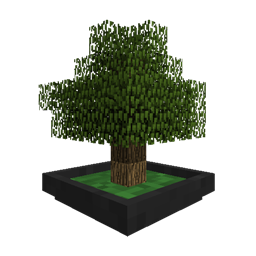
一个 Minecraft 模组,添加了一个能在单个方块空间内种植小树的方块。
如何开始
- 合成一个盆栽盆,把它放在合适的地方。
- 找一些土壤放进盆里。泥土暂时就够用了。右键点击盆栽盆放入。
- 获取一个树苗,右键点击盆栽盆放入。或者打开 GUI,把它放进树苗槽位。
- 看着它生长。
- 打开 GUI,放入一把斧头,让它在树准备好时自动收获。
- 尝试给工具或盆附魔,以获得更好的收获
某些树可能需要特定的土壤。不同种类的土壤可能会对盆栽的生长提供不同的加成。建议使用 JEI 来查询兼容的树苗和可用的土壤。
盆栽树 3 的变化
- 该模组基本上是从头重写的。旧的 libnonymous 代码已整合进模组本身。
- 模组的自定义选项已更改。
- 像蜂箱这样的升级已被替换为将盆栽的掉落物切换为战利品表。这样可以更好地检查工具兼容性,并且总体上让掉落物更加灵活。
- 盆现在可以附魔,并将其附魔应用到用于收获树的工具上。
- 渲染系统现在使用 VBO 来渲染树木。这极大地提升了性能。
- 一个位于独立模组中的新自动生成系统。这样可以更轻松地整合来自其他模组的新树。
- 现在有一种小型盆的变体,可以种植更小的树。真可爱!可以在工作台中在两者之间转换。
- 你可以用任何其他固体方块来给盆上色。一个不错的选择是把正在种植的树的原木或木板放在盆上。
- 最后也是最重要的一点:盆现在可以当作帽子戴。
- 盆栽树 4 是可见源代码,但保留所有权利。抱歉。出现了太多“这是你做的?这是我做的!”的互动。
如何安装 Bonsai Trees 4
With Millida Launcher
Install Millida Launcher
The launcher is free: download it at millida.net/launcher and sign in with any nickname.
Click “Install” on this page
The launcher opens and installs the mod for Minecraft 1.12–1.21.1 on Forge or NeoForge automatically.
Launch the game
A profile with it appears in the launcher: click “Play”.
Manually
Install Forge or NeoForge
The loader must match the game version of the mod file, for example Minecraft 1.21.1. After installing it, a separate profile appears in your launcher.
Download the file for your version
In the version list above, pick the file bonsaitrees4-4.0.9.jar (3.6 MB) for your game version and loader.
Put it in the mods folder
The folder is inside .minecraft (Windows: %appdata%\.minecraft\mods). If it does not exist, create it.
Launch the loader profile
Open “Mods” in the main menu: Bonsai Trees 4 should be in the list.
Minecraft 1.21.1 runs on Java 21: with a different Java version the game may close right after launch.
版本
含依赖项
| Minecraft | 加载器 | 文件 | 日期 | 操作 |
|---|---|---|---|---|
| 1.21.1 | NeoForge | bonsaitrees4-4.0.9.jar3.6 MB 19 | ||
| 1.21.1 | NeoForge | bonsaitrees4-4.0.1.jar3.3 MB | ||
| 1.20.1 | Forge | BonsaiTrees3-1.20.1-3.3.2.jar1.4 MB 15 | ||
| 1.18.1 | Forge | Bonsai Trees 3 v3.0.0389 KB | ||
| 1.15.2 | — | BonsaiTrees-2.1.1.4.jar179 KB 1 | ||
| 1.12.1 | — | bonsaitrees-1.1.4-b170.jar643 KB 1 |
常见问题
Which Minecraft versions does Bonsai Trees 4 work on?
There are files for 1.12–1.21.1, 7 versions in total. The newest is 1.21.1.
Is Bonsai Trees 4 for Forge or Fabric?
There are files for Forge: 1.18.1–1.20.1 and for NeoForge: 1.21.1. There are no files for Fabric: a mod for another loader will not start.
Does Bonsai Trees 4 need other mods?
The author lists no required dependencies: the Forge or NeoForge loader is enough.
Which Java does Bonsai Trees 4 need?
Minecraft 1.21.1 runs on Java 21. If the game closes right after launch, the usual cause is the wrong Java version in the profile settings.
Where can I download Bonsai Trees 4 safely?
On this page: the file bonsaitrees4-4.0.9.jar (3.6 MB) is stored on Millida’s server, with no link shorteners. SHA-1 checksum: 06926c7dc020fa89737c3f2e4a0a722e36b89c81.
评价
成为第一个评价 Bonsai Trees 4 的人


